Share via

Questions about curl app, system app and apps freeze sometimes

Anonymous
2024-01-10T05:49:45+00:00

Hello,

After October or November 2023 update, all browsers and apps freeze for brief periods, every day.

I have run SFC and DISM and errors where repaired, I don´t have the logs anymore.

On 07-01-2024 ran sfc /scannow, no issues where found, but the CBS.log has some warnings:

"2024-01-07 11:18:08, Info CSI 000000a1 Warning: Overlap: Directory ??\C:\WINDOWS\System32\drivers\en-US\ is owned twice or has its security set twice

Original owner: Microsoft-Windows-Foundation-Default-Security.Resources, version 10.0.19041.1, arch amd64, culture [l:5]'en-US', nonSxS, pkt {l:8 b:31bf3856ad364e35}

New owner: Microsoft-Windows-Foundation-Default-Security.Resources, version 10.0.19041.1, arch amd64, culture [l:5]'en-US', nonSxS, pkt {l:8 b:31bf3856ad364e35}

2024-01-07 11:18:08, Info CSI 000000a2 Warning: Overlap: Directory ??\C:\WINDOWS\System32\wbem\en-US\ is owned twice or has its security set twice

Original owner: Microsoft-Windows-Foundation-Default-Security.Resources, version 10.0.19041.1, arch amd64, culture [l:5]'en-US', nonSxS, pkt {l:8 b:31bf3856ad364e35}

New owner: Microsoft-Windows-Foundation-Default-Security.Resources, version 10.0.19041.1, arch amd64, culture [l:5]'en-US', nonSxS, pkt {l:8 b:31bf3856ad364e35}

2024-01-07 11:18:08, Info CSI 000000a3 Warning: Overlap: Directory ??\C:\WINDOWS\help\mui\0409\ is owned twice or has its security set twice

Original owner: Microsoft-Windows-Foundation-Default-Security.Resources, version 10.0.19041.1, arch amd64, culture [l:5]'en-US', nonSxS, pkt {l:8 b:31bf3856ad364e35}

New owner: Microsoft-Windows-Foundation-Default-Security.Resources, version 10.0.19041.1, arch amd64, culture [l:5]'en-US', nonSxS, pkt {l:8 b:31bf3856ad364e35}"

"2024-01-07 11:24:42, Info CSI 0000015f Warning: Overlap: Directory ??\C:\ProgramData\Microsoft\Windows\Start Menu\ is owned twice or has its security set twice

Original owner: Microsoft-Windows-shell32, version 10.0.19041.3758, arch amd64, nonSxS, pkt {l:8 b:31bf3856ad364e35}

New owner: Microsoft-Windows-shell32, version 10.0.19041.3758, arch amd64, nonSxS, pkt {l:8 b:31bf3856ad364e35}

2024-01-07 11:24:42, Info CSI 00000160 Warning: Overlap: Directory ??\C:\ProgramData\Microsoft\Windows\Start Menu\Programs\ is owned twice or has its security set twice

Original owner: Microsoft-Windows-shell32, version 10.0.19041.3758, arch amd64, nonSxS, pkt {l:8 b:31bf3856ad364e35}

New owner: Microsoft-Windows-shell32, version 10.0.19041.3758, arch amd64, nonSxS, pkt {l:8 b:31bf3856ad364e35}

2024-01-07 11:24:42, Info CSI 00000161 Warning: Overlap: Directory ??\C:\ProgramData\Microsoft\Windows\Start Menu\Programs\Startup\ is owned twice or has its security set twice

Original owner: Microsoft-Windows-shell32, version 10.0.19041.3758, arch amd64, nonSxS, pkt {l:8 b:31bf3856ad364e35}

New owner: Microsoft-Windows-shell32, version 10.0.19041.3758, arch amd64, nonSxS, pkt {l:8 b:31bf3856ad364e35} "

"2024-01-07 11:31:49, Info CSI 00000210 Warning: Overlap: Directory ??\C:\WINDOWS\SysWOW64\drivers\en-US\ is owned twice or has its security set twice

Original owner: Microsoft-Windows-Foundation-Default-Security.Resources, version 10.0.19041.1, arch Host= amd64 Guest= x86, culture [l:5]'en-US', nonSxS, pkt {l:8 b:31bf3856ad364e35}

New owner: Microsoft-Windows-Foundation-Default-Security.Resources, version 10.0.19041.1, arch Host= amd64 Guest= x86, culture [l:5]'en-US', nonSxS, pkt {l:8 b:31bf3856ad364e35}

2024-01-07 11:31:49, Info CSI 00000211 Warning: Overlap: Directory ??\C:\WINDOWS\SysWOW64\wbem\en-US\ is owned twice or has its security set twice

Original owner: Microsoft-Windows-Foundation-Default-Security.Resources, version 10.0.19041.1, arch Host= amd64 Guest= x86, culture [l:5]'en-US', nonSxS, pkt {l:8 b:31bf3856ad364e35}

New owner: Microsoft-Windows-Foundation-Default-Security.Resources, version 10.0.19041.1, arch Host= amd64 Guest= x86, culture [l:5]'en-US', nonSxS, pkt {l:8 b:31bf3856ad364e35}

2024-01-07 11:31:49, Info CSI 00000212 Warning: Overlap: Directory ??\C:\WINDOWS\help\mui\0409\ is owned twice or has its security set twice

Original owner: Microsoft-Windows-Foundation-Default-Security.Resources, version 10.0.19041.1, arch Host= amd64 Guest= x86, culture [l:5]'en-US', nonSxS, pkt {l:8 b:31bf3856ad364e35}

New owner: Microsoft-Windows-Foundation-Default-Security.Resources, version 10.0.19041.1, arch Host= amd64 Guest= x86, culture [l:5]'en-US', nonSxS, pkt {l:8 b:31bf3856ad364e35} "

"2024-01-07 11:34:11, Info CSI 00000254 Warning: Overlap: Directory ??\C:\Program Files (x86)\ is owned twice or has its security set twice

Original owner: Microsoft-Windows-shell32, version 10.0.19041.3758, arch Host= amd64 Guest= x86, nonSxS, pkt {l:8 b:31bf3856ad364e35}

New owner: Microsoft-Windows-shell32, version 10.0.19041.3758, arch Host= amd64 Guest= x86, nonSxS, pkt {l:8 b:31bf3856ad364e35}

2024-01-07 11:34:11, Info CSI 00000255 Warning: Overlap: Directory ??\C:\ProgramData\Microsoft\Windows\Start Menu\ is owned twice or has its security set twice

Original owner: Microsoft-Windows-shell32, version 10.0.19041.3758, arch Host= amd64 Guest= x86, nonSxS, pkt {l:8 b:31bf3856ad364e35}

New owner: Microsoft-Windows-shell32, version 10.0.19041.3758, arch Host= amd64 Guest= x86, nonSxS, pkt {l:8 b:31bf3856ad364e35}

2024-01-07 11:34:11, Info CSI 00000256 Warning: Overlap: Directory ??\C:\ProgramData\Microsoft\Windows\Start Menu\Programs\ is owned twice or has its security set twice

Original owner: Microsoft-Windows-shell32, version 10.0.19041.3758, arch Host= amd64 Guest= x86, nonSxS, pkt {l:8 b:31bf3856ad364e35}

New owner: Microsoft-Windows-shell32, version 10.0.19041.3758, arch Host= amd64 Guest= x86, nonSxS, pkt {l:8 b:31bf3856ad364e35}

2024-01-07 11:34:11, Info CSI 00000257 Warning: Overlap: Directory ??\C:\ProgramData\Microsoft\Windows\Start Menu\Programs\Startup\ is owned twice or has its security set twice

Original owner: Microsoft-Windows-shell32, version 10.0.19041.3758, arch Host= amd64 Guest= x86, nonSxS, pkt {l:8 b:31bf3856ad364e35}

New owner: Microsoft-Windows-shell32, version 10.0.19041.3758, arch Host= amd64 Guest= x86, nonSxS, pkt {l:8 b:31bf3856ad364e35} "


Also ran dism.exe /online /cleanup-image /restorehealth

Dism version 10.0.19041.3636

Image version: 10.0.19045.3803

the restore operation completed successfully

--

Avast and Malwarebytes didn't find any issues.

I have tried to chat with Microsoft, but the I could not upload the files via the link provided.

I can´t reinstall Windows because I have files that can´t be moved or copied because I need to maintain them in the hard drive as originals. I will have to replace the hard drive and install windows.

I can provide all the files via Wetransfer.


I have other questions:

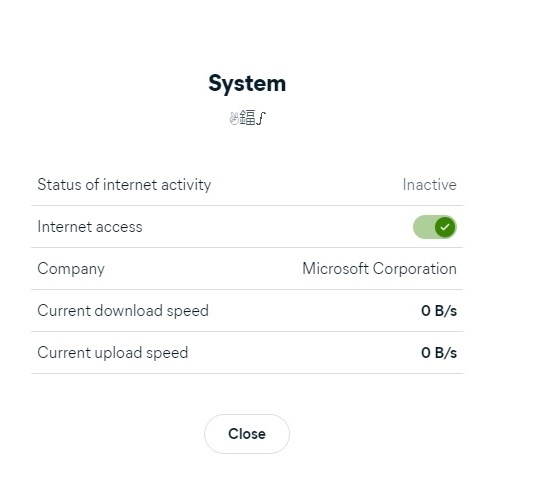
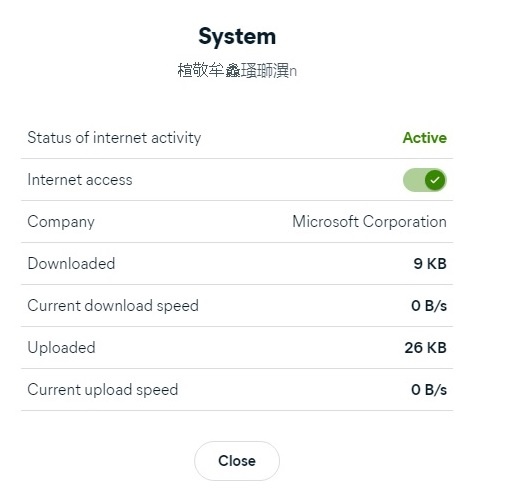
About curl app - can I keep it should I block it? Is it necessary? About the app system - I have realized when I checked the path of the app, via Avast firewall - the path name is another language/characters and changes in real time even when blocked by the firewall. I have blocked it. Should I keep it blocked? Is this a Microsoft app? Maybe is Avast firewall.

Is it possible that the apps freeze because of the system app, or curl app?

I am attaching some print screens:
Thank you,

Windows for home | Windows 10 | Performance and system failures

Locked Question. This question was migrated from the Microsoft Support Community. You can vote on whether it's helpful, but you can't add comments or replies or follow the question.

0 comments No comments

6 answers

Sort by: Most helpful
  1. Anonymous
    2024-01-16T02:03:45+00:00

    For Windows 10, you can view the system crash logs using the Event Viewer. Here's how:

    1. Press Win + X and select "Event Viewer" from the menu.
      1. In the Event Viewer window, navigate to "Windows Logs" in the left pane.
      2. Choose "System" from the subcategories.
      3. Look for events with a source of "BugCheck" or "EventLog" and check the details for information about the system crash.
    2. Additionally, you can use the "Reliability Monitor" to get a graphical view of system events, including crashes:
      1. Press Win + R to open the Run dialog, then type perfmon /rel and press Enter.
      2. The Reliability Monitor will open, and you can see critical events and warnings, including information about system crashes.
      These steps will help you access and review the system crash logs on a Windows 10 system.

    You could try the following:

    1. I suggest you go into Safe mode to see if it's the system itself problem. Because Safe Mode enables a minimum number of additional services or apps to rule out issues caused by personalized settings and third-party apps.
      1. On the desktop click "Start" > "Settings" > "Update & Security" > "Recovery", under "Advanced startup", select "Restart now".
      2. After restarting, go to "Choose an option" screen , select "Troubleshoot" > "Advanced options" > "Startup Settings" > "Restart".
      3. After restarting, you'll see a list of options. Select 4 or press F4 to start your PC in Safe Mode*. Or if you'll need to use the internet, select 5 or press F5 for* Safe Mode with Networking.
      Visit Start your PC in safe mode in Windows (microsoft.com) to view the specific operation steps.
    2. You can create a new local account by following the steps below and switch to the newly created account to see if the function is normal. Because this cannot be ruled out due to the wrong configuration. Visit****Create a local user or administrator account in Windows - Microsoft Support****for more details.
      • Create a local user account
      • Select StartSettingsAccountsand then select Family & other users. (In some versions of Windows you'll see Other users.)
      • Next to Add other user, select Add account.
      • Select I don't have this person's sign-in information, and on the next page, select Add a user without a Microsoft account.
      • Enter a username, password, or password hint—or choose security questions—and then select Next.
      Note: If the new account is normal, please do not delete the old account before backing up the data of the old account to avoid any data loss.

    hope this helps!

    Best Regards

    Patch - MSFT | Microsoft Community Support Specialist

    Was this answer helpful?

    0 comments No comments
  2. Anonymous
    2024-01-15T12:44:13+00:00

    Hello,

    Thank you for your reply.

    The problematic is "system" app, the path name is always changing non English characters. In the first post I have included print screens.

    I have checked task manager, and system interrupts is very high, when Windows freezes.

    I have performed hardware and drivers check with HP assistant, via Bios tool and everything is ok.

    Some drivers were updated with HP assistant, Ethernet and wifi.

    I had Windows updated in-place, after installation ran Windows Update - the following updates were installed: KB5034441, KB5034122, KB5011048.

    KB 5034275 was not installed according to the information provided by Programs and features - installed updates.

    Were also updated: KB5033918, KB5033909, KB5015684, Servicing stack 10.0.19041.3745, and servicing stack 10.0.19041.1704.

    System interrupts still sometimes at 99%.

    Can you please clarify where can I locate system interrupts log or a way to find out the cause?

    Thank you

    Was this answer helpful?

    0 comments No comments
  3. Anonymous
    2024-01-13T03:04:23+00:00
    1. Windows 10 can also perform this operation with the same steps as Windows 11. You may in-place upgrade the system by the steps below.
      • Please rest assured that the in-place upgrade the system will theoretically not affect your data and applications (you need to choose to keep files and applications in the next steps), just update all the system files are the latest.
      • If you have important data, you may make additional backups to prevent accidental loss of your data. Also make sure there is enough free space in the system partition, at least 40GB.
      1. Download Windows 10 ISO file. Visit Download Windows 10 (microsoft.com) and click "Download Now" under “Create Windows 10 Installation Media” to download MCT (Media Creation Tool). Image Then run the program, select "Create installation media (USB flash drive, DVD or ISO file) for another PC”, and then choose Language*,* Version*,* Architecture*(if you are not sure about these, choose "Use the recommended options for this PC"), then select "ISO file" in the "Select Media to Use" interface, and then a windows ISO file will be downloaded to your disk (about 4-5GB in size, it is recommended that you choose a non-system disk)*
      2. In-place upgrade the system After the download is completed, double-click the ISO file, double-click to run "setup.exe" in the open file explorer, and select "Change how Windows Installer downloads updates" > "Download updates, drivers and optional features", Select "Keep personal files and apps" after accepting the terms of the agreement, then click "Next" > "Install". Then the system will reboot a few times, and then enter the welcome screen. Disclaimer: At this point, we have exhausted all troubleshooting and I recommend that we try to perform a clean install to get your computer back into a working condition. Please ensure that you backup any important data, including Documents, Pictures, Videos, and more. After that, you can find instructions on how to install Windows 10/11 in the following article by MVP Andre: How to: Perform a Custom Installation of Windows 11 and Windows 10 - Microsoft Community
    2. Yes, I recommend you uninstall Avast temporarily. Disclaimer: Temporarily turn off antivirus protection. However, keep in mind that if you do so, your device may be vulnerable to threats. So please turn it on immediately once issue fixed.
    3. "curl", if it's not useful to you, I suggest you uninstall it. Because it appears to be garbled, which means there is something wrong with its operation. If you have important data, please backup it in advance.

    hope this helps!

    Best Regards

    Patch - MSFT | Microsoft Community Support Specialist

    Was this answer helpful?

    0 comments No comments
  4. Anonymous
    2024-01-12T07:44:00+00:00

    Hello,

    Thank you for your reply. I can´t upgrade to Windows 11 my laptop doesn´t have the requirements.

    The third party software is Avast?

    Regarding questions about curl and specially about the system app - path language or characters change, should unblock the system app?

    Should block or remove curl?

    Thank you

    Was this answer helpful?

    0 comments No comments
  5. Anonymous
    2024-01-11T10:00:17+00:00

    Hello

    Welcome to the Microsoft community.

    Regarding the issue of your computer applications sometimes freezing.

    According to your description, you have used the repair command.

    Based on the error message, it appears to be related to third-party security software.

    I would suggest you to uninstall the third party security software and upgrade your system in place.

    Disclaimer: Temporarily turn off antivirus protection. However, keep in mind that if you do so, your device may be vulnerable to threats. So please turn it on immediately once issue fixed. 

    You may in-place upgrade the system by the steps below.

    • Please rest assured that the in-place upgrade the system will theoretically not affect your data and applications (you need to choose to keep files and applications in the next steps), just update all the system files are the latest.
    • If you have important data, you may make additional backups to prevent accidental loss of your data. Also make sure there is enough free space in the system partition, at least 40GB.
    1. Download Windows 11 ISO file. Visit Download Windows 11 (microsoft.com) and click "Download Now" under “Create Windows 11 Installation Media” to download MCT (Media Creation Tool). Image Then run the program, select "Create installation media (USB flash drive, DVD or ISO file) for another PC”, and then choose Language*,* Version*,* Architecture*(if you are not sure about these, choose "Use the recommended options for this PC"), then select "ISO file" in the "Select Media to Use" interface, and then a windows ISO file will be downloaded to your disk (about 4-5GB in size, it is recommended that you choose a non-system disk).*
    2. In-place upgrade the system After the download is completed, double-click the ISO file, double-click to run "setup.exe" in the open file explorer, and select "Change how Windows Installer downloads updates" > "Download updates, drivers and optional features", Select "Keep personal files and apps" after accepting the terms of the agreement, then click "Next" > "Install". Then the system will reboot a few times, and then enter the welcome screen. Disclaimer: At this point, we have exhausted all troubleshooting and I recommend that we try to perform a clean install to get your computer back into a working condition. Please ensure that you backup any important data, including Documents, Pictures, Videos, and more. After that, you can find instructions on how to install Windows 10/11 in the following article by MVP Andre: How to: Perform a Custom Installation of Windows 11 and Windows 10 - Microsoft Community

    If the problem still cannot be solved, the computer can only be reinstalled.

    If there is anything that is unclear or I can't understand your problem, please feel free to let me know.

    Best regards

    Patch - MSFT | Microsoft Community Support Specialist

    Was this answer helpful?

    0 comments No comments