Dear Trey Kelly
Welcome to Microsoft Community.
I understand that you are currently experiencing the van 9003 error which requires you to enable secure boot and tpm 2.0. are you experiencing this error while playing Valorant? Is your system Windows 11?
If Secure Boot and TPM 2.0 are disabled on Windows 11, the game will not start properly. Enabling Secure Boot and TPM 2.0 usually does not require a fresh installation of Windows. These features can be enabled on an installed Windows system via a motherboard BIOS setting without affecting an existing Windows installation. However, please note that depending on your motherboard BIOS options and settings, the procedure may be slightly different.
First let's determine the status of Secure Boot in your computer. <br><br> <br><br>Type "systeminfo" in the search box to open System Information. Determine if your BIOS Mode is UEFI and if your Secure Boot State is on or off.<br><br><br><br>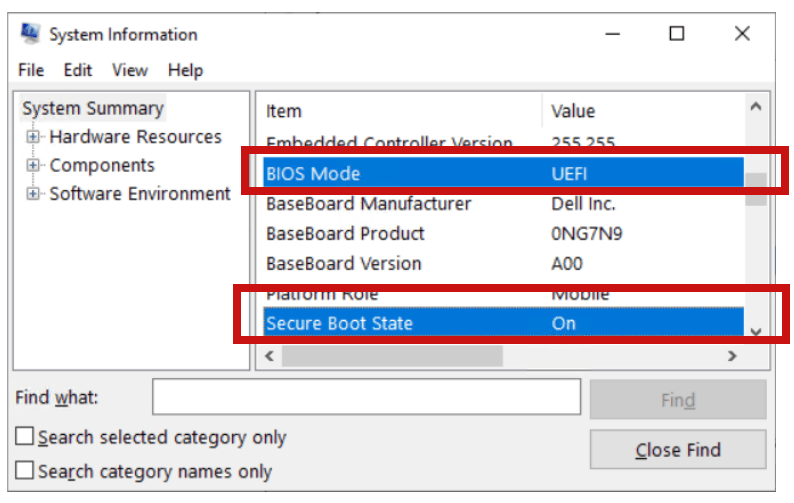 <br><br><br><br>If your computer is Windows 11, then the BIOS Mode should be UEFI, and if Secure Boot State is off, you will need to enter the BIOS interface to turn it on. <br><br> <br><br>Since the method of entering the BIOS is different for each brand of computer, you need to consult with the brand of computer you purchased to find out how to enter the BIOS and turn on Secure Boot State. <br><br><br><br>You can refer to Microsoft's article on enabling Secure Boot, but since improperly enabling the BIOS can lead to some serious consequences for your system, we recommend that you proceed with caution. Disabling Secure Boot | Microsoft Learn <br><br><br><br>If your computer is Windows 11, then the BIOS Mode should be UEFI, and if Secure Boot State is off, you will need to enter the BIOS interface to turn it on. <br><br> <br><br>Since the method of entering the BIOS is different for each brand of computer, you need to consult with the brand of computer you purchased to find out how to enter the BIOS and turn on Secure Boot State. <br><br><br><br>You can refer to Microsoft's article on enabling Secure Boot, but since improperly enabling the BIOS can lead to some serious consequences for your system, we recommend that you proceed with caution. Disabling Secure Boot | Microsoft Learn |
Next, let's determine the status of TPM 2.0 on your computer. <br><br> <br><br>Search for "tpm.msc" in the search box. <br><br> <br><br>If your computer does not support tpm, you will see the following screen:<br><br><br><br>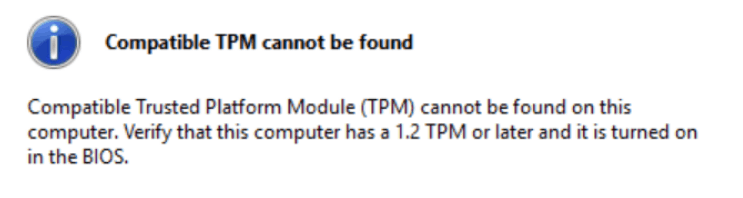 <br><br><br><br>If your computer supports tpm, you need to make sure that its statue is turned on and that the version is 2.0<br><br><br><br> <br><br><br><br>If your computer supports tpm, you need to make sure that its statue is turned on and that the version is 2.0<br><br><br><br>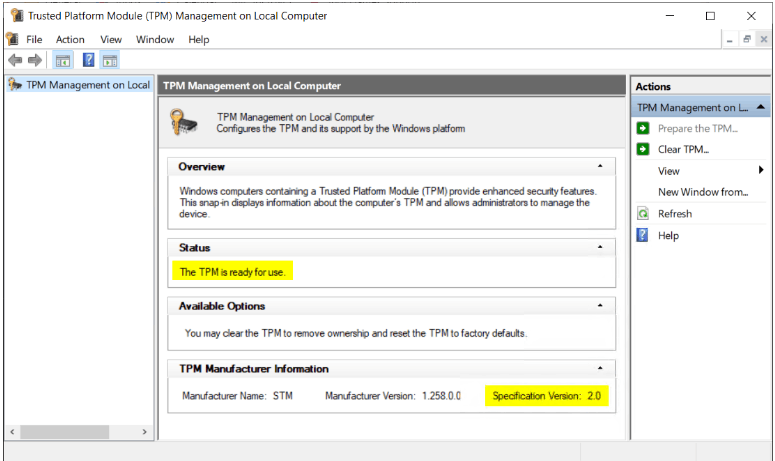 <br><br><br><br>If your TPM is turned off. You can try to enable it, but please note that enabling TPM 2.0 assumes that your hardware supports it. You can refer to the official Microsoft article on enabling TPM. <br><br><br><br>If your TPM is turned off. You can try to enable it, but please note that enabling TPM 2.0 assumes that your hardware supports it. You can refer to the official Microsoft article on enabling TPM. |
Disclaimer: Microsoft provides no assurances and/or warranties, implied or otherwise, and is not responsible for the information you receive from the third-party linked sites or any support related to technology.
Windows 11 requires BIOS mode to be UEFI and TPM2.0 to be enabled during installation, so usually you are compliant with both of these requirements, and you can check to see if your Secure Boot is turned on.
If you are sure that your Secure Boot is on and your TPM2.0 is enabled, it means that the error is actually caused by something else. You can share the situation with me in a reply and I will try other options with you.
Thanks for your patience and understanding!
Best Regards,
LucyW-MSFT | Microsoft Community Support Specialist
' cx='32' cy='32' r='32' /%3E%3Ctext x='50%25' y='55%25' dominant-baseline='middle' text-anchor='middle' fill='%23FFF' %3EA%3C/text%3E%3C/svg%3E)
