Exchange Online
A cloud-based service included in Microsoft 365, delivering scalable messaging and collaboration features with simplified management and automatic updates.
This browser is no longer supported.
Upgrade to Microsoft Edge to take advantage of the latest features, security updates, and technical support.
' cx='32' cy='32' r='32' /%3E%3Ctext x='50%25' y='55%25' dominant-baseline='middle' text-anchor='middle' fill='%23FFF' %3EI%3C/text%3E%3C/svg%3E)
Hello Community,
Please I need your help on this.
When booking a meeting, a message is sent to the entire team, not to a specific person.
We invited our guest to our team from last week. And from yesterday, we made several meeting schedules, but it affected to all of our team members.
Another team had the same issue with that, but it was solved last year. But I forgot how to set to stop to send mail to all.
Can you give me a solution?
Thank you.
A cloud-based service included in Microsoft 365, delivering scalable messaging and collaboration features with simplified management and automatic updates.
Using classic Outlook for Windows in business environments

Additional features, settings, or issues not covered by specific Microsoft Teams categories

' cx='32' cy='32' r='32' /%3E%3Ctext x='50%25' y='55%25' dominant-baseline='middle' text-anchor='middle' fill='%23FFF' %3EYS%3C/text%3E%3C/svg%3E)
Hi @IBN ,
Just following up regarding my previous post. Do you perhaps have any questions regarding the information provided?
Hi @IBN ,
Generally, meeting invitation mails are sent to users added in the participants field(either "Required" or "Optional"):
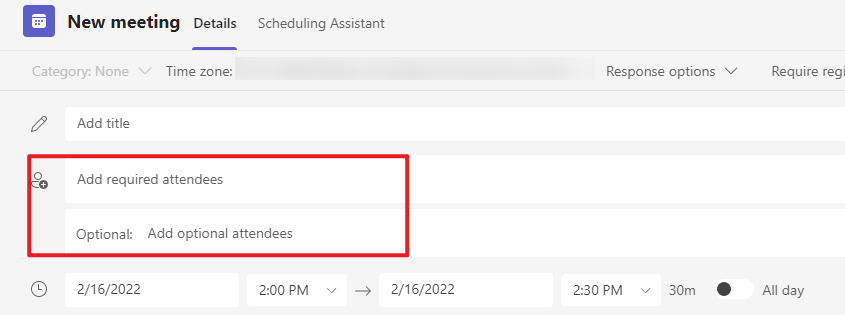
So please make sure only the individual users are added in the participants when creating the meeting.
Or do you mean there are some existing Teams meetings sent the team, then after the guest user was added into the team, you would like to include the guest user into some of the existent meetings without affecting the other team members? If this is the case, based on my test, you can open the original meeting request in Outlook, add the guest user's email address into the participants field, click Send Update, choose "Send updates only to added or deleted attendees":
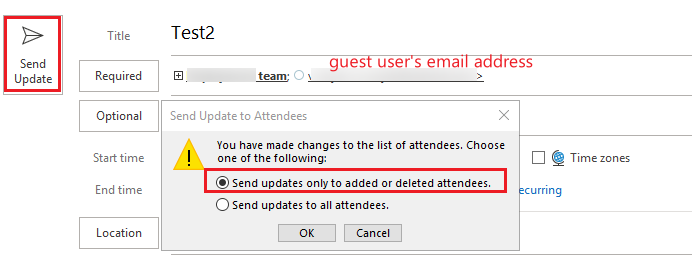
If neither of the above is what you are encountering, could you clarify where and how you "book a meeting" so that we can help you better?
If the answer is helpful, please click "Accept Answer" and kindly upvote it. If you have extra questions about this answer, please click "Comment".
Note: Please follow the steps in our documentation to enable e-mail notifications if you want to receive the related email notification for this thread.
Hi @IBN ,
I am writing to see how everything is going on with this thread. If you still have further concern on this, please feel free to let us know.
' cx='32' cy='32' r='32' /%3E%3Ctext x='50%25' y='55%25' dominant-baseline='middle' text-anchor='middle' fill='%23FFF' %3EA%3C/text%3E%3C/svg%3E)
Set the meeting schedule in the team calendar but don't invite the Teams team. Just invite individual users and guests.