Share via

Windows UEFI mode breaks network / USB communication

Anonymous
2023-08-22T18:08:51+00:00

I'll try to make long story short, but I'm probably going to fail.

I am trying to UPGRADE from my current Windows 10 Home (22H2) to Windows 11. I think this particular drive started out as Windows 8.1 with a computer I bought back in 2014?

PC Health check says all good. Every method I've tried:

  • Windows Update though Settings > Update & Security
  • Update Assistant download from Microsoft
  • ISO media download from Microsoft

They all go to 87%, and it fails.

I have a AsusTek PRIME B450M-A II mobo. BIOS Version/Date 3810, 11/21/2022

Things I've done to get it ready:

  1. Converted boot drive from MBR to GPT
  2. Fast boot disabled in BIOS
  3. All boot devices = UEFI only (no legacy)
  4. CSM disabled (REBAR=ON)

Doing all those things and rebooting get me into my current Windows 10 just fine, and everything is working.

The only issue is Secure boot state is still OFF.
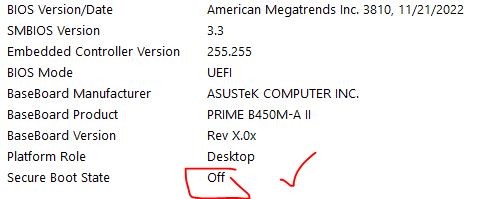
Up to this point we're good, but I don't want to try to install Windows 11 again until I get this to ON.

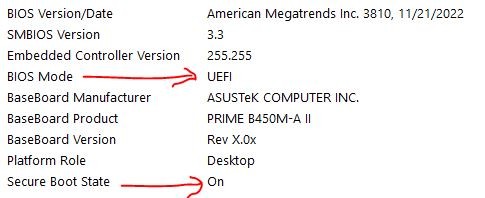
So when I go into the BIOS, and change BOOT > OS Type from OtherOS to Windows UEFI mode... save config and restart, the following maladies pop up.

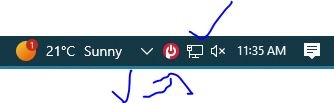
tray icon internet globe of doom

  1. Network adapter/ethernet shows as down. All attempts to troubleshoot it via troubleshooter fail. Disabling/reenabling fails. Updating driver to latest driver does nothing. Internet is dead. See image below.
    1. Comodo Firewall says it's not functioning properly, because of above network adapter issue.
    2. NORDVPN TAP-NordVPN Windows adapter V9 shows with yellow triangle in Device Manager. Also related to above.
  2. UPS powerpanel Personal Service is not running, not communicating with the UPS. UPS connected to computer via USB cable for power monitoring.
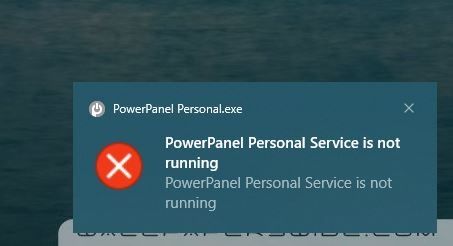
UPS won't talk to me

There might be a host of other issues, but I'm not going to dive deeper, there's enough here to see it ain't working. These are the errors I'm getting when I run the diagnostic on the Troubleshooter.

Windows couldn't automatically bind the IP protocol stack to the network adapter. in a Bind for real
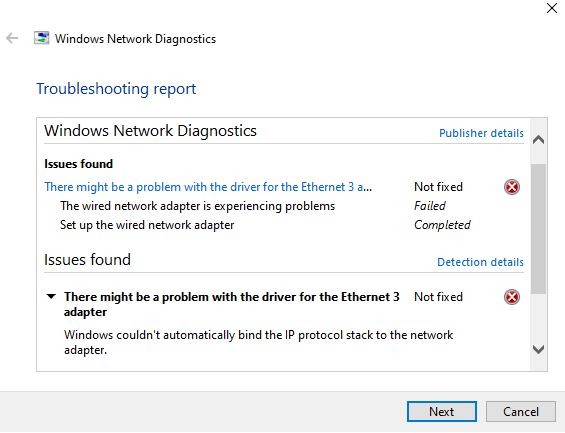
Additionally, when I run the troubleshooter, it finds a mystery adapter that I can't spot anywhere.. calls it Eth2, but the only one I see in Network manager is Eth3 which isn't working.
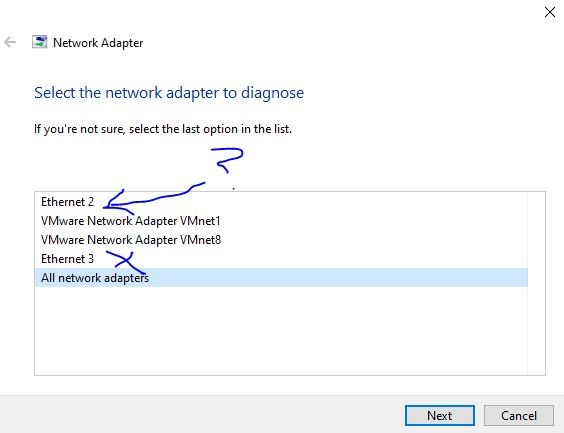
eth2, who r u?

I've tried every type of Google search to figure out what I'm missing and I'm stumped beyond all reason. So I go back into BIOS and change Windows UEFI mode > OtherOS > Restart... and will you look at that:
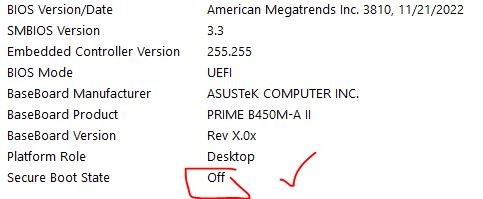
Boot state is now off Powerpanel online, Internet restored

So my questions now are either:

  1. Do I need SecureBoot state ON in order to try upgrading Windows 10 to 11?
  2. If yes, then what must I do to fix all these broken components within Windows when the mode is on? I saw something in the BIOS about key management.. but I sure as hell don't want to touch that right now. Currently there are many keys set under PK/KEK/DB/and DBK.

Thanks in advance to anyone who wants to touch this turd of an Install. I'll be grateful if it ends up being installable at this point without SecureBoot, but all advice appreciated before I burn another cycle off my SSD for an upgrade attempt.

Windows for home | Windows 10 | Install and upgrade

Locked Question. This question was migrated from the Microsoft Support Community. You can vote on whether it's helpful, but you can't add comments or replies or follow the question.

0 comments No comments

9 answers

Sort by: Most helpful
  1. Anonymous
    2024-01-03T07:52:43+00:00

    Hi, I encountered exactly the same problem when trying to install Windows 11 today. When enabling Secure Boot, my USB ports no longer work.

    Hi MS at Buck,

    Welcome to Microsoft Community.

    The symptoms you are currently encountered may be due to the Secure Boot parameter that affects the transmission of other hardware signals.  But in general, the use of Secure Boot does not induce such a serious network and USB problem. Secure Boot should not have such a result. We have fallen into the same dilemma on this issue. This is the first time that we have encountered this situation. One possibility but uncommon direction of the two is that the enlightenment of Secure Boot interferes with other BIOS configurations and presents a wrong display in BIOS.If possible, try to check the configuration related to network or USB in BIOS, and switch the configuration status multiple times to check whether the actual effect is matched with the literal meaning of the configuration.Another possibility is that this problem has a specific BIOS version. Your motherboard is 2014, and the BIOS version is 2022. This interval is not short.

    The code in the latest BIOS version may not be fully compatible with hardware. It may be worth contacting the hardware manufacturer to understand whether there are the same or similar cases.

    Thanks for your patience and understanding!

    Best Regards,

    Kyo - MSFT | Microsoft Community Support Specialist

    Was this answer helpful?

    2 people found this answer helpful.
    0 comments No comments
  2. Anonymous
    2023-08-23T14:15:22+00:00

    Hi MS at Buck,

    Thank you for getting back to us.

    Secure boot is an important part of ensuring the normal use of Windows 11 and receiving updates.

    While some technology enthusiasts may be keen to explore the underlying design of the system to find some ways around this limitation, doing so may lead to a decrease in system security.

    Cloning the boot drive to a new SSD may be a good backup strategy, but is not guaranteed to fix issues related to hardware registration.

    Secure Boot Key and Question: Are you referring to something similar to what is mentioned in this link?

    Windows Secure Boot Key Creation and Management Guidance | Microsoft Learn

    Best Regards,

    Kyo - MSFT | Microsoft Community Support Specialist

    Was this answer helpful?

    0 comments No comments
  3. Anonymous
    2023-08-23T14:06:15+00:00

    Additionally.. I found this post here > https://www.reddit.com/r/MSI\_Gaming/comments/zo2zj6/secure\_boot\_disables\_all\_usb\_ports/

    It is also a B450 board... makes me wonder if it's a Platform issue?

    Was this answer helpful?

    0 comments No comments
  4. Anonymous
    2023-08-23T13:53:07+00:00

    Thanks for the reply Kyo. I know the motherboard has the 'Windows 11 Ready' sticker on the box so I assumed it would be safe and good to go.

    A couple of follow up questions then:

    1. Is SecureBoot required for Windows 11? If I can successfully upgrade now without it, are there any concerns I need to worry about running Win 11 without Secureboot (since I've been apparently running Win 10 without it all this time as well)
    2. If I clone my Boot drive onto a new SSD (as backup), would it be worth trying to either run a Windows Repair (keeping data and files) with SecureBoot ON to see if it fixes the issue of registering the hardware properly?
    3. My understanding of Secure Boot Keys is very limited and I wouldn't be comfortable messing with them unless I was walked through how they work and if anything goes wrong, how to revert back to original state. That being said.. is it likely it's the keys that are causing the issue?

    MS

    Was this answer helpful?

    0 comments No comments
  5. Anonymous
    2023-08-23T07:44:52+00:00

    Hi MS at Buck,

    Welcome to Microsoft Community.

    The symptoms you are currently encountered may be due to the Secure Boot parameter that affects the transmission of other hardware signals.  But in general, the use of Secure Boot does not induce such a serious network and USB problem. Secure Boot should not have such a result. We have fallen into the same dilemma on this issue. This is the first time that we have encountered this situation. One possibility but uncommon direction of the two is that the enlightenment of Secure Boot interferes with other BIOS configurations and presents a wrong display in BIOS.If possible, try to check the configuration related to network or USB in BIOS, and switch the configuration status multiple times to check whether the actual effect is matched with the literal meaning of the configuration.Another possibility is that this problem has a specific BIOS version. Your motherboard is 2014, and the BIOS version is 2022. This interval is not short.

    The code in the latest BIOS version may not be fully compatible with hardware. It may be worth contacting the hardware manufacturer to understand whether there are the same or similar cases.

    Thanks for your patience and understanding!

    Best Regards,

    Kyo - MSFT | Microsoft Community Support Specialist

    Was this answer helpful?

    0 comments No comments