Share via

How do I uninstall KB5033372 Security Update

Anonymous
2023-12-19T18:28:27+00:00

The latest update has absolutely hamstrung my laptop speed. I can barely work. Please note, I have both restarted and shut down/booted up repeatedly across the below for the past two hours.

I’ve tried uninstalling via Win + I, I managed to uninstall one part, but the security part of the update fails each time. “An error has occurred. Not all the of the updates were successfully uninstalled”

I have then tried cmd as an administrator, firstly the wusa one, which would have a ‘catastrophic failure’, and then trying to do sfc /scannow which results in “there is a system repair pending which requires reboot to complete. Restart windows and run sfc again”. Restart and shut down haven’t worked.

I was trying to follow this advice: https://answers.microsoft.com/en-us/windows/forum/all/cant-uninstall-windows-update/ff638684-ceee-465b-8c69-c462fbe4f648

I have very poor technical knowledge, I just really need my laptop to return to the speed it was last week (before the update). The update is the only change, and boot up speed was drastically slower immediately following the update.

How do I uninstall this security update please?

Windows for home | Windows 10 | Windows update

Locked Question. This question was migrated from the Microsoft Support Community. You can vote on whether it's helpful, but you can't add comments or replies or follow the question.

0 comments No comments

5 answers

Sort by: Most helpful
  1. Anonymous
    2024-01-29T12:55:02+00:00

    I'm having the same issue. Good ol' Microslop. Thanks for loading me up with another update, even though I have automatic updates turned off. This is TYPICAL. The best solution is to trash Microsoft. I have NEVER seen such incompetence. One issue after another. Thanks for nothing.

    10+ people found this answer helpful.
    0 comments No comments
  2. Anonymous
    2023-12-20T18:48:03+00:00

    Hi Morning,

    The restoration to pre- update worked. My laptop is now running well again. Thank you.

    I have paused updates until 03/01/2024. Could I check whether a new update (that hopefully works better with my machine) will exist by then? If not, I’ll pause it for longer.

    1 person found this answer helpful.
    0 comments No comments
  3. Anonymous
    2024-01-10T16:45:16+00:00

    Would you be able to assist me as well. I think I'm having a similar issue with this update

    I'm on server 2016 with no restore point to go back to

    Here is the error I see in my CBS.log

    CSI 0000000a (F) HRESULT_FROM_WIN32(ERROR_SXS_ASSEMBLY_MISSING) #31893# from Windows::ServicingAPI::CCSITransaction::ICSITransaction_PinDeployment(Flags = 0, a = 5b0fe4d42d90ce625b3791ace21fb453, version 10.0.14393.2969, arch amd64, nonSxS, pkt {l:8 b:31bf3856ad364e35}, cb = (null), s = (null), rid = 'Package_4321_for_KB4519998~31bf3856ad364e35~amd64~~10.0.1.9.4519998-6755_neutral', rah = '3', manpath = (null), catpath = (null), ed = 0, disp = 0)[gle=0x80073701]

    2024-01-07 08:06:47, Info CBS Failed to pin deployment while resolving Update: Package_4321_for_KB4519998~31bf3856ad364e35~amd64~~10.0.1.9.4519998-6755_neutral from file: (null) [HRESULT = 0x80073701 - ERROR_SXS_ASSEMBLY_MISSING]

    2024-01-07 08:06:47, Info CBS Failed to bulk stage deployment manifest and pin deployment for package:Package_6426_for_KB5033373~31bf3856ad364e35~amd64~~10.0.1.3 [HRESULT = 0x80073701 - ERROR_SXS_ASSEMBLY_MISSING]

    0 comments No comments
  4. Anonymous
    2023-12-21T12:15:15+00:00

    Hello Phili Webb,

    Thank you for taking the time to analyze the progress of this issue with me. We appreciate your patience and cooperation in working closely with me on this issue, and are happy to learn that your situation is currently good news!

    Please mark the scenarios as "yes" so that more people with similar issues can find a solution to refer to. Thank you for your cooperation!

    Best Regarts ,

    Morning | Microsoft Technical Support Community

    0 comments No comments
  5. Anonymous
    2023-12-20T06:56:02+00:00

    Hello Phili Webb,

    Welcome to the Microsoft Community!

    I am sorry to hear that you are experiencing this problem, this issue must be causing you some distress and I understand how you feel.

    Thank you for the description you provided, I checked the thread link you provided, however there is a big difference between your situation and this thread, there are Security Updates (SSU) and Cumulative Updates for System Updates.Security Updates for Windows are usually designed to fix vulnerabilities in the system and to improve the security of the system, they are usually impossible to uninstall, and removing a Security Update may cause the system to become insecure. The version of the update that you want to uninstall is a security update, which is the reason why you are unable to perform the uninstallation of the update successfully.

    Here's a link to the documentation about If KB5033372:December 12, 2023—KB5033372 (OS Builds 19044.3803 and 19045.3803) - Microsoft Support

    It seems that your process of uninstalling this update has caused some new issues to occur. If these issues are still continuing, please let me know the issues you are experiencing with me via a reply and I will sort out a suitable troubleshooting solution for you.

    Considering that you have already encountered some system errors and that you liked last week's version, you can try to restore the restore point that you had last week to see if it improves your situation, and if you are lucky enough to have a suitable restore point, do this after backing up your important data.

    If KB5033372 does not exist on your computer after this program, suspend the update for two weeks, after two weeks a new update will be released to avoid this situation to continue. Steps to suspend: Start Menu - Settings - Windows Update - select the amount of time to suspend.

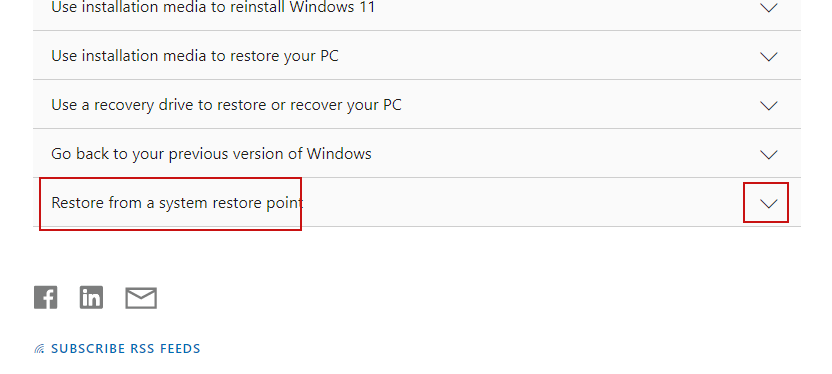
    For a scenario to restore a restore point please refer to the Restore Restore Points section at the bottom of this document. Document Link:Recovery options in Windows - Microsoft Support
     

    I'm interested in following the progress of this issue, if there are any areas of doubt you can share them with a screenshot or description via a reply, any sharing on this issue is welcome and I look forward to hearing from you.

    Thank you for your patience and cooperation!

    Best Regarts ,

    Morning | Microsoft Technical Support Community

    0 comments No comments
