Hello ,
Welcome to Microsoft Community.
Based on the description, you've attempted some methods to address the issue.
Here, I have a few methods that might help diagnose the problem or resolve it.
- Set it as both the default device and the default communication device in the settings (This might be helpful).
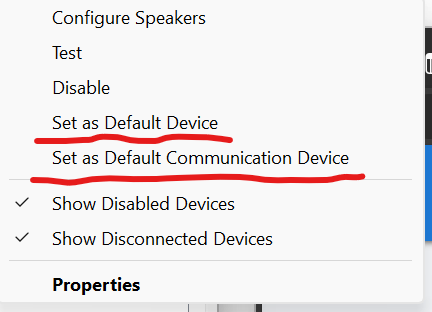 “Win”+ "R" open "Run", Type ”mmsys.cpl“ to open the management settings*.* Right-click on the device and make your selection. After connecting the Bluetooth headphones*, there may be two new devices added, one of which includes 'Hands-Free' in its name. (If there are two new additions, please test each one separately to check for functionality).*
- Try creating a new account and see if the issue persists in the new account. Click here for further assistance.
- Try update or reinstalling the Bluetooth driver (Microsoft's pushed drivers may not necessarily match the latest drivers provided by the laptop manufacturer).
- You can go to Device Manager to see if there's an option to roll back the driver version. By default, Windows can receive driver updates. “Win” + "R" open "Run" ,Type ”hdwwiz.cpl“ to open the Device Manager*.* Locate the corresponding device, right-click 'Properties' , and on the 'Driver' tab, find the appropriate option.
- If the above steps do not help, you can also try uninstalling recent updates to see if it resolves the issue. If you wish to return to the latest state, you can update through Windows Update*.* Click here for further assistance.
If anything is unclear, please do not hesitate to let me know.
Malygos - MSFT | Microsoft Community Support Specialist
' cx='32' cy='32' r='32' /%3E%3Ctext x='50%25' y='55%25' dominant-baseline='middle' text-anchor='middle' fill='%23FFF' %3EA%3C/text%3E%3C/svg%3E)
