I'm still looking for help on this problem. Please, at least provide some clues on how I could do my own research into this problem.
This browser is no longer supported.
Upgrade to Microsoft Edge to take advantage of the latest features, security updates, and technical support.
' cx='32' cy='32' r='32' /%3E%3Ctext x='50%25' y='55%25' dominant-baseline='middle' text-anchor='middle' fill='%23FFF' %3EA%3C/text%3E%3C/svg%3E)
I have a wifi adapter that works fine on my linux install, and here is information from that:
06:00.0 Network controller [0280]: Broadcom Inc. and subsidiaries BCM43602 802.11ac Wireless LAN SoC [14e4:43ba] (rev 01)
*-network
   description: Wireless interface

   product: BCM43602 802.11ac Wireless LAN SoC

   vendor: Broadcom Inc. and subsidiaries

   physical id: 0

   bus info: pci@0000:06:00.0

   logical name: wlp6s0

   version: 01

   serial: d0:a6:37:ec:14:f1

   width: 64 bits

   clock: 33MHz

   capabilities: pm msi pciexpress bus\_master cap\_list ethernet physical wireless

   configuration: broadcast=yes driver=brcmfmac driverversion=7.35.177.61 firmware=01-ea662a8c ip=192.168.4.116 latency=0 multicast=yes wireless=IEEE 802.11
06:00.0 Network controller [0280]: Broadcom Inc. and subsidiaries BCM43602 802.11ac Wireless LAN SoC [14e4:43ba] (rev 01)
Subsystem: Apple Inc. BCM43602 802.11ac Wireless LAN SoC [106b:0133]

Kernel driver in use: brcmfmac
Now inside of windows 11:
Windows fails to download the correct driver for it. It is in device manager, listed as an unusable network interface.
I need the actual driver for BCM43602, and I have already searched for it and could not find it. I tried keeping win11 updated, searching the internet for drivers, reinstalling win11, and running the network troubleshooter.
If needed I can provide the information from device manager that it lists from the device.
This leaves me with no internet connection inside of the windows operating system, which makes my workspace useless, unless I have a working ethernet port in the workstation's room. I do not have ethernet in my college dorm, which is not ideal. I have certain products that only work in this operating system, such as premier pro, which I an unable to use once I am at college (I am on winter break right now). Please find this driver, it is the only thing I need in this situation, as there is wifi but not ethernet in the dorm.
Best of luck
Locked Question. This question was migrated from the Microsoft Support Community. You can vote on whether it's helpful, but you can't add comments or replies or follow the question.
I'm still looking for help on this problem. Please, at least provide some clues on how I could do my own research into this problem.
I still need help with this. My PC has a unique build so I may need to provide more system information to help fix the problem. Anyone that can help, I would appreciate it very much.
Thank you

Hi, I am Dave, I will help you with this.
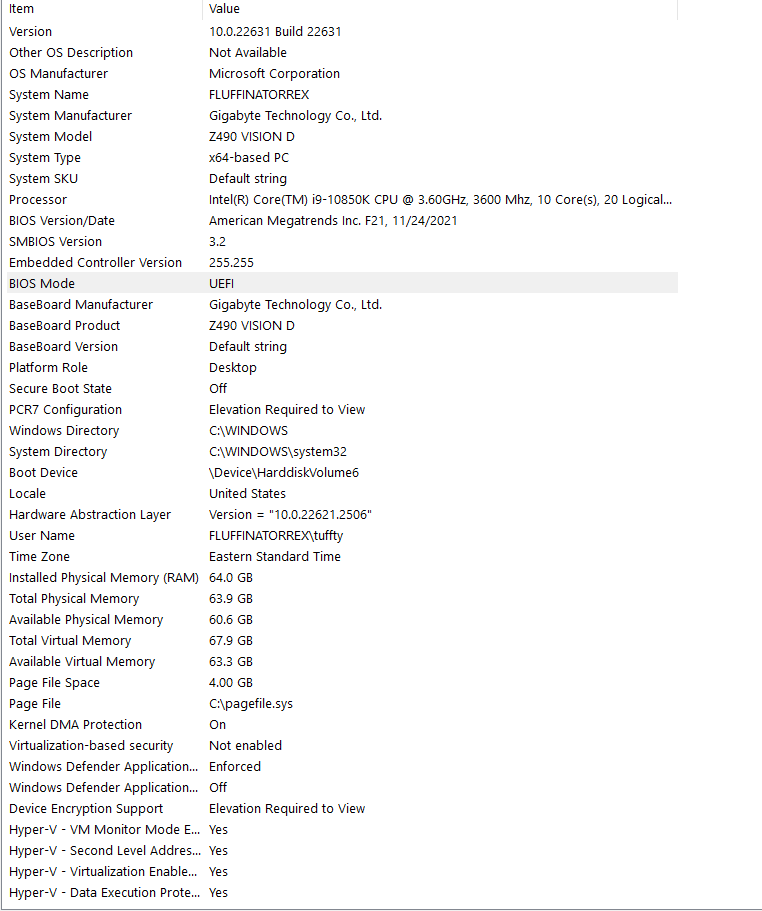
Click your Start button, then just type msinfo and press Enter, please provide a screenshot of the resulting System Information window.