Share via

Dual monitor, mouse movement, block mouse in from moving from one screen to another in certain area of the screen.

Anonymous
2024-02-06T13:00:05+00:00


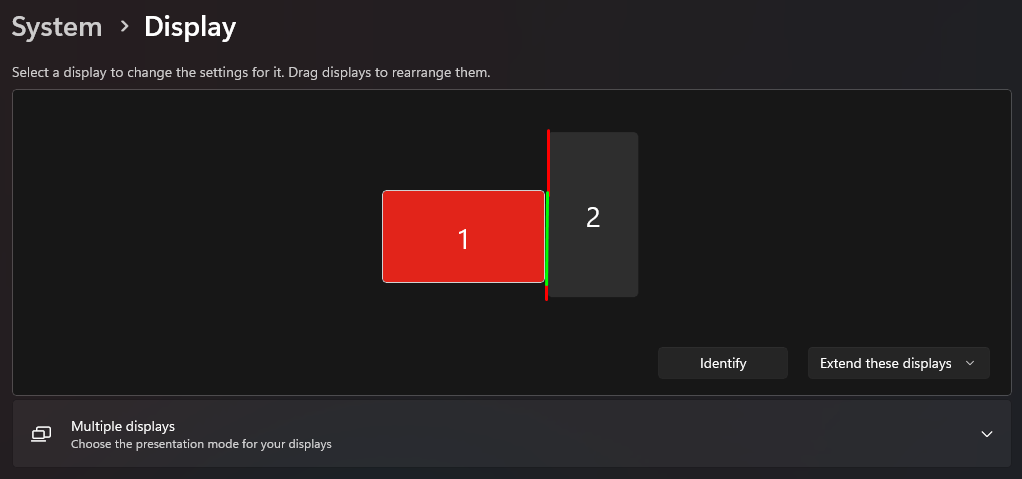
Hello. Currently, I am using a laptop (17 inches, horizontal, of course) and a second monitor (21 inches, vertical). My question is whether it is possible to block the mouse from transitioning from the vertical monitor to the laptop desktop if it involves a "jump" in the vertical axis of the mouse? I mean that the mouse can only move to the laptop screen (from 2nd monitor) in a place that corresponds to where the laptop display actually is physically present, without teleporting the mouse up or down (marked green on the picture) I wish to prevent the mouse from leaving the vertical screen if said "teleportation" would be necessary. (marked red on the picture)

I am running Legion 5, Windows 11

Windows for home | Windows 11 | Settings

Locked Question. This question was migrated from the Microsoft Support Community. You can vote on whether it's helpful, but you can't add comments or replies or follow the question.

0 comments No comments

6 answers

Sort by: Most helpful
  1. Arnel G 1,210 Reputation points Independent Advisor
    2024-02-06T21:29:01+00:00

    Try this

    In Display Settings, look for "Ease of cursor movement between displays". Uncheck it. and apply. This option may sometimes cause unexpected jumps when transitioning between monitors. By default, Windows assumes a rectangular arrangement of monitors, even if some are vertical. Sometimes this causes the issue.

    40+ people found this answer helpful.
    0 comments No comments
  2. Anonymous
    2024-02-06T15:42:44+00:00

    "The mouse should only travel between each monitor in the green area." Well, yeah.

    That is the case. I does travel freely in both red and green area, at least in windows 11, not only in green area, that is the entire point of my post. Do I need to use 3rd party app to DISABLE mouse traveling through red area and appearing on 2nd screen with different Y axis value?

    10+ people found this answer helpful.
    0 comments No comments
  3. Anonymous
    2024-04-12T17:49:36+00:00

    Thanks for the tip. I was experiencing the same issue as OP, and this exactly addressed the issue.

    5 people found this answer helpful.
    0 comments No comments
  4. Anonymous
    2024-06-20T18:51:52+00:00

    Yes! That worked. Green area only was the default behavior on Windows 10 back to XP. It's crazy to have it available through the red because if your mouse accidentally drifts across the red, when you bring it back it comes back in the green like it went through a portal.

    Is that the sole purpose of the "Ease of cursor movement between displays" setting? It doesn't have an explanation of what it does on the settings screen.

    4 people found this answer helpful.
    0 comments No comments
  5. Anonymous
    2024-06-11T13:29:38+00:00

    Unchecking "Faciliter le déplacement du curseur entre les affichages" did the job to me aswell.

    That kind of unwanted mouse teleportation annoyed me so much.

    4 people found this answer helpful.
    0 comments No comments
