Developer technologies | Windows Presentation Foundation
A part of the .NET Framework that provides a unified programming model for building line-of-business desktop applications on Windows.
This browser is no longer supported.
Upgrade to Microsoft Edge to take advantage of the latest features, security updates, and technical support.
' cx='32' cy='32' r='32' /%3E%3Ctext x='50%25' y='55%25' dominant-baseline='middle' text-anchor='middle' fill='%23FFF' %3ES%3C/text%3E%3C/svg%3E)
I want to set the width of TextBox to the width of parent element (with a subtraction of a constant) as follows but I get an error:
Width="{Binding (FrameworkElement.ActualWidth - 20), RelativeSource={RelativeSource AncestorType=ScrollContentPresenter}}"
Any idea how I should fix the error? Or how I can set the width to a percentage value of the parent?
A part of the .NET Framework that provides a unified programming model for building line-of-business desktop applications on Windows.

You try something like to set the textbox to the width of the parent and use a margin for your subtraction
<TextBox HorizontalAlignment="Stretch" Margin="0,0,20,0"
unfortunately it did not work in the following setup. The TextBox extends beyond the edge of the ListView.
<ListView Grid.Row="1" Grid.Column="0" ItemsSource="{Binding View}" Width="auto">
    <ListView.ItemTemplate>
        <DataTemplate>
            <Border BorderThickness="2" Padding="0" Width="{Binding (FrameworkElement.ActualWidth), RelativeSource={RelativeSource AncestorType=ScrollContentPresenter}}">
                <StackPanel Orientation="Vertical" HorizontalAlignment="Left">
                    <StackPanel Orientation="Horizontal" >
                        <Image Width="15" Height="15" Source="Paint.png" Margin="0,10,10,0" VerticalAlignment="Top"/>
                        <TextBox Text="{Binding Text}" TextWrapping="Wrap" HorizontalAlignment="Stretch"  Margin="0,0,20,0"/>
                    </StackPanel>
                </StackPanel>
            </Border>
        </DataTemplate>
    </ListView.ItemTemplate>
</ListView>
' cx='32' cy='32' r='32' /%3E%3Ctext x='50%25' y='55%25' dominant-baseline='middle' text-anchor='middle' fill='%23FFF' %3EHL%3C/text%3E%3C/svg%3E)
You could try to set MaxWidth for TextBox.
<ListView Grid.Column="0" x:Name="ContactListView" ItemsSource="{Binding View}">
            <ListView.ItemTemplate>
                <DataTemplate x:Name="SingleLineDataTemplate" >
                    <StackPanel Orientation="Horizontal" Height="44" >
                        <Image Source="spring.jpg" Height="16" Width="16" VerticalAlignment="Center"/>
                        <TextBox Text="{Binding Text}" Padding="1" MaxWidth="300" TextWrapping="Wrap" VerticalAlignment="Center" Margin="12,0,0,0"/>
                    </StackPanel>
                </DataTemplate>
            </ListView.ItemTemplate>
  </ListView>
Update:
<Grid x:Name="grid">
        <Grid.ColumnDefinitions>
            <ColumnDefinition />
            <ColumnDefinition Width="90" />
        </Grid.ColumnDefinitions>
        <ListView Grid.Column="0" x:Name="ContactListView" Width="{Binding  Path=ActualWidth, ElementName=grid, Converter={local:PercentageConverter}, ConverterParameter='0.7'}" ItemsSource="{Binding View}" >
            <ListView.ItemTemplate>
                <DataTemplate>
                    <StackPanel  Orientation="Horizontal" >
                        <Image  Width="15" Source="spring.jpg" />
                        <Border x:Name="b"  BorderThickness="2"  BorderBrush="Gray" Height="50" >
                            <TextBox Text="{Binding Text}" TextWrapping="Wrap"
                                     Width="{Binding  Path=ActualWidth, ElementName=ContactListView, Converter={local:PercentageConverter}, ConverterParameter='0.9'}"/>
                        </Border>
                    </StackPanel>
                </DataTemplate>
            </ListView.ItemTemplate>
        </ListView>
    </Grid>

 public class PercentageConverter : MarkupExtension, IValueConverter
  {
    private static PercentageConverter _instance;

    #region IValueConverter Members

    public object Convert(object value, Type targetType, object parameter, CultureInfo culture)
    {
      return System.Convert.ToDouble(value) * System.Convert.ToDouble(parameter);
    }
    public object ConvertBack(object value, Type targetType, object parameter, CultureInfo culture)
    {
      throw new NotImplementedException();
    }

    #endregion

    public override object ProvideValue(IServiceProvider serviceProvider)
    {
      return _instance ?? (_instance = new PercentageConverter());
    }
  }
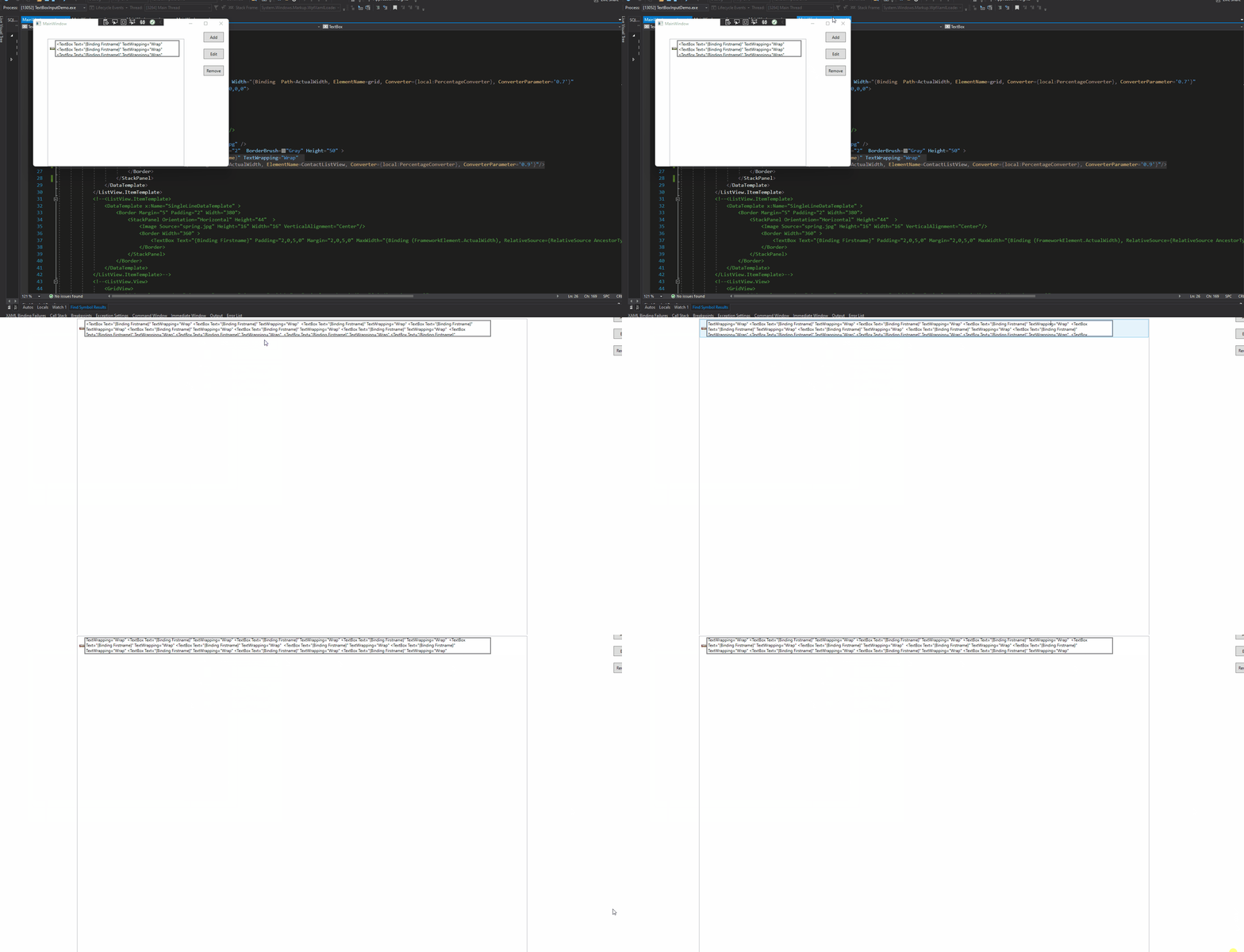
The result:
If the response is helpful, please click "Accept Answer" and upvote it.
Note: Please follow the steps in our documentation to enable e-mail notifications if you want to receive the related email notification for this thread.
With MaxWidth I still have the problem when maximizing or minimizing the window. The TextBox should always have a percentage value of the width of ListView:
Maybe you can help to fix the following error? With this I have the desired result:
Width="{Binding (FrameworkElement.ActualWidth - 20), RelativeSource={RelativeSource AncestorType=ScrollContentPresenter}}"
Hi,@Sarah .You could check the update in my answer.
Hi, I tried your code. I still have the same problem. The TextBox goes over the edge of the ListView


Hi Sarah,
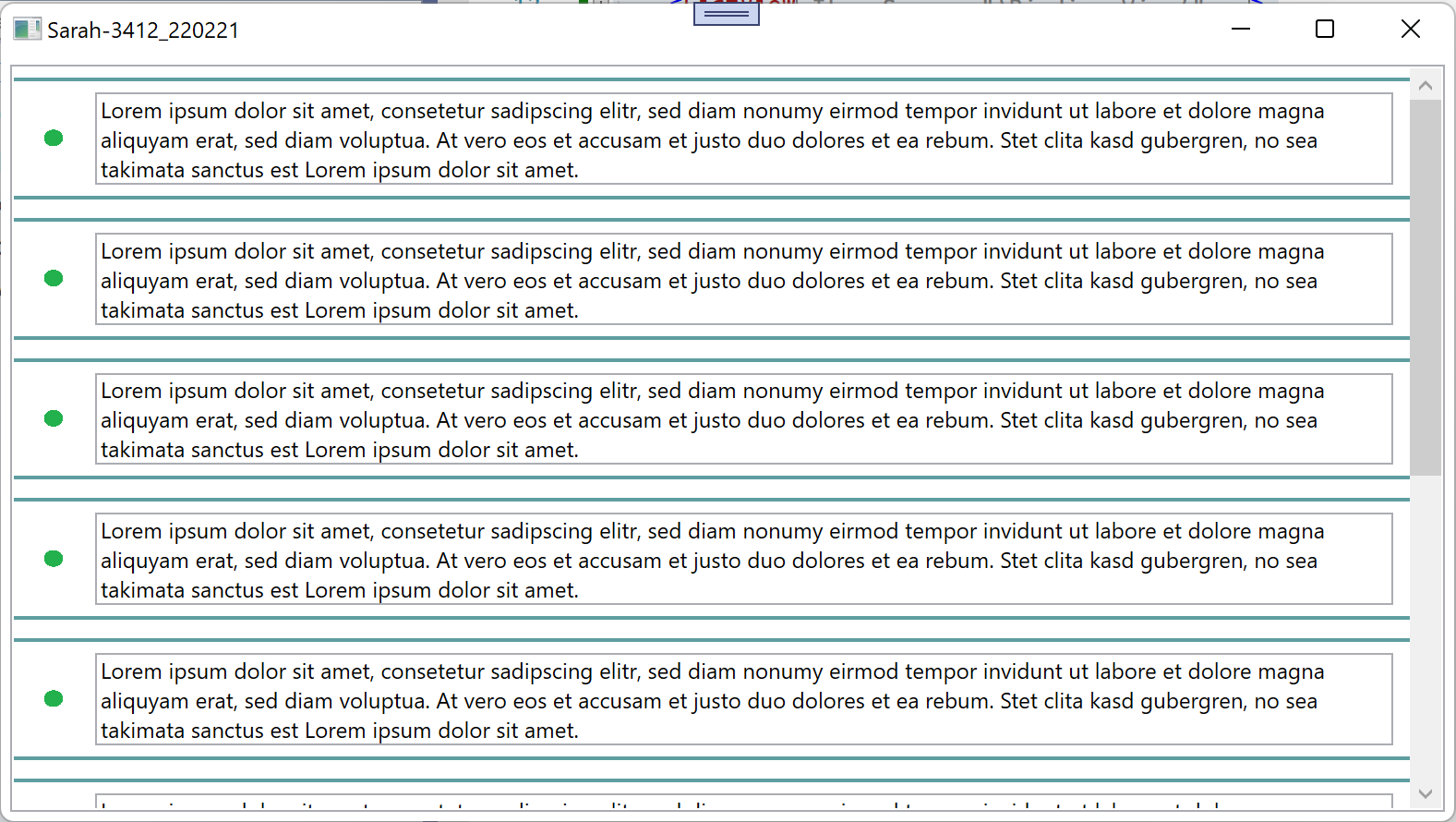
I correct my code:
Hi, I tried your code but it doesn't solve my problem. i have several TextBox and images in different direction therefore i need StackPanel. Is there another way using StackPanel?
Hi Sarah,
I think is better to use ItemContainerStyle like this:
<ListView ItemsSource="{Binding View}"
          Margin="5"
          HorizontalContentAlignment="Stretch"
          ScrollViewer.HorizontalScrollBarVisibility="Disabled">
  <ListView.ItemTemplate>
    <DataTemplate>
      <Grid>
        <Grid.ColumnDefinitions>
          <ColumnDefinition Width="35"/>
          <ColumnDefinition/>
        </Grid.ColumnDefinitions>
        <Image Grid.Column="0"
               Width="15"
               Height="15"
               Source="images/Paint.png" />
        <Border x:Name="b"
                Grid.Column="1"
                Margin="5">
        <TextBox Grid.Column="1"
                 Text="{Binding Text}"
                 TextWrapping="Wrap"
                 Width="{Binding ActualWidth, ElementName=b}"/>
        </Border>
      </Grid>
    </DataTemplate>
  </ListView.ItemTemplate>
  <ListView.ItemContainerStyle>
    <Style TargetType="{x:Type ListViewItem}">
      <Setter Property="BorderBrush" Value="CadetBlue" />
      <Setter Property="BorderThickness" Value="0,2,0,2" />
      <Setter Property="Margin" Value="0,5,0,5" />
    </Style>
  </ListView.ItemContainerStyle>
</ListView>