My files are distributed across 9 drives, so I use shortcuts on the Desktop to go directly to the relevant folder and files.
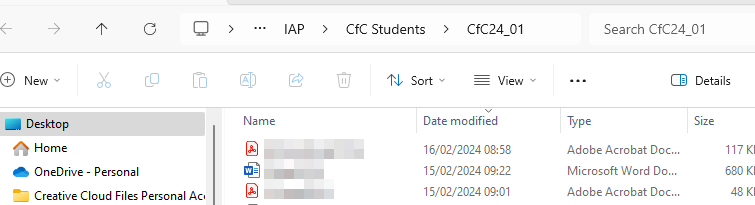
When the window opens, there is no indication of which drive it is on, nor is it possible to navigate directly to the adjacent folders (CfC23_11, CfC24_02 etc).
This folder is about 7 levels down in G: To navigate to that information store means remembering the location of the folder, going down 2 screens on the left pane to G:, then clicking through the various levels. What a faff!
When opening the folder in the right pane, I want the left pane to open with the target folder highlighted within the expanded navigation tree.
If I manage to copy the real path of the folder from the navigation box, then paste it back into the navigation box, the left pane does indeed show the folder in context in the left pane - in this and subsequent navigations. However to see that highlighted folder needs scrolling a screen or two down, it would be good to adjust that. (But the path in the navigation box is still hidden)
How can that be specified as the default initial behaviour in any options menu?
' cx='32' cy='32' r='32' /%3E%3Ctext x='50%25' y='55%25' dominant-baseline='middle' text-anchor='middle' fill='%23FFF' %3EA%3C/text%3E%3C/svg%3E)

