I've been having a very similar problem for months. It affects not just my explorer settings, though, but any application that "automatically" selects light/dark mode based on system settings.
When I choose a custom theme (wallpapers, edge colours, dark mode, etc.) the system will switch over, and when I start up again (either from sleep or full restart) the system will show the previous settings while the running applications are spinning up, but will inevitably default the colour mode settings. The wallpapers and window border colours remain, but opening "Personalization" shows that I'm not using a theme at all. Selecting a theme will bring the settings back, but literally every time I start the computer I have to open Personalization and select a theme.
If any windows are open when I do this they are unaffected, unless they are restarted, or I select themes repeatedly.
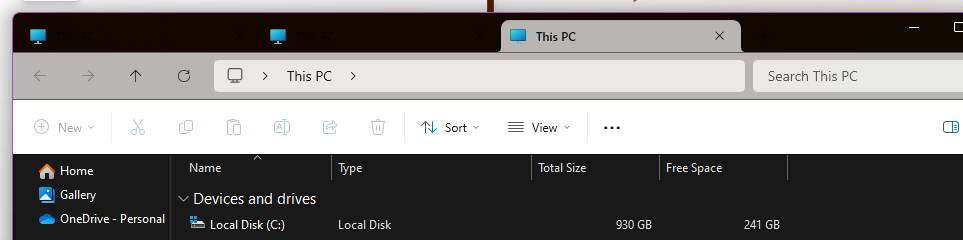
It's annoying as hell, and I haven't found any solution to this. I note that, because half of the settings apparently *do* remember that I wand the Dark theme, all text is in white, so when there are multiple tabs open, everything except the tab I'm currently on is illegible:
' cx='32' cy='32' r='32' /%3E%3Ctext x='50%25' y='55%25' dominant-baseline='middle' text-anchor='middle' fill='%23FFF' %3EA%3C/text%3E%3C/svg%3E)
