Share via

Wi-Fi adapter suddenly stopped working,

Anonymous
2024-03-20T02:09:16+00:00

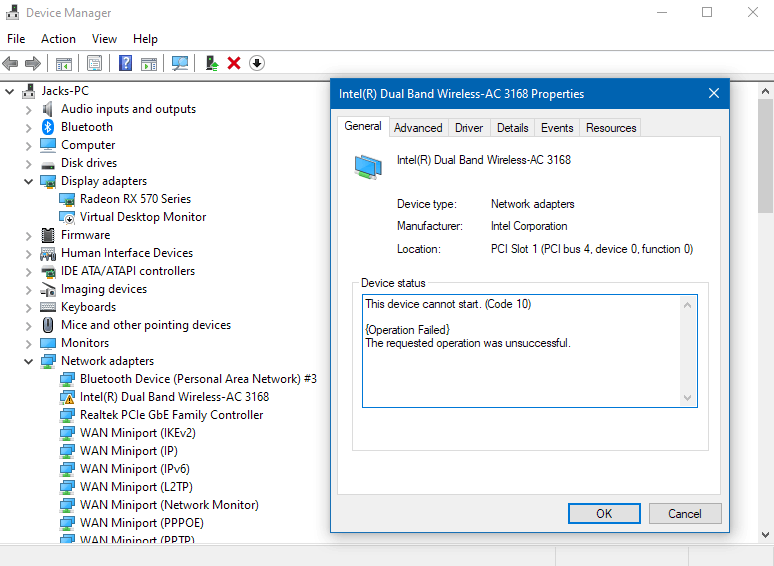
I have an Intel(R) Dual Band Wireless-AC 3168 Wi-Fi adapter and a few months back it stopped working after I booted one day, I couldn't find any information on how to get it to work back then and ended up just using ethernet. Now I'm curious if anyone else has any ideas. In device manager properties in the device status it says

"This device cannot start. (Code 10)

{Operation Failed}

The requested operation was unsuccessful. "

and in the events tab it says

"Device PCI\VEN_8086&DEV_24FB&SUBSYS_21108086&REV_10\803253FFFFA6F36000 was not migrated due to partial or ambiguous match.

Last Device Instance Id: {5d624f94-8850-40c3-a3fa-a4fd2080baf3}\vwifimp_wfd\7&594a07a&1&19

Class Guid: {4d36e972-e325-11ce-bfc1-08002be10318}

Location Path:

Migration Rank: 0xF000FFFFFFFFF132

Present: true

Status: 0xC0000719"

I've tried things like updating drivers, cleaning with command prompt, etc. but now I wonder if anyone else has any possible ideas of how I could fix this error, thank you!

Windows for home | Windows 10 | Devices and drivers

Locked Question. This question was migrated from the Microsoft Support Community. You can vote on whether it's helpful, but you can't add comments or replies or follow the question.

0 comments No comments

5 answers

Sort by: Most helpful
  1. John DeV 164K Reputation points Independent Advisor
    2024-03-20T22:27:34+00:00

    Please try performing a System Restore at an earlier date where everything is still working.

    Press Windows key+R to open Run then type: rstrui.exe

    Press Enter. This will open System Restore

    Click the Next button.

    Select the restore point at an earlier date where everything is still working.

    Click Next then Finish

    Kind regards,

    John DeV

    Independent Advisor

    Was this answer helpful?

    0 comments No comments
  2. Anonymous
    2024-03-20T19:20:12+00:00

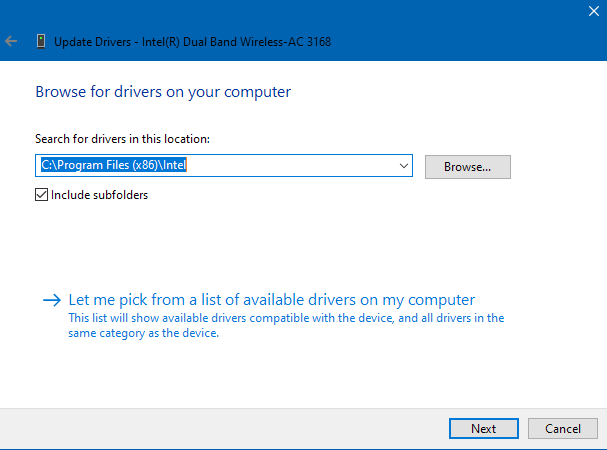
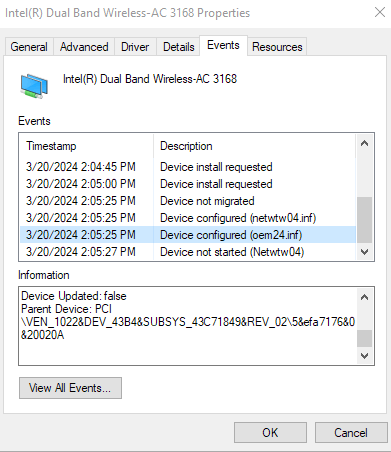
    I followed your steps in order and still have no luck, after shutting down and unplugging my computer for 30 minutes, I went to check fast startup but it was already off, in device manager there is no 'power management' tab for me for some reason and when browsing for driver software there is no box for 'show compatible hardware'. I lastly uninstalled the driver and software and restarted without any success. Screenshots and events error messages attached. Thank you.

    Jack
    3/20/2024 2:04:11 PM - Device Deleted

    "Device PCI\VEN_8086&DEV_24FB&SUBSYS_21108086&REV_10\803253FFFFA6F36000 was deleted.

    Class Guid: {4d36e972-e325-11ce-bfc1-08002be10318}"

    3/20/2024 2:04:22 PM - Device install requested

    "Device PCI\VEN_8086&DEV_24FB&SUBSYS_21108086&REV_10\803253FFFFA6F36000 requires further installation."

    3/20/2024 2:04:45 PM - Device install requested

    "Device PCI\VEN_8086&DEV_24FB&SUBSYS_21108086&REV_10\803253FFFFA6F36000 requires further installation."

    3/20/2024 2:05:00 PM - Device install requested

    "Device PCI\VEN_8086&DEV_24FB&SUBSYS_21108086&REV_10\803253FFFFA6F36000 requires further installation."

    3/20/2024 2:05:25 PM - Device not migrated

    "Device PCI\VEN_8086&DEV_24FB&SUBSYS_21108086&REV_10\803253FFFFA6F36000 was not migrated due to partial or ambiguous match.

    Last Device Instance Id: {5d624f94-8850-40c3-a3fa-a4fd2080baf3}\vwifimp_wfd\7&594a07a&1&19

    Class Guid: {4d36e972-e325-11ce-bfc1-08002be10318}

    Location Path:

    Migration Rank: 0xF000FFFFFFFFF132

    Present: true

    Status: 0xC0000719 "

    3/20/2024 2:05:25 PM - Device configured (netwtw04.inf)

    "Device PCI\VEN_8086&DEV_24FB&SUBSYS_21108086&REV_10\803253FFFFA6F36000 was configured.

    Driver Name: netwtw04.inf

    Class Guid: {4d36e972-e325-11ce-bfc1-08002be10318}

    Driver Date: 09/03/2018

    Driver Version: 19.51.15.3

    Driver Provider: Microsoft

    Driver Section: Install_MPCIEX_GENM2_3168_AC_HMC_WINT_64_AC

    Driver Rank: 0xFC0001

    Matching Device Id: PCI\VEN_8086&DEV_24FB&SUBSYS_21108086

    Outranked Drivers:

    Device Updated: false

    Parent Device: PCI\VEN_1022&DEV_43B4&SUBSYS_43C71849&REV_02\5&efa7176&0&20020A"

    3/20/2024 2:05:25 PM - Device configured (oem24.inf)

    "Device PCI\VEN_8086&DEV_24FB&SUBSYS_21108086&REV_10\803253FFFFA6F36000 was configured.

    Driver Name: oem24.inf

    Class Guid: {e2f84ce7-8efa-411c-aa69-97454ca4cb57}

    Driver Date: 05/07/2019

    Driver Version: 21.1020.0.1

    Driver Provider: Intel Corporation

    Driver Section: Install_PIE

    Driver Rank: 0xFF0000

    Matching Device Id: PCI\VEN_8086&DEV_24FB

    Outranked Drivers:

    Device Updated: false

    Parent Device: PCI\VEN_1022&DEV_43B4&SUBSYS_43C71849&REV_02\5&efa7176&0&20020A"

    3/20/2024 2:05:27 PM - Device not started (Netwtw04)

    "Device PCI\VEN_8086&DEV_24FB&SUBSYS_21108086&REV_10\803253FFFFA6F36000 had a problem starting.

    Driver Name: netwtw04.inf

    Class Guid: {4d36e972-e325-11ce-bfc1-08002be10318}

    Service: Netwtw04

    Lower Filters:

    Upper Filters: vwifibus

    Problem: 0xA

    Problem Status: 0xC0000001"

    Was this answer helpful?

    0 comments No comments
  3. John DeV 164K Reputation points Independent Advisor
    2024-03-20T03:14:28+00:00

    Thank you for updating me with that information. Please let me know if you have tried the methods below.

    **Shutdown your computer

    Unplug the power cable from the computer for 30 minutes, then plug it in again and turn on.

    **Please try to turn off Fast startup

    Press Start then search Control panel

    Under View by > select Small icons

    Select Power Options

    On the left side, Click "Choose what power buttons do"

    Click "Change settings that are currently unavailable"

    Under Shutdown settings > Turn off fast startup

    Power off the system then pull the power cable from the computer, wait for 15 minutes.

    Power back on

    Open Device Manager

    Expand Network adapters

    Right click on the Wireless driver then select Properties

    Click Power Management tab,

    Uncheck "Allow the computer to turn off this device to save power"

    Restart your computer

    **Open Device Manager

    Expand the Network adapters

    Find the Wireless driver in the list

    Right click it and select Update

    Click "Browse my computer for driver software"

    Select "Let me pick from a list of available drivers on my computer"

    Make sure to put a check mark "Show compatible hardware"

    Select an older driver from the list

    Click Next then restart your computer using Clean Boot of Windows

    **Open Device Manager

    Click View > Show hidden devices

    Expand Network adapters

    Right click the Wireless driver

    Select Uninstall

    Tick the "Delete the driver software for this device" box

    Click Uninstall

    Restart your computer

    Kindly let me know if this helps or if you have any further concerns.

    Kind regards,

    John DeV

    Independent Advisor

    Was this answer helpful?

    0 comments No comments
  4. Anonymous
    2024-03-20T03:08:43+00:00

    Here is the info requested, let me know if there is any other info I can provide! Thanks

    Was this answer helpful?

    0 comments No comments
  5. John DeV 164K Reputation points Independent Advisor
    2024-03-20T02:41:25+00:00

    Hi, good day! I'm John Dev a Windows user like you and I'll be happy to assist you today. I know this has been difficult for you, Rest assured, I'm going to do my best to help you.

    I will ask a few questions so I have a better idea of what solutions to provide.

    What is your current Windows operating system and version? Press Windows key+R to open Run then type: winver

    What is the exact make and model of your computer?

    Press Windows key+R to open Run then type: msinfo32

    Press Enter

    Please take a screenshot of the System Information window and post it in your next response. Note: Don't include any personal information or sensitive data.

    https://answers.microsoft.com/en-us/feedback/fo...

    Kind regards,

    John DeV

    Independent Advisor

    Was this answer helpful?

    0 comments No comments