Hello, this is Emily.
Is your Dell computer running Windows home or pro edition? If it is home, you cannot set up a business account as Windows log in user.
If you just need to use your Office 365 apps, you can still install them and sign in using your onmicrosoft.com account on those apps. They will work just fine even if your Windows sign in is a personal account.
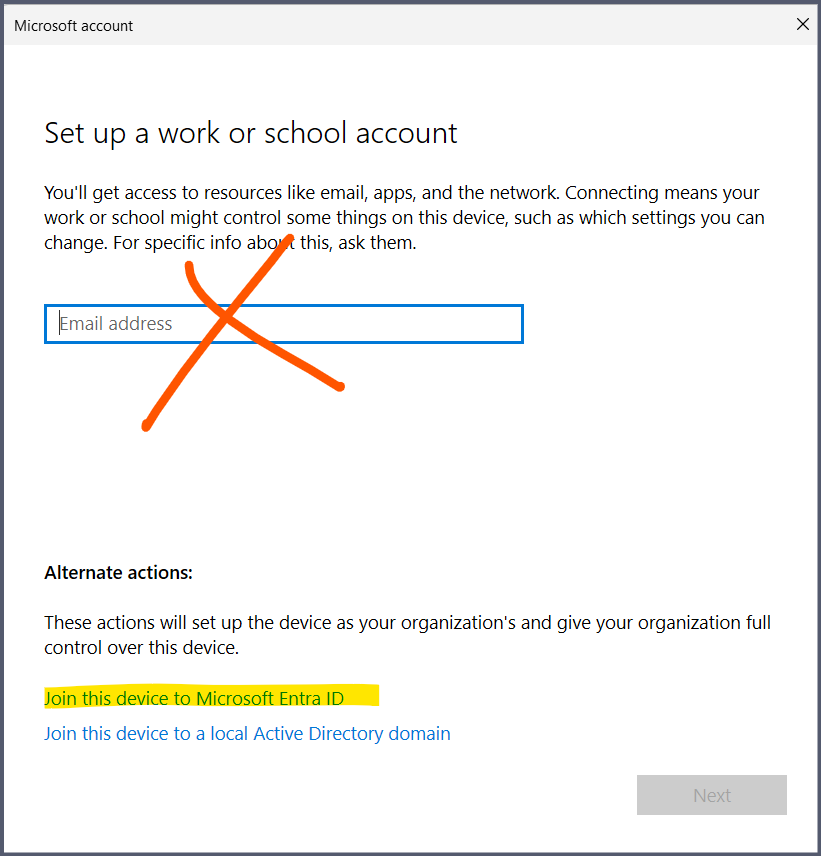
If you want to set up a Windows user using the business account, and you have Windows 11 Pro, you still have to set up the computer with either a local account or personal account first, then go to Settings > Accounts > Access Work or school. Click on Connect. On the pop up, don't sign in yet. Instead, click on Join this device to Entra ID. Then on the next step it will prompt you to sign in and you can sign in there.
Once set up, restart the computer, use switch user and you should now be able to sign in using your onmicrosoft.com account credential.
' cx='32' cy='32' r='32' /%3E%3Ctext x='50%25' y='55%25' dominant-baseline='middle' text-anchor='middle' fill='%23FFF' %3EA%3C/text%3E%3C/svg%3E)


