Share via

Caps Lock On-Screen Display

Anonymous
2021-08-02T16:55:55+00:00
  • This needs updating for Windows 10 21H1. With the last update, I started getting an On-Screen Display saying Caps Lock was ON?OFF.

Windows 10 Version 21H1

Windows 10 Version 21H1 for x64-based Systems (KB5004296)

My name is Lee; an Independent Consultant, I'm here to help you with your problem.

  1. Press the Windows key on the keyboard and select Settings.
  2. Click System.
  3. Choose Display and click Advanced display settings.
  4. Scroll down and select Display adapter properties.
  5. Click on Screen configurations tab. In Properties window, make sure Enable on-screen display is checked. Under "Indicator settings for NumLock and CapsLock" section, look for "While the numeric lock or caps lock is ON" section, choose the "Show the indicator for a few seconds" option.

Thanks

Where’s the Screen Configurations tab?

This is what I get:
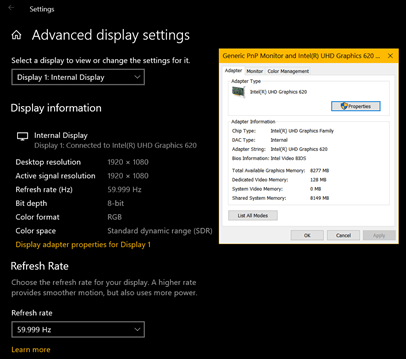
 

This is very disturbing every time I press “Caps Lock” and I want it to go away. It just started with the last update to Windows 10 21H1.
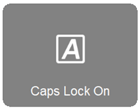
 

Again; This problem still exists in Windows 10 Version 21H1. I have tried the other fixes and they DON'T WORK.

Windows for home | Windows 10 | Accessibility

Locked Question. This question was migrated from the Microsoft Support Community. You can vote on whether it's helpful, but you can't add comments or replies or follow the question.

0 comments No comments

Answer accepted by question author

  1. Ruwim.B 6,300 Reputation points Volunteer Moderator
    2024-04-25T18:53:27+00:00

    On HP computers, this issue is caused by the recent update of HP System Event Utility to version 1,5,6,0. Doesn't happen with the previous 1.4 version. Ending this task will stop the OSD notifications for the current Windows session, but will again be enabled after next reboot. In order to stop these displays permanently, the HP System Event Utility app must be uninstalled.

    30+ people found this answer helpful.
    0 comments No comments

16 additional answers

Sort by: Most helpful
  1. Anonymous
    2024-04-26T11:06:27+00:00

    Thanks, just what I needed <3
    I was afraid to uninstall it so alternative is: Disable it from Starting Apps @Task Manager.
    Works for me!

    2 people found this answer helpful.
    0 comments No comments
  2. Anonymous
    2024-04-29T04:30:40+00:00

    I enjoy the fact that you went out of your way to do this but for some reason it's not working

    1 person found this answer helpful.
    0 comments No comments
  3. Anonymous
    2024-04-26T06:43:26+00:00

    Will the next update fix that issue? I assume it's a bug

    Hoping for the best that they will fix it or at least put an option to turn this feature off instead of completely removing it as this may be actually useful for some users

    1 person found this answer helpful.
    0 comments No comments
  4. Sumit 43,786 Reputation points Volunteer Moderator
    2024-04-24T08:24:54+00:00

    04/2024:

    This indicator only shows up from any Software you have installed - Windows does not have any feature like that, which shows this natively.

    For example, LG OSD software shows this. To disable that,

    Via How to switch of Caps lock on-screen indicator (LG gram running windows 11) : r/techsupport (reddit.com)

    1. Open Run (Windows Key + R)
    2. Input regedit and click OK
    3. Look for the following path: Computer\HKEY_USERS\S-1-5-21-1076181867-<SOME DIGITS>\SOFTWARE\LGE\OSD
    4. Double click on IndicatingOnOff and change the value to 3

    Uninstall HP system event utility from Windows to resolve this.

    1 person found this answer helpful.
    0 comments No comments