Hi, OnlyAlex22
Welcome to Microsoft Community.
Anyone who learns can feel a lack of knowledge, and it's commendable that you're trying to solve the problem on your own.
I understand from your description that you are having problems with the safety of the cmd commands: "How to make hibernation unavailable" and "How to make hibernation available "These two groups seem to be the official help provided by Microsoft and have been tested to be safe.
You also mentioned a set of commands, "powercfg /h /type full", which you can find out about if you want to go to the:
Powercfg command-line options | Microsoft Learn
Microsoft has provided an official explanation of this command, so you can learn about the explanation of this command and similar commands.
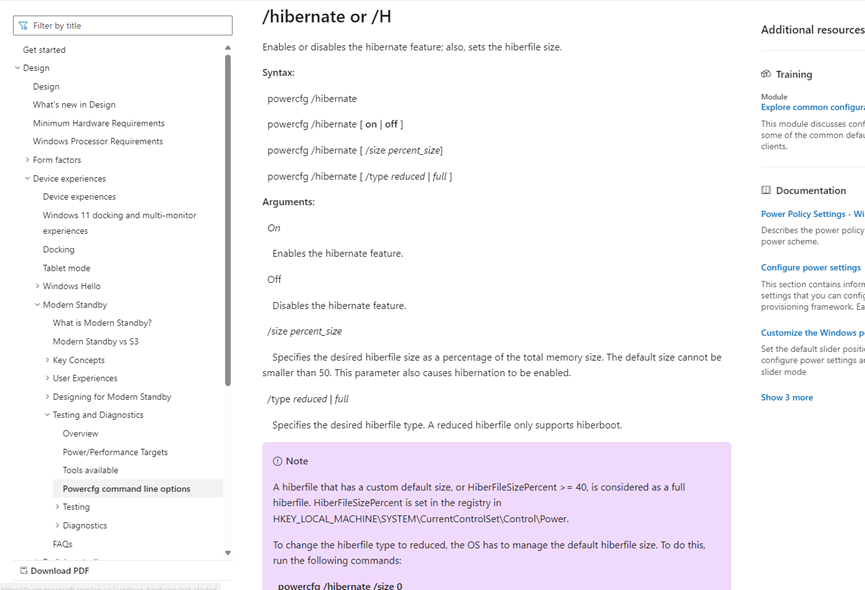
Then according to your description, you are trying to solve the sleep problem. But the commands you mentioned are all about hibernation. It's very similar, but it's a different function.
You say you are experiencing that all the options for fast startup, hibernation and locking have disappeared. This is probably due to the fact that you turned on hibernation mode and it came back after a reboot, which should be the result of turning off hibernation mode.
Then there is the issue of the hibernation file taking up a lot of your ram memory, this depends a lot on how many programs you started before hibernating, the more programs you start, the more it will take up the next time you start it up.
I don't think you need to reset your computer at this time.
If you have any further concerns or questions, reply to us and we'll be able to help you more.
Best Regards,
Logan - MSFT | Microsoft Community Support Specialist
' cx='32' cy='32' r='32' /%3E%3Ctext x='50%25' y='55%25' dominant-baseline='middle' text-anchor='middle' fill='%23FFF' %3EA%3C/text%3E%3C/svg%3E)
