When i try and install discord, it gives me the following error:
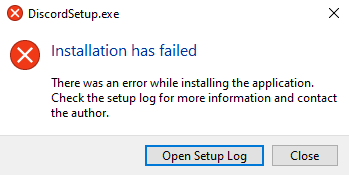
and when i click Open Setup Log, it gives me this log:
3312> 2024-05-30 20:26:19> Unhandled exception: System.TypeInitializationException: O inicializador de tipo de '<Module>' acionou uma exceção. ---> <CrtImplementationDetails>.ModuleLoadException: The C++ module failed to load during appdomain initialization.
---> System.DllNotFoundException: C:\Windows\Microsoft.NET\Framework\v4.0.30319\WPF\wpfgfx_v0400.dll ---> System.ComponentModel.Win32Exception: O arquivo ou pasta está corrompido e ilegível
--- Fim do rastreamento de pilha de exceções internas ---
em MS.Internal.NativeWPFDLLLoader.LoadNativeWPFDLL(UInt16* relDllPath, UInt16* baseDllPath)
em MS.Internal.NativeWPFDLLLoader.LoadCommonDLLsAndDwrite()
em CModuleInitialize.{ctor}(CModuleInitialize* , IntPtr cleaningUpFunc)
em ?A0x4566221a.InitCmiStartupRunner()
em ?A0x4566221a.??__E?A0x4566221a@unused@@YMXXZ()
em _initterm_m((fnptr)* pfbegin, (fnptr)* pfend)
em <CrtImplementationDetails>.LanguageSupport.InitializePerAppDomain(LanguageSupport* )
em <CrtImplementationDetails>.LanguageSupport._Initialize(LanguageSupport* )
em <CrtImplementationDetails>.LanguageSupport.Initialize(LanguageSupport* )
--- Fim do rastreamento de pilha de exceções internas ---
em <CrtImplementationDetails>.LanguageSupport.Initialize(LanguageSupport* )
em .cctor()
--- Fim do rastreamento de pilha de exceções internas ---
em Squirrel.Update.Program.executeCommandLine(String[] args)
em Squirrel.Update.Program.main(String[] args)
2908> 2024-05-30 20:34:54> Unhandled exception: System.TypeInitializationException: O inicializador de tipo de '<Module>' acionou uma exceção. ---> <CrtImplementationDetails>.ModuleLoadException: The C++ module failed to load during appdomain initialization.
---> System.DllNotFoundException: C:\Windows\Microsoft.NET\Framework\v4.0.30319\WPF\wpfgfx_v0400.dll ---> System.ComponentModel.Win32Exception: O arquivo ou pasta está corrompido e ilegível
--- Fim do rastreamento de pilha de exceções internas ---
em MS.Internal.NativeWPFDLLLoader.LoadNativeWPFDLL(UInt16* relDllPath, UInt16* baseDllPath)
em MS.Internal.NativeWPFDLLLoader.LoadCommonDLLsAndDwrite()
em CModuleInitialize.{ctor}(CModuleInitialize* , IntPtr cleaningUpFunc)
em ?A0x4566221a.InitCmiStartupRunner()
em ?A0x4566221a.??__E?A0x4566221a@unused@@YMXXZ()
em _initterm_m((fnptr)* pfbegin, (fnptr)* pfend)
em <CrtImplementationDetails>.LanguageSupport.InitializePerAppDomain(LanguageSupport* )
em <CrtImplementationDetails>.LanguageSupport._Initialize(LanguageSupport* )
em <CrtImplementationDetails>.LanguageSupport.Initialize(LanguageSupport* )
--- Fim do rastreamento de pilha de exceções internas ---
em <CrtImplementationDetails>.LanguageSupport.Initialize(LanguageSupport* )
em .cctor()
--- Fim do rastreamento de pilha de exceções internas ---
em Squirrel.Update.Program.executeCommandLine(String[] args)
em Squirrel.Update.Program.main(String[] args)
How can i fix it?
' cx='32' cy='32' r='32' /%3E%3Ctext x='50%25' y='55%25' dominant-baseline='middle' text-anchor='middle' fill='%23FFF' %3EA%3C/text%3E%3C/svg%3E)
