Exchange Online
A cloud-based service included in Microsoft 365, delivering scalable messaging and collaboration features with simplified management and automatic updates.
This browser is no longer supported.
Upgrade to Microsoft Edge to take advantage of the latest features, security updates, and technical support.
' cx='32' cy='32' r='32' /%3E%3Ctext x='50%25' y='55%25' dominant-baseline='middle' text-anchor='middle' fill='%23FFF' %3ETD%3C/text%3E%3C/svg%3E)
Hello guys !
I need to find all mailboxes where user mailbox have access to
I tried via Get-Mailbox | Get-MailboxPermission(...) also XPO but it is still loading and occurs i/o issues and others faults...reason why it does not works as expected is my tenant have huge number of users few thousands for each domain so the method taking a lot of time and occurs mentioned issues - not effective
My idea was get all mailboxes of user domain and after it execute mentioned query but, they do not know if user do not have access to mailboxes of different domain, so in this solution I should get list of users for each domain and after it check it one by one... - not effective
My question is if any solutions exists on that ? it not must to be in powershell maybe some audit? I need just list of objects where user have full access rights.
objects means shared mailboxes, room mailboxes, user mailboxes,
for groups it is completed through AAD.
Thanks for your time
A cloud-based service included in Microsoft 365, delivering scalable messaging and collaboration features with simplified management and automatic updates.
The administration of a hybrid deployment that connects on-premises Exchange Server with Exchange Online, enabling seamless integration and centralized control.
Answer accepted by question author

You could try with the script below to check permission for shared mailboxes, room mailboxes, user mailboxes (There doesn't exist full access permission for distribution group):
$mailboxes = Get-Mailbox -ResultSize unlimited | where{$_.RecipientTypeDetails -ne "DiscoveryMailbox"}

foreach ($mailbox in $mailboxes){
    Get-MailboxPermission -Identity $mailbox.UserPrincipalName | where{$_.user -notlike "*self*"}
}
If it still takes a long time to run which caused failure, you could check permission based on domain:
$mailboxes = Get-Mailbox -ResultSize unlimited | where{$_.RecipientTypeDetails -ne "DiscoveryMailbox" -and $_.UserPrincipalName -like "*@domain.onmicrosoft.com"}

foreach ($mailbox in $mailboxes){
    Get-MailboxPermission -Identity $mailbox.UserPrincipalName | where{$_.user -notlike "*self*"}
}
If the answer is helpful, please click "Accept Answer" and kindly upvote it. If you have extra questions about this answer, please click "Comment".
Note: Please follow the steps in our documentation to enable e-mail notifications if you want to receive the related email notification for this thread.
 $mailboxes = Get-Mailbox -ResultSize unlimited | where{$_.RecipientTypeDetails -ne "DiscoveryMailbox" -and $_.UserPrincipalName -like "*@domain.onmicrosoft.com"}

 foreach ($mailbox in $mailboxes){
     Get-MailboxPermission -Identity $mailbox.UserPrincipalName | where{$_.user -notlike "*self*"}
 }
works no i/o, but i received only 6k users it is maybe 1% of users, i will try Get-Mailbox -Identity * for get more, any way thanks if you will have new ideas let me know !
I bad constructed my words... nevermind with *(...)
any idea why get-mailbox returns only 6k users?
I am using exchange online not on premise so I cannot use -IgnoreDefaultScope because it is only for on-premise cmd
Here may be a workaround for you:
Export all mailboxes to a CSV file:
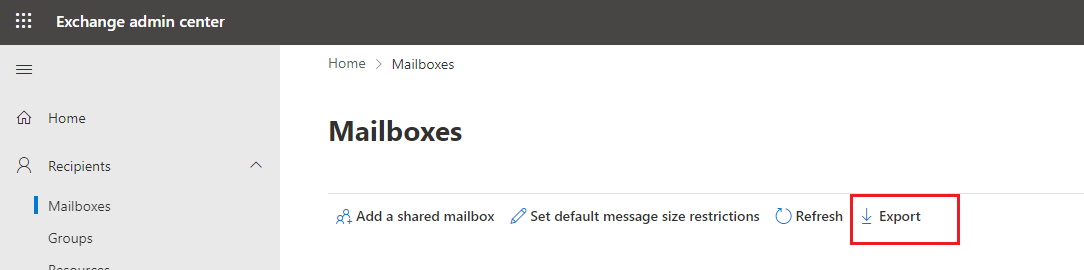
Split the CSV to multiple files, then check for them one file by one file (All sub file need title as the original file):
$mailboxes = Import-CSV c:\temp\mailboxes.csv

foreach ($mailbox in $mailboxes){
    Get-MailboxPermission -Identity $mailbox.PrimarySmtpAddress| where{$_.user -notlike "*self*"}
}
 ]1
]1
and again I stuck... have chance to no way for check it...

If you want this information for specific user, use the -User parameter. For example:
Get-Mailbox | Get-MailboxPermission -User vasil
Details here: https://www.michev.info/Blog/Post/1516/quickly-list-all-mailboxes-to-which-a-particular-user-has-access
If you want it for multiple users, or you have a big set of mailboxes to go over, best use a proper "inventory" type of script instead of oneliners.
' cx='32' cy='32' r='32' /%3E%3Ctext x='50%25' y='55%25' dominant-baseline='middle' text-anchor='middle' fill='%23FFF' %3EPA%3C/text%3E%3C/svg%3E)
This method no longer works using the V3 EXO Powershell module
' cx='32' cy='32' r='32' /%3E%3Ctext x='50%25' y='55%25' dominant-baseline='middle' text-anchor='middle' fill='%23FFF' %3EA%3C/text%3E%3C/svg%3E)
@Piotrkowski, Ari I was able to get it to work just now in PowerShell 7 with the v3 EXP module.
' cx='32' cy='32' r='32' /%3E%3Ctext x='50%25' y='55%25' dominant-baseline='middle' text-anchor='middle' fill='%23FFF' %3ER%3C/text%3E%3C/svg%3E)
Is there a way to check for all the shared or user mailbox accesses for a single user with out running PS script?