Share via

Unable to install RSAT: Group Policy Management Tools

Anonymous
2024-05-13T16:01:26+00:00

Hello Everyone,

I've tried to install this on my Windows 10 22H2 domain computer. Trying through the Settings and Add an optional feature I get the "Couldn't add". Having tried to install via Powershell, I got

Add-WindowsCapability : Add-WindowsCapability failed. Error code = 0x800f0954

After using the following I now get Add-WindowsCapability : Add-WindowsCapability failed. Error code = 0x8024002e

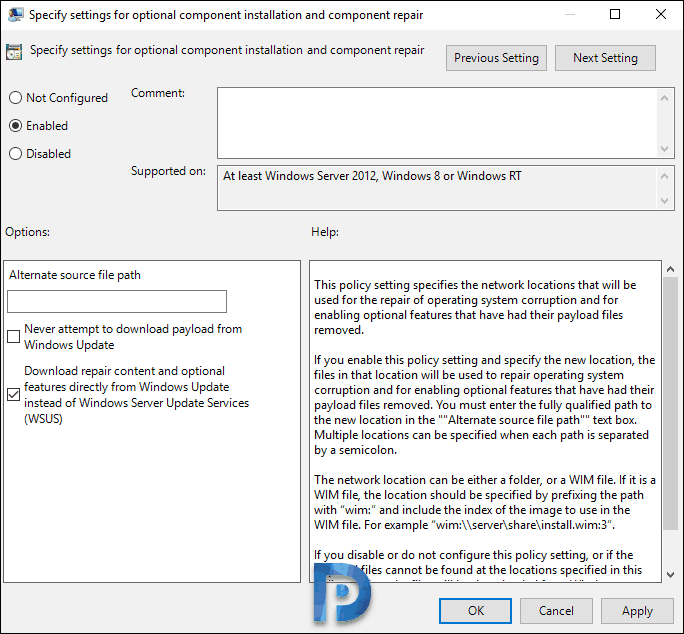
Right click policy setting and click Enabled. In addition to that, check the box “Download repair content and optional features directly from Windows Updates instead of Windows Server Updates Services (WSUS)“.

RSAT Tools Installation Error 0x800f0954

Download repair content and optional features directly from Windows Updates instead of WSUS

Click Apply and OK. Now open the command prompt on your computer and run the command gpupdate so that the latest policy settings are applied to the local machine.

Can anyone assist me please.

Windows for home | Windows 10 | Settings

Locked Question. This question was migrated from the Microsoft Support Community. You can vote on whether it's helpful, but you can't add comments or replies or follow the question.

0 comments No comments

Answer accepted by question author

  1. Ramesh 176.1K Reputation points Volunteer Moderator
    2024-05-13T17:01:32+00:00

    Geoff,

    This has to do with WU policies.

    0x8024002E WU_E_WU_DISABLED Access to an unmanaged server isn't allowed.

    Please reset Windows Update using this Batch file.

    Don't reboot Windows yet.

    Then, run these commands:

    Restart-Service wuauserv

    Add-WindowsCapability –Online -Name Rsat.GroupPolicy.Management.Tools~~~~0.0.1.0


    See also: [Fix] RSAT Tools Error 0x8024002e or 0x800f0954 » Winhelponline

    If nothing helps, we'll see how to install the package offline.

    3 people found this answer helpful.
    0 comments No comments

5 additional answers

Sort by: Most helpful
  1. Anonymous
    2024-05-13T16:51:38+00:00

    Hello Ramesh,

    Thank you but unfortunately it didn't work.

    2 people found this answer helpful.
    0 comments No comments
  2. Ramesh 176.1K Reputation points Volunteer Moderator
    2024-05-13T16:16:09+00:00

    Hi Geoff,

    From admin PowerShell, run these commands:

    Set-ItemProperty -Path "HKLM:\SOFTWARE\Policies\Microsoft\Windows\WindowsUpdate\AU" -Name "UseWUServer" -Value 0
    
    Restart-Service wuauserv
    
    Add-WindowsCapability –Online -Name Rsat.GroupPolicy.Management.Tools~~~~0.0.1.0
    
    1 person found this answer helpful.
    0 comments No comments
  3. Anonymous
    2024-06-14T16:41:35+00:00

    Hi, thanks a lot this worked for me. I needed to add the feature to windows 10 and this worked!

    0 comments No comments
  4. Anonymous
    2024-05-14T15:36:54+00:00

    Thanks for your help Ramesh.

    0 comments No comments