Share via

My computer got a virus and winre.wim is missing (RE disabled)

Anonymous
2024-04-30T19:27:16+00:00

My computer seems to have been infected by a very tough virus. I started to noticed after I bought a new battery on Amazon (I know it's very illogical, but I have no other explanation for what might be causing this). I also disabled updates for Chrome and Adobe, but should not be that.

The first time I noticed the unusual behavior was when a video window popped up showing a clip of a a Youtube music video I was watching, which was very very weird. It was a detached player with controls like the one you use to make the screen more or less bright. Then WMP started to play music like the files were corrupted, with awful bias and breaking up. Then the keyboard would not respond, and I couldn't type anything (and I have to enter a pwd to log in at start up, mind you). Then I went to MSCONFIG and selected the Selective Startup to try to troubleshoot, and now I can't make it go back to loading Normal startup. It's getting worse and worse.

All sorts of strange things are happening and when I tried to restore the system with a system image I had created a while ago, the goddamned winre.wim is file missing. The option to recover from a system image in Backup and Restore (Windows 7) is not available, it's not showing, maybe because of that.

I used ChatGpt to try a few things, and got this error message:

G:>reagentc /boottore

REAGENTC.EXE: Windows RE is disabled.

I see one very big file in my recovery partition (E:) (this is just where I save the backup images), which is a VHDX: 778e6db0-9f71-01d6-d832-c7bbb84feb00.vhdx. It doesn't contain the winre.wim though. There's another one called Esp.vhdx. I doubt it will have the winre.wim either.

Can one of you pls help me to fix this? I think this is probably a goddamned virus (god knows how I got it). But now I just want to overwrite the system with the system image I created back in Jan/24 and be done. To do that I need to be able to get the RECOVERY utility up and running.

Here my partitions:

DISKPART> list partition

Partition ### Type Size Offset


Partition 1 System 260 MB 61 KB

Partition 2 Reserved 128 MB 261 MB

Partition 3 Primary 154 GB 389 MB

Partition 4 Primary 632 MB 154 GB

Partition 5 Primary 1512 GB 155 GB

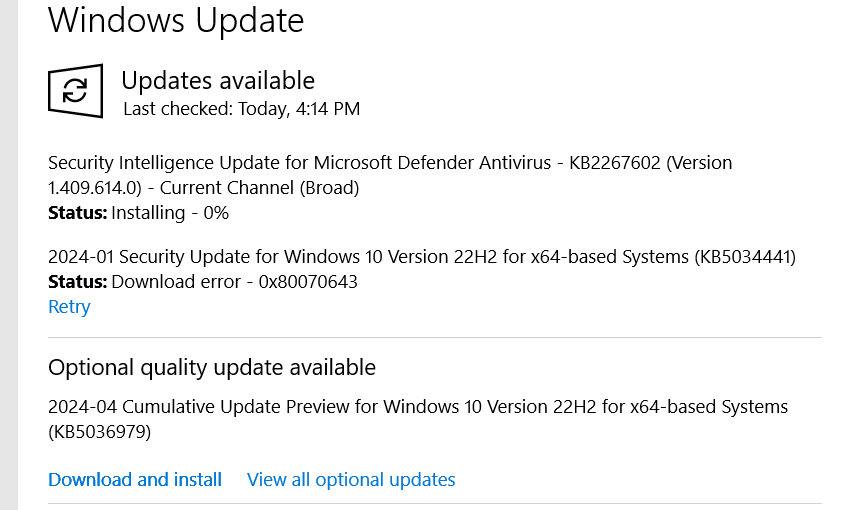
Edit: I just found that package KB5034441 failed to install in Windows Update. Could this have been the reason why my RECOVERY feature is not working?

In other post a user commented that all his trouble with RE being disabled happened because of his having a recovery partition that wasn't large enough for this update. Could that be my issue as well? My recovery partition seems to be the G: volume below (the E: I use to store system images):

DISKPART> list volume

Volume ### Ltr Label Fs Type Size Status Info


Volume 0 C Windows NTFS Partition 154 GB Healthy Boot

Volume 1 G NTFS Partition 632 MB Healthy

Volume 2 D DATA NTFS Partition 1512 GB Healthy

Volume 3 E RECOVERY NTFS Partition 195 GB Healthy

**** Volume 4 FAT32 Partition 260 MB Healthy System

The package KB5034441 doesn't install successfully.
Windows for home | Windows 10 | Windows update

Locked Question. This question was migrated from the Microsoft Support Community. You can vote on whether it's helpful, but you can't add comments or replies or follow the question.

0 comments No comments

6 answers

Sort by: Most helpful
  1. Anonymous
    2024-05-01T17:51:26+00:00

    IF you have issues consider doing a Clean install with a USB, Go into a Web Browser then type in aka.ms/Windows10MediaCreationTool, next click on the download it will ask to make changes, click yes, now accept the license agreement then choose your language and edition hit yes, now with your USB in hand click next let it finish downloading then click finish boot into bios with restart spam the DEL key then after that change the boot order to USB after that now click exit out of BIOS then it will show you the booting screen follow each step carefully once your done boom you got a good install.

    Was this answer helpful?

    0 comments No comments
  2. Anonymous
    2024-05-01T16:54:03+00:00

    Thanks for your reply. I have figured everything already.

    I was able to grab winre.wim from the recovery partition.

    I was able to resize the recovery partition thinking that Windows would update my files in that partition, but that is just for windows 11, when what I have is windows 10. That's why those files stayed the same.

    I'm all good now, even though I'm still trying to find what's going wrong with my system. It's almost like it's a virus, though it may be being cause by my disabling of Chrome updates (Google is very shady).

    Was this answer helpful?

    0 comments No comments
  3. Anonymous
    2024-05-01T08:04:45+00:00

    You're question. Is winRE failing because KB5034441 does not install?
    The answer is no. There's not enough space to download the update. So this update does not install either.
    The update is to address issues with encrypting and decrypting drives. If you don't use that your fine anyway

    your "list partition" shows no partition of about 550 MB, that should be the recovery-partition.

    I'm a bit confused here.

    you have the recovery-part in a volume. That means that you have attached a driver-letter to it.

    That implies that the windows-system has acces to it. That seams strange.

    The whole winRE-system is meant to always be able to start even if windows is failing.

    What i did was a fresh install of windows from the MediaCreationtool USB-Stick and I emptied the whole SSD during the install.

    Now the installation proces can freely create partitions.

    That resulted in a SSD with the EFI-partition (100MB), MSR-partition (16MB), Windows-partition(118GB) and Recovery-part(554MB)

    The order of these partitions is important and is now different from previous installs.

    The Recovery-partition needs a partition in front to be able to create emtpy space next to it.

    Then i made the Windows-partition smaller. And added that space to the Recovery-partition.

    The way to know if WINRE is active is

    reagentc /info

    if it is not then activate

    reagentc /enable

    There's a lot of info on the internet. I am not sure where to begin yet. I'm looking and reading but don't get anywhere yet. Not into chatGPT as of now.

    https://learn.microsoft.com/en-us/archive/msdn-technet-forums/d7654814-72d1-414e-9020-ded4167e38f5

    Was this answer helpful?

    0 comments No comments
  4. Anonymous
    2024-04-30T22:38:43+00:00

    Last update, I closed all the apps that might be locking the recovery partition (Explorer, EaseUS, etc.) and then it seems Windows Updates finally was able to update "package 2024-01 Security Update for Windows 10 Version 22H2 for x64-based Systems" (KB5034441).

    However I am totally puzzled that the used space in the partition hasn't changed. I wonder why that is. When I check for updates again it says that "You're up-to-date". Also, I don't see the option to recover the system from an image.

    Ideas?

    Was this answer helpful?

    0 comments No comments
  5. Anonymous
    2024-04-30T22:05:52+00:00

    I was able to locate the WINRE.WIM in the partition G: (the one with 632 MB), the recovery partition, whose size I have increased with the help of EaseUS.

    Directory of G:\Recovery\WindowsRE

    09/Oct/2020 09:15 PM <DIR> .

    09/Oct/2020 09:15 PM <DIR> ..

    07/Dec/2019 05:08 AM 3,170,304 boot.sdi

    09/Oct/2020 09:15 PM 1,109 ReAgent.xml

    28/Jul/2020 03:54 AM 556,723,434 Winre.wim

               3 File(s)    559,894,847 bytes 
    
               2 Dir(s)     617,586,688 bytes free
    

    I was able to successfully start the Recovery agent, so success!!

    However, even with 1GB in the recovery partition, the update is still not working. Not sure why. If somebody has any tips please let me know! :)

    Image

    Was this answer helpful?

    0 comments No comments
