I did all of this, and I still get the message, the Store is not available in your Country or Region. I have Windows 10. This problem has apparently been going on for such a long time. Why has there not been a fix?
This browser is no longer supported.
Upgrade to Microsoft Edge to take advantage of the latest features, security updates, and technical support.
' cx='32' cy='32' r='32' /%3E%3Ctext x='50%25' y='55%25' dominant-baseline='middle' text-anchor='middle' fill='%23FFF' %3EA%3C/text%3E%3C/svg%3E)
After resetting my pc my Microsoft Store got region-locked and now doesn't work. Whenever I try to open the app it greets me with "Store is not available in your country or region" but I've never had this issue before.
Error: 0x87e10002
Thank you!
Locked Question. This question was migrated from the Microsoft Support Community. You can vote on whether it's helpful, but you can't add comments or replies or follow the question.
I did all of this, and I still get the message, the Store is not available in your Country or Region. I have Windows 10. This problem has apparently been going on for such a long time. Why has there not been a fix?
Thank you for the reply!
I am currently In Estonia and have set the region accordingly. I'll try US
Edit: US didn't work
' cx='32' cy='32' r='32' /%3E%3Ctext x='50%25' y='55%25' dominant-baseline='middle' text-anchor='middle' fill='%23FFF' %3EJD%3C/text%3E%3C/svg%3E)
Hello Tom,
Good day! I'm John Dev a Windows user like you and I'll be happy to assist you today. I know this has been difficult for you, Rest assured, I'm going to do my best to help you.
What is the region or country set on your computer? Please try changing your Region to United States if it helps.
Kind regards,
John DeV
Independent Advisor
After resetting my pc my Microsoft Store got region-locked and now doesn't work. Whenever I try to open the app it greets me with "Store is not available in your country or region" but I've never had this issue before.
Error: 0x87e10002
Thank you!
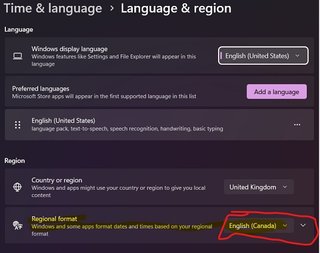
I just ran into this issue. I tried to edit my registry settings via regedit but no change with country 70+244. I kept 70 but then tried to verify the country settings actually in the control panel. Attached is a screenshot of what I found. The display language is different than the computer region and may make it confusing since this is shown by default in the lower Right side.
:: TO FIX ::
(I tried to upload my image but get image failed) -- Region Edit- hosted by postimg.jpg
Hello Tom,
Thank you for updating me with that information. What is your current Windows operating system and version? Press Windows key+R to open Run then type: winver
Press Enter
Please try this if it helps.
Open Registry Editor
Navigate to the path below
HKEY_CURRENT_USER\Control Panel\International\Geo
On the right side, double click Nation then type: 70 or 244
Click Ok
Restart your computer
Kind regards,
John DeV
Independent Advisor