Share via

Epson printer will not print since last Windows 11 update, any ideas how to sort this?

Anonymous
2024-02-18T12:31:47+00:00

Since updating Windows 11 on my laptop, my Epson printer will not print, but laptop can find printer. Documents print from my mobile so I know it is not the printer. Drivers up to date on printer; no pending Windows updates.

Windows for home | Windows 11 | Devices and drivers

Locked Question. This question was migrated from the Microsoft Support Community. You can vote on whether it's helpful, but you can't add comments or replies or follow the question.

0 comments No comments

56 answers

Sort by: Most helpful
  1. Anonymous
    2024-05-25T09:49:21+00:00

    My Epson ET-2750 started printing garbage from Windows 11 Pro. Works perfectly from my Linux Ubuntu machine. It was working from Windows 11 so some update must have corrupted the printer driver. Not happy Microsoft. Reminds me of the early days Linux where you had to buy a driver for your printer.

    6 people found this answer helpful.
    0 comments No comments
  2. Anonymous
    2024-05-05T04:39:28+00:00

    Here's what works for me when windows refused to recognise an Epson XP-700 on an ethernet network.

    1. Download and install latest driver on your PC from the Epson website.
    2. Go to Windows Settings on your PC, select "Bluetooth & devices"followed by Printers & scanners
      Click on the "Add device" button in the top right-hand corner of the window. For me, the XP-700 was now on the list of options. Select, install, and everything works for me.
      Best of luck everyone

    PS:. The reason I raised it here is because a fortnight ago everything worked fine. The only thing that's changed since then which may be stopping the printer being recognised by the PC is another bloody Windows update which fiddles with my settings.

    6 people found this answer helpful.
    0 comments No comments
  3. Anonymous
    2024-08-11T18:12:56+00:00

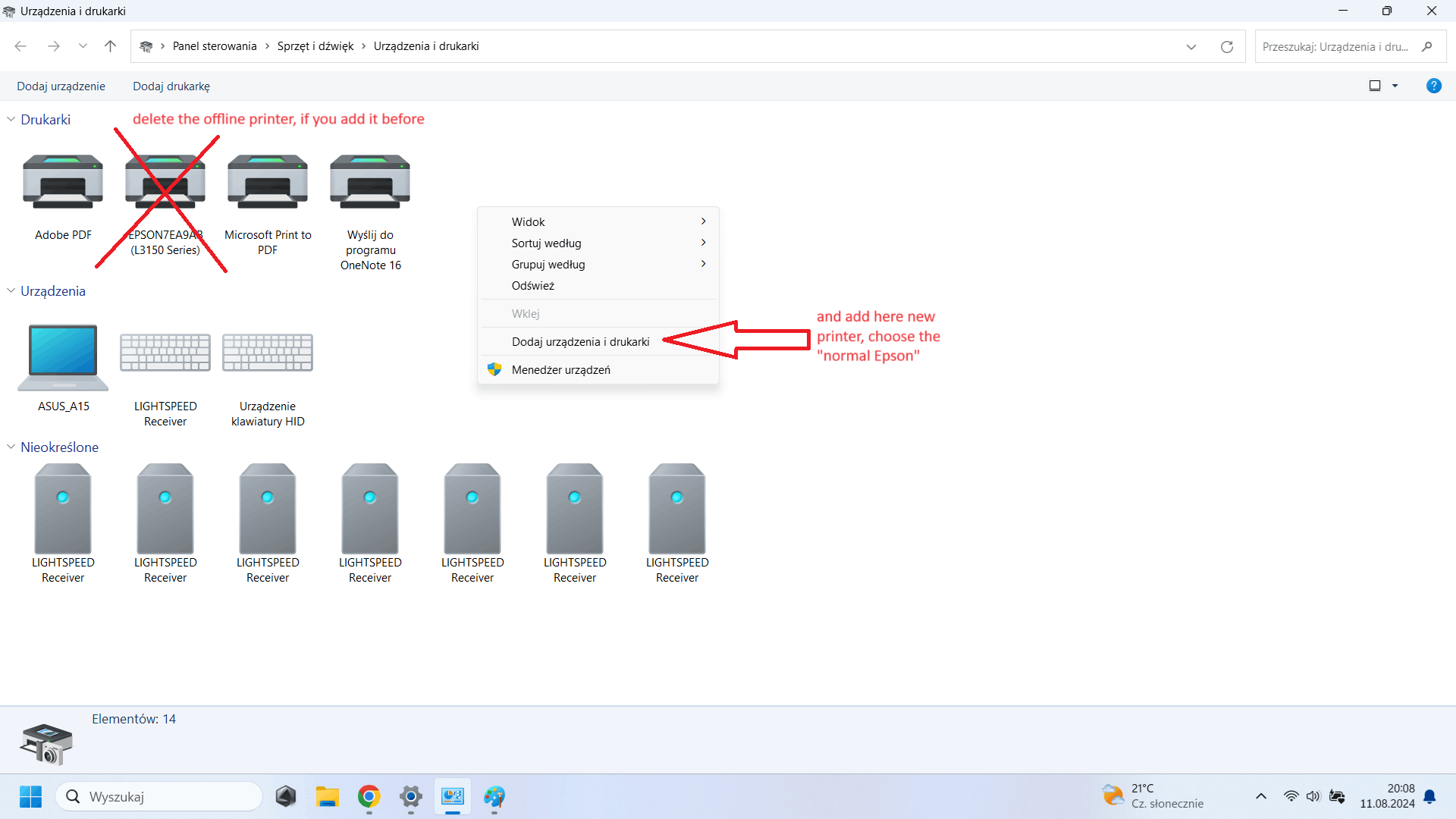
    I did it! I thought I was going to lose my mind. I tried installing the EPSON driver multiple times on Windows 11 with no success. On a laptop with Windows 10, I uninstalled the driver and decided to reinstall it there. I noticed that the MAC address and IP address of the printer are displayed normally, the installation completes successfully, and everything works fine. However, on Windows 11, the MAC address appears, but the IP address does not. Knowing the IP address (the one that appears during installation on Windows 10 or can be obtained by printing the data directly from the printer), I tried to connect manually in the EPSON installer. And it worked—I added the printer, but it was still offline.

    AND NOW THE METHOD THAT WORKED: Control Panel --> Hardware and Sound --> Devices and Printers --> View more devices (in blue text at the top) --> More device and printer settings --> I removed the previously added Epson (offline) and right-clicked to add devices and printers --> searched for available network devices --> selected Epson (but the normal one, not Direct) and success—everything works, both printing and scanning.

    Maybe this solution will help someone else too. It’s very strange that other methods of adding the printer, especially during driver installation, don’t work.
    I'm sorry for the Polish language of the interface, but that's the point.
    5 people found this answer helpful.
    0 comments No comments
  4. Anonymous
    2024-07-13T10:16:09+00:00

    Same. I have Windows 11 Pro installed (fully up to date) and an Epson Stylus Photo P50.

    If my PC is on and I turn the printer on. Windows tells me it is idle. If I then try to print I get an error in Windows and no print.

    If I then reboot the PC (leaving the printer on). Once I log back in the printer will start printing the document.

    The only solution I have found is to turn on the printer BEFORE turning on the PC. Then the printer works.

    This is a recent occurrence though. It used to work that I could turn on the printer after the Windows was up and running and just print stuff. :(

    3 people found this answer helpful.
    0 comments No comments
  5. Anonymous
    2024-07-05T18:59:02+00:00

    I have an Epson ET-4760 - I have done everything in this entire thread - twice - and the printer still won't print although it still works with my old Windows 10 laptop just fine. Please advise which windows update is related to printer so I can uninstall it.

    3 people found this answer helpful.
    0 comments No comments
