Hi, Nick_IB
Welcome to the Microsoft Community
Thanks for your feedback. I read the information you provided. You mentioned that you wanted to install some legacy Windows components, but you couldn't find DirectPlay in Windows Features.
I noticed that you have tried many methods, but none of them solved the problem, which is really frustrating.
We have tested your problem and can install the DirectPlay component on our computer. This component is at the bottom of Windows Features. Please check again to see if you missed it.
Another method you can try is to install DirectPlay through the command line. The steps are as follows.
Press Win + X, select "Terminal (Admin)"
Type the following command and press Enter:
dism /online /enable-feature /featurename:DirectPlay /all
Wait for the command to complete, then restart the computer.
I hope this information is helpful. If you have any questions, please let me know and I will be happy to help you further.
Best regards
Brian - Microsoft Community Support Specialist
Hey Thanks for your reply
I tried many things but nothing is working.
stuff i tested:
1------------------------------------------------------------------------
Commad:"dism /online /enable-feature /featurename:DirectPlay /all"
Error I got:
"Deployment Image Servicing and Management tool
Version: 10.0.19041.3636
Image Version: 10.0.19045.4412
Error: 0x800f080c
Feature name DirectPlay is unknown.
A Windows feature name was not recognized.
Use the /Get-Features option to find the name of the feature in the image and try the command again.
The DISM log file can be found at C:\Windows\Logs\DISM\dism.log"
2----------------------------------------------------------------------
Command:"dism /online /enable-feature /featurename:LegacyComponents /all"
Error:"same error as the above"
3-----------------------------------------------------------------------
Command:"dism /online /get-features /format:table"
Searched through the table and didn't find anything related to legacy or direct play
4-----------------------------------------------------------------------
Commands:
sfc /scannow
DISM /Online /Cleanup-Image /CheckHealth
DISM /Online /Cleanup-Image /ScanHealth
DISM /Online /Cleanup-Image /RestoreHealth
and still no corruption of any file found
and restarted my pc to check in the windows features, it still not showing:
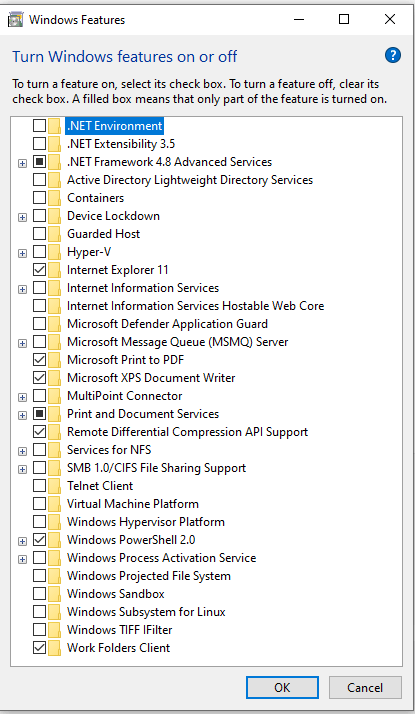
I'm confused, why nothing is working :(
' cx='32' cy='32' r='32' /%3E%3Ctext x='50%25' y='55%25' dominant-baseline='middle' text-anchor='middle' fill='%23FFF' %3EA%3C/text%3E%3C/svg%3E)
