Hi Samuel PETRYK,
Thank you for getting back to us.
Current, SSDs (such as the SK Hynix Platinum P41 you mentioned) typically do not use additional cables.
It makes direct contact with the motherboard in the form of contacts and uses screws and studs on the motherboard to secure its position.
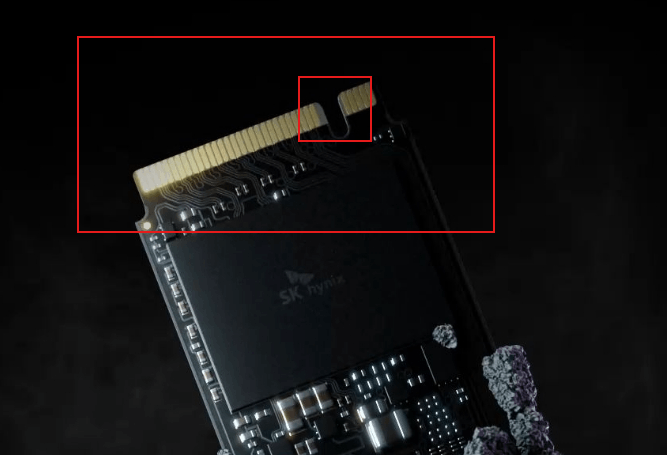
- I'll use the official image of the product as an example, and the highlighted part of the image is the part of the SSD that connects directly to the motherboard. Please note that while the motherboard may have an M.2 connector, there are multiple implementations of the M.2 connector itself, and the different implementations are slightly different, with the main difference being the location of the "notch". You will need to visit the motherboard manufacturer's official website for detailed interface specifications and supported protocol types.
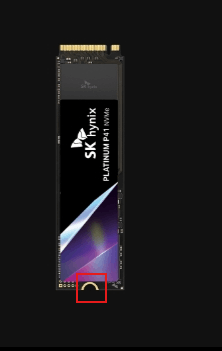
- The side opposite to this contact is where the screws are placed and secured to the motherboard. (Red highlighted area)
Please note that before you buy any new component, it is important to visit the official website of the motherboard's manufacturer for details of its specifications.
Some components can be downgraded for use, but some cannot.
For example, a PCIe NVMe Gen4 based SSD will run on a motherboard that supports PCIe Gen3 at maximum, but will not be able to approach the nominal rate. (Because the rate is based on the PCIe Gen4 standard)
Disclaimer: Microsoft provides no assurances and/or warranties, implied or otherwise, and is not responsible for the information you receive from the third-party linked sites or any support related to technology.
Thanks for your patience and understanding.
Best Regards,
Kyo.Y - MSFT | Microsoft Community Technical Support
' cx='32' cy='32' r='32' /%3E%3Ctext x='50%25' y='55%25' dominant-baseline='middle' text-anchor='middle' fill='%23FFF' %3EA%3C/text%3E%3C/svg%3E)
