I have 2 storage spaces, each contains four 4TB drives. After one of the Windows updates, their volumes stopped from being mounted.
- The Storage Spaces panel shows both storage spaces as green
- All of physical drives in each storage space are shown as healthy
- Volume drive letters appear in explorer, but their drive is not recognized (can't open it)
- Moving drives to a different enclosure doesn't change anything
I don't know which Windows update caused it, but it was in the last couple of months. If anybody ran into this, any information will be appreciated.
For Microsoft specifically. How can I get a hold of Microsoft Support? I have a lot of valuable data on those drives and would like to open a real support case.
Update 1
It appears that the file system type got erased from the metadata by one of the Windows updates.
> Get-Volume E

DriveLetter FriendlyName FileSystemType DriveType HealthStatus OperationalStatus SizeRemaining Size
E                        Unknown        Fixed     Healthy      Unknown                     0 B  0 B
Here's the virtual drive where the volume is located and it's healthy.
> Get-VirtualDisk -FriendlyName X

Access                            : Read/Write
AllocatedSize                     : 4257117896704
AllocationUnitSize                : 268435456
ColumnIsolation                   : PhysicalDisk
DetachedReason                    : None
FaultDomainAwareness              : PhysicalDisk
FootprintOnPool                   : 8514772664320
HealthStatus                      : Healthy
Interleave                        : 262144
IsManualAttach                    : False
IsTiered                          : False
LogicalSectorSize                 : 4096
MediaType                         : Unspecified
NumberOfColumns                   : 1
NumberOfDataCopies                : 2
NumberOfGroups                    : 1
OperationalStatus                 : OK
PhysicalDiskRedundancy            : 1
PhysicalSectorSize                : 4096
ProvisioningType                  : Thin
ReadCacheSize                     : 0
RequestNoSinglePointOfFailure     : False
ResiliencySettingName             : Mirror
Size                              : 7916698468352
UniqueIdFormat                    : Vendor Specific
Usage                             : Data
Any thoughts on how to set the file system type without destroying data?
Update 2
One more bit. R-Studio shows that the storage space disk/partition is marked as ReFS. So, appears that the issue is with the volume/partition.
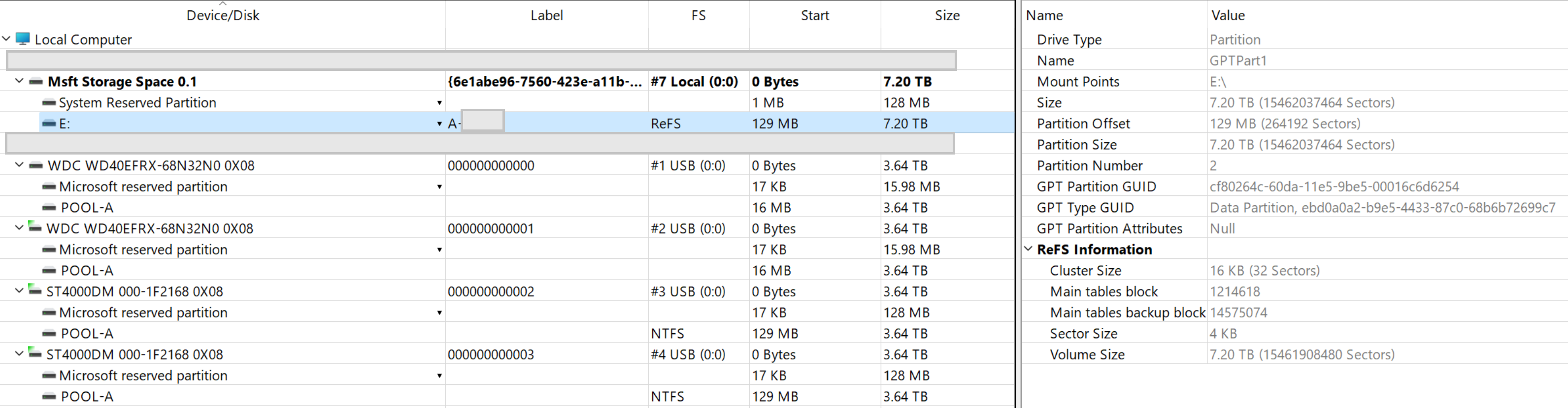
Update 3
I can see that file system type got lost after one the updates on volume E. Here's diskpart output for the broken storage space. In contrast, volume R, which was create much later than volume E, shows proper file system type.
DISKPART> list disk

  Disk ###  Status         Size     Free     Dyn  Gpt
  --------  -------------  -------  -------  ---  ---
* Disk 7    Online         7373 GB      0 B        *
  Disk 10   Online           10 GB      0 B        *

DISKPART> list partition

  Partition ###  Type              Size     Offset
  -------------  ----------------  -------  -------
  Partition 1    Reserved           128 MB  1024 KB
* Partition 2    Primary           7372 GB   129 MB

DISKPART> list volume

  Volume ###  Ltr  Label        Fs     Type        Size     Status     Info
  ----------  ---  -----------  -----  ----------  -------  ---------  --------
* Volume 4     E                RAW    Partition   7372 GB  Healthy
  Volume 5     R   REFS_SPACE   ReFS   Partition      9 GB  Healthy
So, somehow it is related to the file system type being dropped either in a Windows update or when the storage pool is being upgraded after a recent Windows update.
Update 4
It appears that this is a more common problem with Storage Spaces than I realized. This thread spans 2012-2014 and not much attention from Microsoft.
https://social.technet.microsoft.com/Forums/windows/en-US/09a9c78c-e2dc-441b-873a-79b0d3b8179d/healthy-storage-space-drive-not-accessable-shown-as-raw-in-disk-management?forum=w8itprogeneral
Somebody suggested in discussions that this may happen if disks are removed unsafely, which is not the case for me - both enclosures ae eSATA-attached and on a UPS, so they are never detached.
It appears that ReFS partition recovery tools is the only path here. Will report if it works for me.
' cx='32' cy='32' r='32' /%3E%3Ctext x='50%25' y='55%25' dominant-baseline='middle' text-anchor='middle' fill='%23FFF' %3EAM%3C/text%3E%3C/svg%3E)

' cx='32' cy='32' r='32' /%3E%3Ctext x='50%25' y='55%25' dominant-baseline='middle' text-anchor='middle' fill='%23FFF' %3EA%3C/text%3E%3C/svg%3E)