Developer technologies | Windows Presentation Foundation
A part of the .NET Framework that provides a unified programming model for building line-of-business desktop applications on Windows.
This browser is no longer supported.
Upgrade to Microsoft Edge to take advantage of the latest features, security updates, and technical support.
' cx='32' cy='32' r='32' /%3E%3Ctext x='50%25' y='55%25' dominant-baseline='middle' text-anchor='middle' fill='%23FFF' %3EM%3C/text%3E%3C/svg%3E)
I suspect that INotifyPropertyChanged is overkill for what I would like to achieve.
I need:
to display a list of strings in a ListBox (the 5th column in the attached picture that is not working yet)
to allow the user to edit each ListBox Item and set the status of the contained string (Accepted/Rejected) through the associated CheckBox
when the button "Confirm" is clicked, to get access to the ListBox Item strings and the associated Checkbox to save to a database the strings that have "Accepted" status
The ListBox (5th column) is defined as follows:
<ListBox x:Name="AutoStrucNames" Grid.Row="5" Grid.Column="100" Height="600" Margin="80,20,0,40" Width="160" SelectionMode="Single" HorizontalAlignment="Left" Grid.ColumnSpan="10" Background="PowderBlue"
DataContext="{Binding ElementName=main}" ItemsSource="{Binding AutoNames}" >
<ListBox.ItemTemplate>
<DataTemplate>
<StackPanel Orientation="Horizontal">
<CheckBox x:Name="CheckAccepted" Margin="3" VerticalAlignment="Center" IsChecked="{Binding IsChecked, Mode=TwoWay}" />
<TextBox Text="{Binding Value, UpdateSourceTrigger=PropertyChanged, Mode=TwoWay }"/>
</StackPanel>
</DataTemplate>
</ListBox.ItemTemplate>
</ListBox>
Questions:
Thank you in advance
maura.monville@Stuff .com
A part of the .NET Framework that provides a unified programming model for building line-of-business desktop applications on Windows.
An object-oriented and type-safe programming language that has its roots in the C family of languages and includes support for component-oriented programming.
' cx='32' cy='32' r='32' /%3E%3Ctext x='50%25' y='55%25' dominant-baseline='middle' text-anchor='middle' fill='%23FFF' %3EHL%3C/text%3E%3C/svg%3E)
Hi,@mauede .Could you add pictures that have not been added successfully for a more intuitive display?
When the Button "Confirm" is clicked I need to get all the strings in the TexBoxes, contained in the ListBox, whose associated Checkbox is checked (to me it means "Accepted").
Do you want to get the data of the checked item in the CheckBox in the ListBox by clicking the button?What is the purpose of obtaining the data?
Thank you.
The ListBox items must be editable.
The code behind does not have to receive any notification from the items being edited.
The application does not correct the user who enters a silly name. At least, so far this is not a requirement.
Yes. When the CONFIRM button is clicked the code has to get access to the names (strings) in the ListBox whose associated CheckBox has been checked.
The reason is that through CheckBox the user selects the names (strings) that will be saved to a database.
Thanks
Hi,@mauede . Is there any update to the question? Did my answer solve your problem? If so, you could accept it as the answer. It's helpful to community members with similar questions.
You could try to refer to the example below.
Table Code :
CREATE TABLE [dbo].[Table]
(
    [Id] INT NOT NULL PRIMARY KEY ,
    [Name] NCHAR(10) NULL
)
MainWindow.xaml:
<StackPanel>
        <ListBox  Name="list" Height="300"  Margin="4,4,4,4"  ItemsSource="{Binding Items}"  SelectionMode="Extended">
            <ListBox.ItemTemplate>
                <DataTemplate>
                    <StackPanel Orientation="Horizontal">
                        <CheckBox  Name="check"  Margin="3"   VerticalAlignment="Center" Click="CheckBox_Click"   IsChecked="{Binding IsChecked, Mode=TwoWay}" />
                        <TextBox x:Name="tb" BorderThickness="0" Text="{Binding Name}" />
                    </StackPanel>
                </DataTemplate>
            </ListBox.ItemTemplate>
        </ListBox>
        <Button  x:Name="btn" Content="Save" Click="btn_Click"/>
    </StackPanel>
MainWindow.xaml.cs:
using System.Windows;
using System.Windows.Controls;
using System.ComponentModel;
using System.Collections.ObjectModel;
using System.Data.SqlClient;

namespace ListBoxWithCheckBoxTemplateDemo
{
  public partial class MainWindow : Window
  {
    public MainWindow()
    {
      InitializeComponent();
      DataContext = new ViewModel();
    }
    private void CheckBox_Click(object sender, RoutedEventArgs e)
    {
      var cb = sender as CheckBox;
      var item = cb.DataContext;
      list.SelectedItem = item;
    }
    private void btn_Click(object sender, RoutedEventArgs e)
    {
      string constr = @"constr ";
      SqlConnection con = new SqlConnection(constr);
      con.Open();
      foreach (Data item in list.Items)
      {
        if (item.IsChecked == true)
        {
          string sqlinsert = "INSERT INTO [dbo].[Table]([Id],[Name])VALUES(@Id,@Name)";
          SqlCommand cmd = new SqlCommand(sqlinsert, con);
          cmd.Parameters.AddWithValue("@Name", item.Name);
          cmd.Parameters.AddWithValue("@Id", item.Id);
          SqlCommand cmdCount = new SqlCommand("SELECT count(*) from [dbo].[Table] WHERE Id = @Id", con);
          cmdCount.Parameters.AddWithValue("@Id", item.Id);
          int count = (int)cmdCount.ExecuteScalar();
          if (count == 0)
          {
            cmd.ExecuteNonQuery();
            MessageBox.Show("item saved");
          }
          else
          {
            MessageBox.Show("item exists");
          }
        }
      }
      con.Close();
    }
  }
  public class ViewModel : INotifyPropertyChanged
  {
    public ViewModel()
    {
      Items = new ObservableCollection<Data>();
      Items.Add(new Data() { Id= 1, Name = "Beijing", IsChecked = false });
      Items.Add(new Data() { Id = 2, Name = "Shanghai", IsChecked = false });
      Items.Add(new Data() { Id = 3, Name = "Guangdong", IsChecked = true });
      Items.Add(new Data() { Id = 4, Name = "Beijing", IsChecked = true });
    }
    private ObservableCollection<Data> _items;
    public ObservableCollection<Data> Items
    {
      get => _items;
      set
      {
        _items = value;
        OnPropertyChanged(nameof(Items));
      }
    }
    public event PropertyChangedEventHandler PropertyChanged;
    protected virtual void OnPropertyChanged(string propertyName)
    {
      PropertyChanged?.Invoke(this, new PropertyChangedEventArgs(propertyName));
    }
  }
  public class Data
  {
    public int Id { get;set;}
    public string Name { get; set; }
    public bool IsChecked { get; set; }
    public override string ToString() => Name;
  }
}
The result:
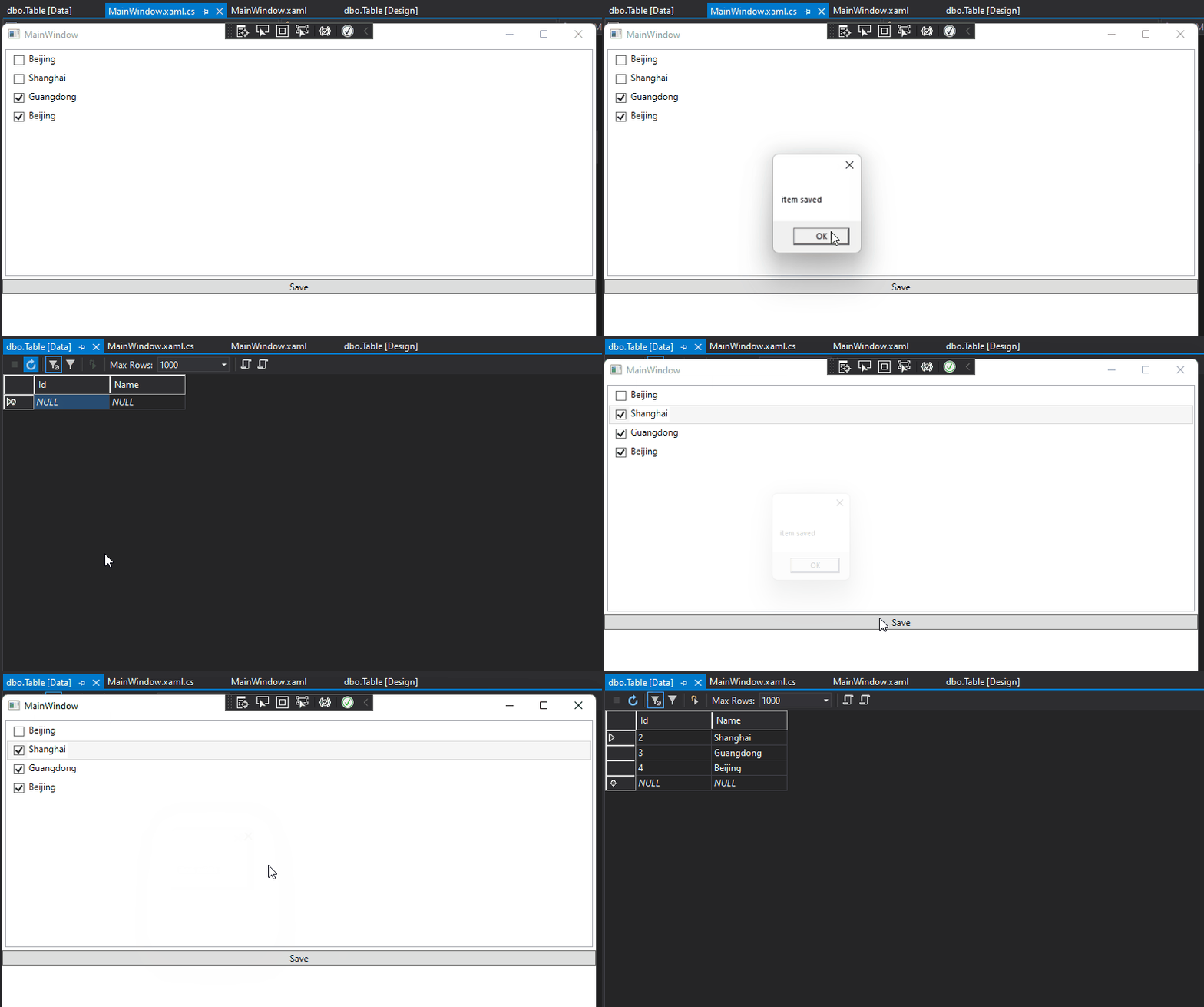
If the response is helpful, please click "Accept Answer" and upvote it.
Note: Please follow the steps in our [documentation][5] to enable e-mail notifications if you want to receive the related email notification for this thread.
[5]: https://learn.microsoft.com/en-us/answers/articles/67444/email-notifications.html

To start off, the following code is meant to be to learn from, not to match your current requirements. I use a database but the code can work without a database. So with that you may or may not want to continue, it's your choice.
At the moment nothing is displayed in the ListBox maybe because it is filled with TextBoxes.
<ListBox x:Name="AutoStrucNames" Grid.Row="5" Grid.Column="100" Height="600" Margin="80,20,0,40" Width="160" SelectionMode="Single" HorizontalAlignment="Left" Grid.ColumnSpan="10" Background="PowderBlue"
DataContext="{Binding ElementName=main}" ItemsSource="{Binding AutoNames}" >
<ListBox.ItemTemplate>
<DataTemplate>
<StackPanel Orientation="Horizontal">
<CheckBox x:Name="CheckAccepted" Margin="3" VerticalAlignment="Center" IsChecked="{Binding IsChecked, Mode=TwoWay}" />
<TextBox Text="{Binding AutoNames, UpdateSourceTrigger=PropertyChanged, Mode=TwoWay }"/>
</StackPanel>
</DataTemplate>
</ListBox.ItemTemplate>
</ListBox>
The strings that I have to display are in List <string> AutoNames.
I just try to display as follows:
AutoStrucNames.ItemsSource = (System.Collections.IEnumerable)AutoNames;
I see only the ListBox with many empty strings with a CheckBox . I feel frustrated.
You need to implement INotifyPropertyChanged if you want to subscribe to notifications that a property has changed. If you don't need to you don't have to implement this interface.
In the case of <TextBox Text="{Binding Value, UpdateSourceTrigger=PropertyChanged, Mode=TwoWay }"/> you don't need to implement INotifyPropertyChanged. It's easy to figure out, take the property and remove notifications, run the code and inspect edited items.
Thank you.
When the Button "Confirm" is clicked I need to get all the strings in the TexBoxes, contained in the ListBox, whose associated Checkbox is checked (to me it means "Accepted").
Can you please show an example of how to access the strings inside the TextBoxes contained in the ListBox as the action triggered by clicking a Button external to the ListBox rather than selecting or editing any ListBox Item?
Thank you so much.
maura.monville@Stuff .com
Once I'm done with some work I'm doing at work will have a GitHub sample as it's better to get from there then posting code here.