
Thank You!
You have helped me alot
This browser is no longer supported.
Upgrade to Microsoft Edge to take advantage of the latest features, security updates, and technical support.
' cx='32' cy='32' r='32' /%3E%3Ctext x='50%25' y='55%25' dominant-baseline='middle' text-anchor='middle' fill='%23FFF' %3EA%3C/text%3E%3C/svg%3E)
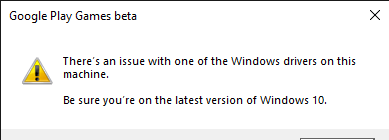
fter updating my windows following error is coming "There's an issue with one of the windows drivers on this machine Be sure you are no the latest version of windows 10". Even though I have update my graphics driver still this error is coming.I am administrator of my pc and I have also tried running it as administrator and reinstalling it from official site. I have tested all the driver all are working fine
Locked Question. This question was migrated from the Microsoft Support Community. You can vote on whether it's helpful, but you can't add comments or replies or follow the question.
Thank You!
You have helped me alot
' cx='32' cy='32' r='32' /%3E%3Ctext x='50%25' y='55%25' dominant-baseline='middle' text-anchor='middle' fill='%23FFF' %3ESC%3C/text%3E%3C/svg%3E)
Hello there! I am Charity, I'm an Independent Advisor. I'm glad to help you today!
My apologies about that. Is your Windows 10 up to date? I see that you have updated the other drivers, but is the operating system itself is up to date?
Press Win + I to open Settings.
Go to Update & Security > Windows Update.
Click Check for updates and install any available updates.
I would also suggest to check your system files if it has errors.
First, open Command Prompt as an administrator by right-clicking the Start button and selecting "Command Prompt (Admin)." In the Command Prompt window, type sfc /scannow and press Enter. Wait for the scan to complete; this process might take some time, and the tool will automatically attempt to fix any detected issues. Once the scan is finished, restart your computer.
Next, open Command Prompt as an administrator again. In the Command Prompt window, type DISM /Online /Cleanup-Image /RestoreHealth and press Enter. Wait for the process to complete, as it might also take some time to repair the Windows image. Once the DISM process is complete, restart your computer.
Please do let me know if this worked for you.
Kind Regards,
Charity
The issue had been solved but new issue arrived
I am unable to Start button and other trays on taskbar but I am able to use apps pinned to task bar
What I should I do now?