Developer technologies | Transact-SQL
A Microsoft extension to the ANSI SQL language that includes procedural programming, local variables, and various support functions.
This browser is no longer supported.
Upgrade to Microsoft Edge to take advantage of the latest features, security updates, and technical support.
' cx='32' cy='32' r='32' /%3E%3Ctext x='50%25' y='55%25' dominant-baseline='middle' text-anchor='middle' fill='%23FFF' %3ESR%3C/text%3E%3C/svg%3E)
Hi Expert,
How to define business key in sql server example
col 11 bit(datatype) - business key as If 0 then No 1 then yes
A Microsoft extension to the ANSI SQL language that includes procedural programming, local variables, and various support functions.
Additional SQL Server features and topics not covered by specific categories

Sorry, but for me it is not clear what you mean here with "business key"?
May can you explain it more detailed, please?

Same here... totally not clear
Please provide queries to create your table(s) + insert some sample data
According to the sample data, please explain what is your expected result set
Answer accepted by question author
' cx='32' cy='32' r='32' /%3E%3Ctext x='50%25' y='55%25' dominant-baseline='middle' text-anchor='middle' fill='%23FFF' %3EBZ%3C/text%3E%3C/svg%3E)
Hi,@Shambhu Rai
Welcome to Microsoft T-SQL Q&A Forum!
Step1: You should understand the concept of business key.
You can think of a business key as an index that identifies the uniqueness of rows based on business rules based on columns that naturally exist in the table.
For example, a business key is the combination of the customer code in the customer table, the sales order header number, and the sales order item line number in the sales order detail table.
Now we often use surrogate keys instead of business keys, which are usually large integers with an automatically generated identity seed to effectively associate fact tables with dimensions.
Step2: Why use business keys
Because inserting a new row with the same business key value as an existing row is not allowed after setting the business key.
When we want to set the primary key, we find that although there is a column that retains the unique value of the entire table, it contains all the records that do not match the table. At this time, we need to add a new column as the business key.
Step3: How can we implement Surrogate Key?
A Surrogate Key can be implemented by an auto-incremented key. SQL Server supports an IDENTITY column to perform the auto-increment feature. It allows a unique number to be generated when a new record is inserted into the database table.
You can try this:
CREATE TABLE [dbo].[EmployeeMaster](
[EmployeeId] [int]IDENTITY(1,1) NOT NULL,
[EmployeeCode] [varchar](25) NULL,
[EmployeeName] [varchar](50) NULL,
[EmailAddress] [varchar](50) NULL,
)
--Syntax for Introducing Auto identity column with Create Table.
ALTER TABLE EmployeeMasterADD ID INT IDENTITY(1,1)
I put a picture here, please take a look at this picture.
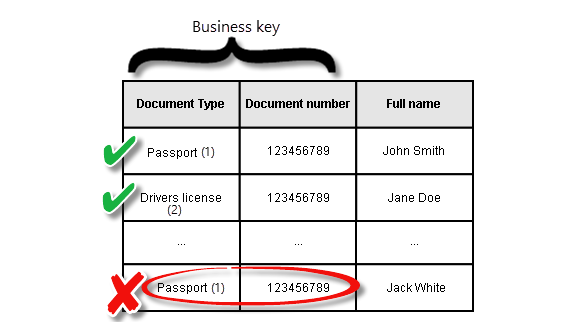
The following is a related link about business keys, I hope you can understand it better after seeing it.
Best regards,
Bert Zhou
If the answer is the right solution, please click "Accept Answer" and kindly upvote it. If you have extra questions about this answer, please click "Comment".
Note: Please follow the steps in our Documentation to enable e-mail notifications if you want to receive the related email notification for this thread.