Hello, so I recently moved addresses and I took my PC with me. I had an external hard drive from Seagate that I used to store mostly game files (a lot of other ones too though). While I was unplugging and taking everything apart to store it for the move, I accidentally unplugged the hard drive before ejecting it from the computer safely. When I got everything set back up, I realized the drive wasn't appearing like it usually does. I know that unplugging a hard drive before ejecting can be troublesome, so I started troubleshooting and looking up what I could do to fix it. I have now tried everything I could possibly do to get the hard drive working. I have
- Restarted my PC, with and without the hard drive or any of the other USB ports I am using for other devices. Plus I tried plugging in the hard drive before and after restart.
- Updated every applicable driver and tried to see if windows needed to update. It did not.
- Changed USB ports, and use different cables.
- Check to make sure every drive and port powers are on.
One thing I have not been able to do is plug it into a different device to see if it works there. I do not have any other available devices.
Now starting at square one, I know that sometimes external hard drives need to be formatted. So I followed some troubleshooting to try and see if I could possibly do that. However, when I opened my disk management, I could not see my hard drive, unallocated space, or any sort of partition indicating that my computer was recognizing another hard drive as indicated in this screen capture.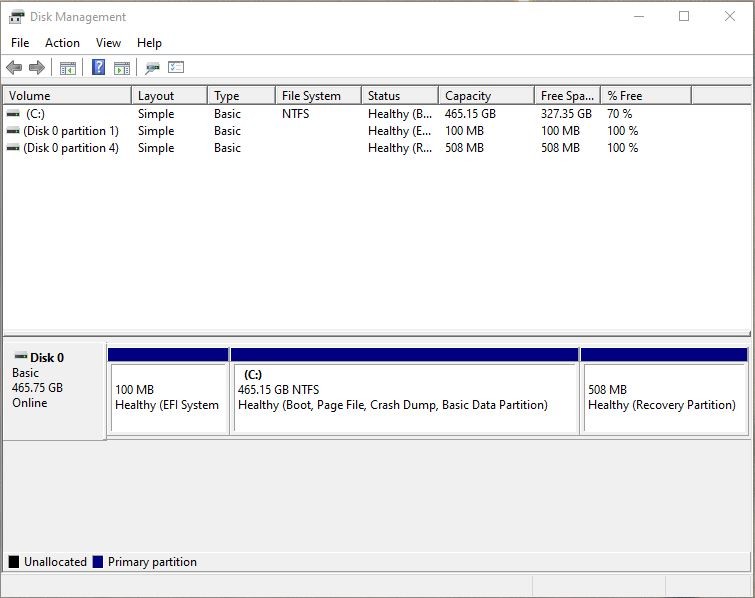
I tried to follow some guides to figure out why I couldn't see it in the disk management, but all of the guides were explaining what happens when the PC as a whole cannot identify the hard drive. So I tried looking into my devices and it was showing up! Circled in blue, the external hard drive was being detected by my PC. I will also say that every time connected or disconnected the drive, the noise indications let me know that it was being detected or not. So my problem is not that my PC can't connect to the drive, but that it just won't recognize that it is supposed to be apart of the drives.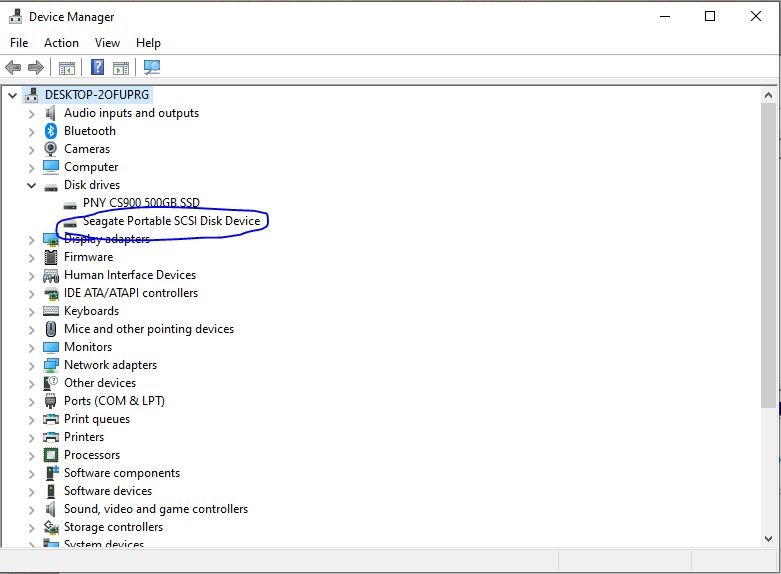
So again, I went through troubleshooting guides to see what was happening, but most of the information was largely unhelpful. One thing I was recommended to do was to populate the drive in its properties under volumes. When I try to do that it pops up with an error message in this screen cap.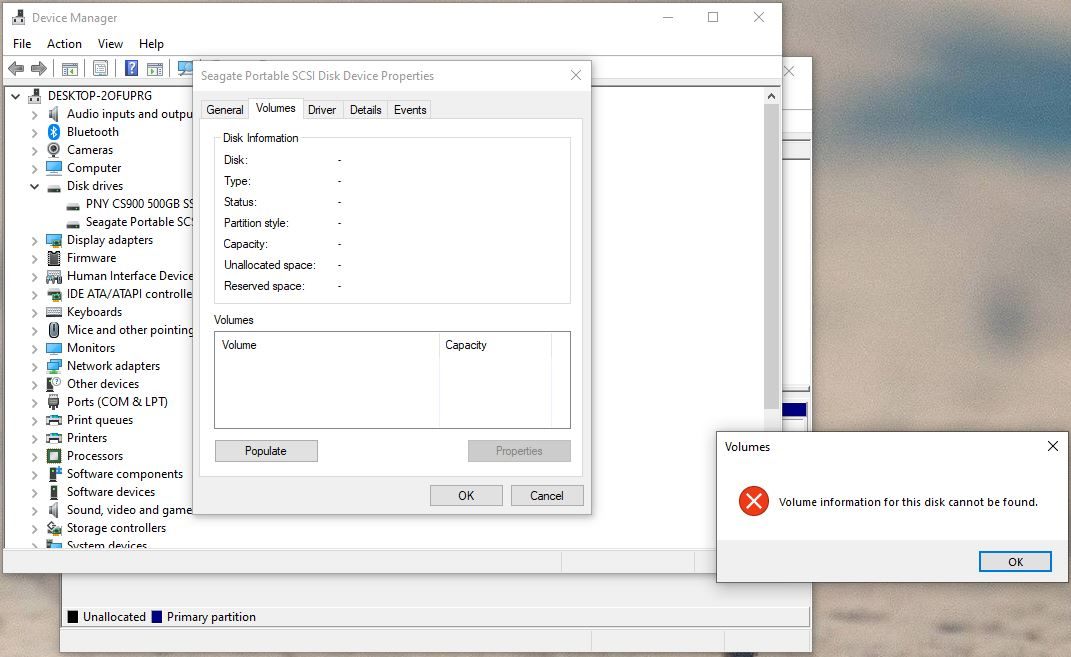
I will also say, sometimes the drive does just seem to disconnect randomly and I won't be able to find it again in the devices section, but disconnecting and reconnecting it seems to make it show up again every time. Also I will occasionally see the unallocated space pop up in the disk management for a split second but before I can try to initialize or do anything with it, it disappears.
So that is where I am at with it.
At this point, I don't really care if I lose all the files in the hard drive as I have most of it backed up in the cloud. I also tried to hard restart the drive, but to do so I need to do that in the disk management and as it won't show up, I can't reset it either.
I just want to be able to use the hard drive again and avoid having to spend money to buy another one.
Thank you in advance for any help offered.
' cx='32' cy='32' r='32' /%3E%3Ctext x='50%25' y='55%25' dominant-baseline='middle' text-anchor='middle' fill='%23FFF' %3EA%3C/text%3E%3C/svg%3E)

' cx='32' cy='32' r='32' /%3E%3Ctext x='50%25' y='55%25' dominant-baseline='middle' text-anchor='middle' fill='%23FFF' %3EQH%3C/text%3E%3C/svg%3E)