- Tuneup plus results were good.
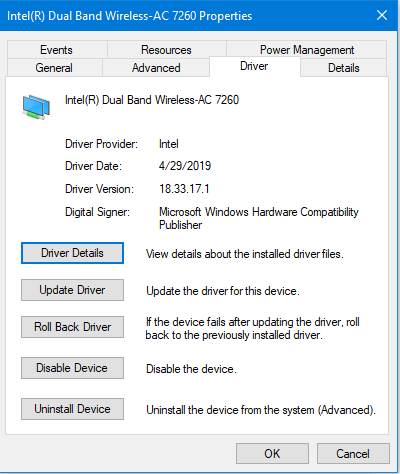
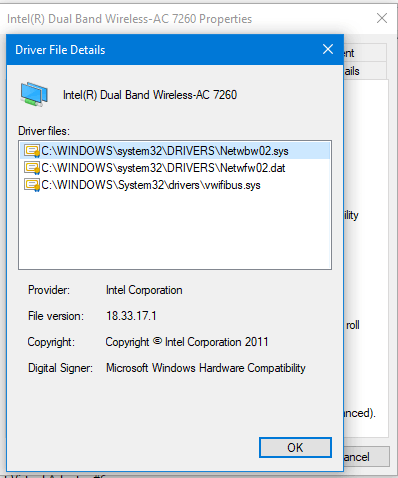
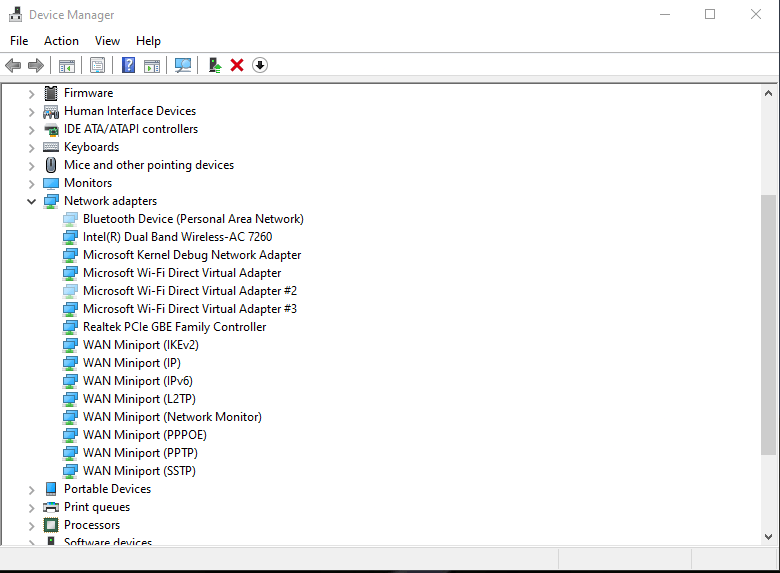
I did remove and installed the wifi driver again but the problem wasn't resolved. I also tried another version from Intel website but the WIFI keeps disconnecting or when I update the driver Windows goes back to the 4/29/2019 version. What should I do to stop the random disconnecting?
Here's the Disk Partition:
Disk 0 : SSD. It has 4 partition(s). Model: SAMSUNG MZHPV256HDGL-00000

Disk 1 : HDD. It has 1 partition(s). Model: HGST HTS721010A9E630

The script has found the above 2 storage device(s) in total.
=======================================================================
Microsoft DiskPart version 10.0.19041.3636
Copyright (C) Microsoft Corporation.
On computer: DESKTOP-S4KCVPD
Disk ### Status Size Free Dyn Gpt
Disk 0 Online 238 GB 1024 KB *
Disk 1 Online 931 GB 0 B *
Volume ### Ltr Label Fs Type Size Status Info
Volume 0 E DVD-ROM 0 B No Media
Volume 1 C NTFS Partition 237 GB Healthy Boot
Volume 2 FAT32 Partition 100 MB Healthy System
Volume 3 NTFS Partition 499 MB Healthy Hidden
Volume 4 G New Volume NTFS Partition 931 GB Healthy
Disk 0 is now the selected disk.
SAMSUNG MZHPV256HDGL-00000
Disk ID: {E2551269-E808-47B3-9DBE-920E32DB0426}
Type : SATA
Status : Online
Path : 0
Target : 0
LUN ID : 0
Location Path : PCIROOT(0)#PCI(1C04)#PCI(0000)#ATA(C00T00L00)
Current Read-only State : No
Read-only : No
Boot Disk : Yes
Pagefile Disk : Yes
Hibernation File Disk : No
Crashdump Disk : Yes
Clustered Disk : No
Volume ### Ltr Label Fs Type Size Status Info
Volume 1 C NTFS Partition 237 GB Healthy Boot
Volume 2 FAT32 Partition 100 MB Healthy System
Volume 3 NTFS Partition 499 MB Healthy Hidden
Partition ### Type Size Offset
Partition 1 System 100 MB 1024 KB
Partition 2 Reserved 16 MB 101 MB
Partition 3 Primary 237 GB 117 MB
Partition 4 Recovery 499 MB 237 GB
Partition 1 is now the selected partition.
Partition 1
Type : c12a7328-f81f-11d2-ba4b-00a0c93ec93b
Hidden : Yes
Required: No
Attrib : 0X8000000000000000
Offset in Bytes: 1048576
Volume ### Ltr Label Fs Type Size Status Info
* Volume 2 FAT32 Partition 100 MB Healthy System
Partition 2 is now the selected partition.
Partition 2
Type : e3c9e316-0b5c-4db8-817d-f92df00215ae
Hidden : Yes
Required: No
Attrib : 0X8000000000000000
Offset in Bytes: 105906176
There is no volume associated with this partition.
Partition 3 is now the selected partition.
Partition 3
Type : ebd0a0a2-b9e5-4433-87c0-68b6b72699c7
Hidden : No
Required: No
Attrib : 0000000000000000
Offset in Bytes: 122683392
Volume ### Ltr Label Fs Type Size Status Info
* Volume 1 C NTFS Partition 237 GB Healthy Boot
Partition 4 is now the selected partition.
Partition 4
Type : de94bba4-06d1-4d40-a16a-bfd50179d6ac
Hidden : Yes
Required: Yes
Attrib : 0X8000000000000001
Offset in Bytes: 255535874048
Volume ### Ltr Label Fs Type Size Status Info
* Volume 3 NTFS Partition 499 MB Healthy Hidden
Disk 1 is now the selected disk.
HGST HTS721010A9E630
Disk ID: {BC358F03-BBE1-4B62-BE2E-E9498062ABA1}
Type : SATA
Status : Online
Path : 3
Target : 0
LUN ID : 0
Location Path : PCIROOT(0)#PCI(1F02)#ATA(C03T00L00)
Current Read-only State : No
Read-only : No
Boot Disk : No
Pagefile Disk : No
Hibernation File Disk : No
Crashdump Disk : No
Clustered Disk : No
Volume ### Ltr Label Fs Type Size Status Info
Volume 4 G New Volume NTFS Partition 931 GB Healthy
Partition ### Type Size Offset
Partition 1 Primary 931 GB 1024 KB
Partition 1 is now the selected partition.
Partition 1
Type : ebd0a0a2-b9e5-4433-87c0-68b6b72699c7
Hidden : No
Required: No
Attrib : 0000000000000000
Offset in Bytes: 1048576
Volume ### Ltr Label Fs Type Size Status Info
* Volume 4 G New Volume NTFS Partition 931 GB Healthy
===============================================================================
Windows Recovery Environment (Windows RE) and system reset configuration
Information:
Windows RE status:         Enabled

Windows RE location:       \\?\GLOBALROOT\device\harddisk0\partition4\Recovery\WindowsRE

Boot Configuration Data (BCD) identifier: 9b3040fd-18be-11ea-8599-dec38b5e9b88

Recovery image location:

Recovery image index:      0

Custom image location:

Custom image index:        0
REAGENTC.EXE: Operation Successful.
===============================================================================
Firmware Boot Manager
identifier {fwbootmgr}
displayorder {bootmgr}
                    {e79e97ef-4df4-11ef-aa3d-806e6f6e6963}

                    {e79e97f0-4df4-11ef-aa3d-806e6f6e6963}

                    {e79e97f1-4df4-11ef-aa3d-806e6f6e6963}
timeout 0
Windows Boot Manager
identifier {bootmgr}
device partition=\Device\HarddiskVolume1
path \EFI\Microsoft\Boot\bootmgfw.efi
description Windows Boot Manager
locale en-US
inherit {globalsettings}
default {current}
resumeobject {fcd6d93a-39d5-11ef-960e-bedc13159c18}
displayorder {current}
toolsdisplayorder {memdiag}
timeout 30
Firmware Application (101fffff)
identifier {e79e97ef-4df4-11ef-aa3d-806e6f6e6963}
description UEFI:CD/DVD Drive
Firmware Application (101fffff)
identifier {e79e97f0-4df4-11ef-aa3d-806e6f6e6963}
description UEFI:Removable Device
Firmware Application (101fffff)
identifier {e79e97f1-4df4-11ef-aa3d-806e6f6e6963}
description UEFI:Network Device
Windows Boot Loader
identifier {9b3040fd-18be-11ea-8599-dec38b5e9b88}
device ramdisk=[\Device\HarddiskVolume4]\Recovery\WindowsRE\Winre.wim,{9b3040fe-18be-11ea-8599-dec38b5e9b88}
path \windows\system32\winload.efi
description Windows Recovery Environment
locale en-us
inherit {bootloadersettings}
displaymessage Recovery
osdevice ramdisk=[\Device\HarddiskVolume4]\Recovery\WindowsRE\Winre.wim,{9b3040fe-18be-11ea-8599-dec38b5e9b88}
systemroot \windows
nx OptIn
bootmenupolicy Standard
winpe Yes
Windows Boot Loader
identifier {current}
device partition=C:
path \WINDOWS\system32\winload.efi
description Windows 10
locale en-US
inherit {bootloadersettings}
recoverysequence {9b3040fd-18be-11ea-8599-dec38b5e9b88}
displaymessageoverride Recovery
recoveryenabled Yes
isolatedcontext Yes
allowedinmemorysettings 0x15000075
osdevice partition=C:
systemroot \WINDOWS
resumeobject {fcd6d93a-39d5-11ef-960e-bedc13159c18}
nx OptOut
bootmenupolicy Standard
Resume from Hibernate
identifier {fcd6d93a-39d5-11ef-960e-bedc13159c18}
device partition=C:
path \WINDOWS\system32\winresume.efi
description Windows Resume Application
locale en-US
inherit {resumeloadersettings}
recoverysequence {9b3040fd-18be-11ea-8599-dec38b5e9b88}
recoveryenabled Yes
isolatedcontext Yes
allowedinmemorysettings 0x15000075
filedevice partition=C:
filepath \hiberfil.sys
bootmenupolicy Standard
debugoptionenabled No
Windows Memory Tester
identifier {memdiag}
device partition=\Device\HarddiskVolume1
path \EFI\Microsoft\Boot\memtest.efi
description Windows Memory Diagnostic
locale en-US
inherit {globalsettings}
badmemoryaccess Yes
EMS Settings
identifier {emssettings}
bootems No
Debugger Settings
identifier {dbgsettings}
debugtype Local
RAM Defects
identifier {badmemory}
Global Settings
identifier {globalsettings}
inherit {dbgsettings}
                    {emssettings}

                    {badmemory}
Boot Loader Settings
identifier {bootloadersettings}
inherit {globalsettings}
{hypervisorsettings}
Hypervisor Settings
identifier {hypervisorsettings}
hypervisordebugtype Serial
hypervisordebugport 1
hypervisorbaudrate 115200
Resume Loader Settings
identifier {resumeloadersettings}
inherit {globalsettings}
Device options
identifier {9b3040fe-18be-11ea-8599-dec38b5e9b88}
description Windows Recovery
ramdisksdidevice partition=\Device\HarddiskVolume4
ramdisksdipath \Recovery\WindowsRE\boot.sdi
' cx='32' cy='32' r='32' /%3E%3Ctext x='50%25' y='55%25' dominant-baseline='middle' text-anchor='middle' fill='%23FFF' %3EA%3C/text%3E%3C/svg%3E)
