Share via

Paintshop Pro 8 suddenly will not run

Anonymous
2024-08-06T16:05:07+00:00

PSP8 is a legacy version of PaintShop Pro, originally from JASC, now replaced by Corel versions. It's one of my most used apps and I've just spent two days trying to discover why it will no longer run. (Tried all methods: taskbar icon, direct from C:\Program Files (x86)\Jasc Software Inc\Paint Shop Pro 8\Paint Shop Pro.exe, opening an associated image file.)

I bought Corel PaintShop Pro 2018 about six years ago, but I'm so comfortable with PSP8 (and have written many scripts for it) that I've never seriously used the newer version.

Seeking a fix. I've studied many posts here and elsewhere. But none of the recommendations I've tried have worked so far. Possibly because I've not implemented the more complex ones carefully enough. I'm about to repeat some methodically, while still searching.

One likely cause is a Windows 10 update, possibly an update to my graphics driver Intel HD Graphics 530, but that's little more than a guess. Nevertheless I uninstalled the most recnt one, KB5041168, but no change.

Here is info that gets added to Event Viewer > Event Viewer (Local) > Custom Views > Administrative Events, when I click the PSP8 taskbar icon (which flashes the hour glass, then nothing). First ID 1000 then 1005 with same timestamp.

Any and all advice would be much appreciated.

Windows for home | Windows 10 | Files, folders, and storage

Locked Question. This question was migrated from the Microsoft Support Community. You can vote on whether it's helpful, but you can't add comments or replies or follow the question.

0 comments No comments

13 answers

Sort by: Most helpful
  1. Anonymous
    2024-08-08T15:30:36+00:00

    Thanks for your patient help.

    Although I hate unsolved puzzles, I decided half an hour ago that enough was enough. I've just re-installed PSP8 from scratch using the original 2003 DVD from JASC. It runs. Now beginning the tedious tasks of restoring settings, file locations, associations, etc. And - hardest - the score of macros I'd written over decades using Macro Express Pro.

    1 person found this answer helpful.
    0 comments No comments
  2. Anonymous
    2024-08-08T11:01:39+00:00

    Thanks, yes, I did register them. If you could upload a copy of your 1.38 MB version please, I'll try that too, although I'm doubtful of success.

    Image

    EDIT Thu 8 Aug 2024 12:08

    Ignore that, I was mistaken, as you see:

    0 comments No comments
  3. Neil D 32,740 Reputation points Volunteer Moderator
    2024-08-07T15:56:03+00:00

    You can't just replace it you have to register it via a command prompt.

    Try this How to Register a DLL (with Pictures) - wikiHow I remember you will need a Command Prompt (Admin) and then navigate to C:\windows\system32 to run the command line.

    I have PSP 7 and it still runs in Windows 10 without a problem so PSP 8 shouldn't be a problem. My file mfc42.dll details

    0 comments No comments
  4. Anonymous
    2024-08-07T11:39:40+00:00

    Thanks. Yes to Repair and Yes to all compatability options. Also used Repair option from the original CD. Not yet tried completely unistalling PSP8 and reinstalling, partly because of the subsequent tasks of restoring around 30 years of settings,, but also because I'm pessimistic of that fixing it.

    EDIT Wed 7 Aug 2024 16:00

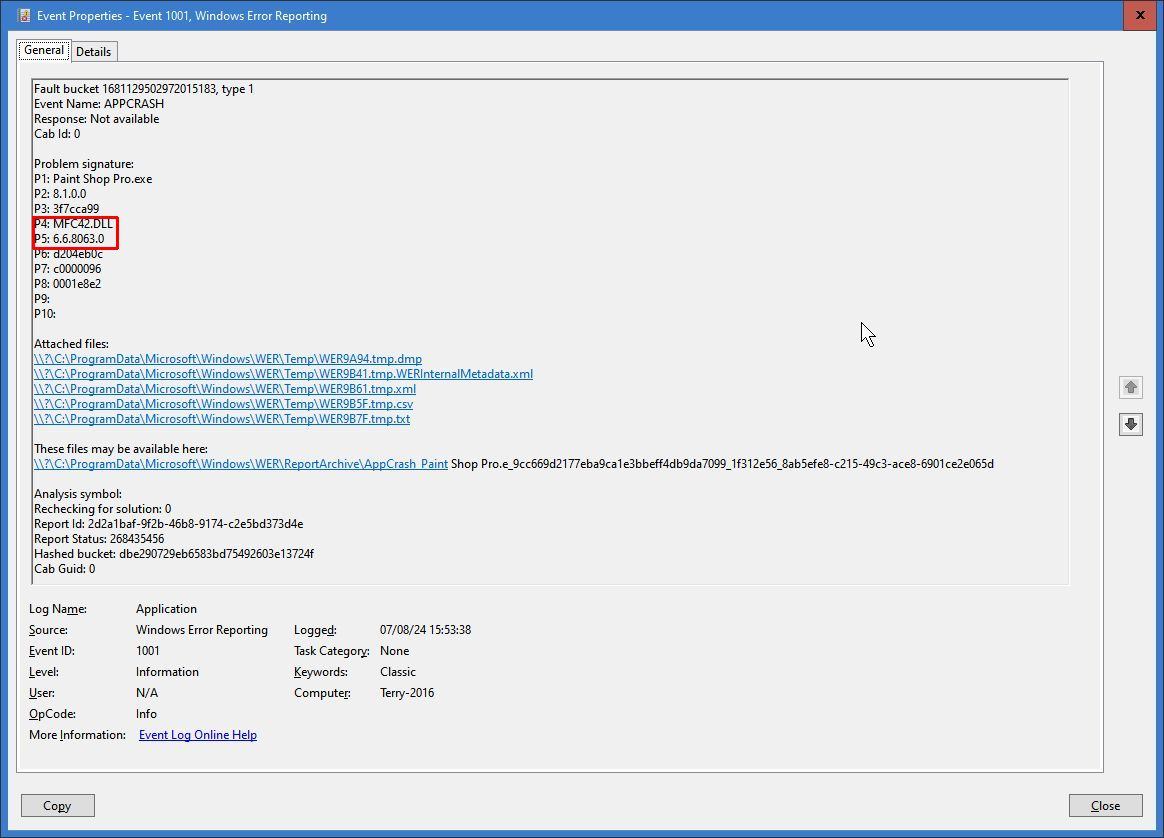
    Mfc42.dll is apparently at ther root of the issue according to Event Viewer. As I'm at the desperate stage, I downloaded the latest version of that file. It's version ...8064 and 1366 KB in size. I then copied it to replace the orginal (version 8063, 1423 KB) in \System32. No fix.

    And I don't understand why, immediately after trying to run PSP8, the three events that are then displayed in Event Viewer still show version 8063, not 8064 as expected! Apart from that puzzle, ikt now has me hesitating about changing it back again...

    Also, to add further to my confusion, I note there are several other locations of mfc42.dll on my C: drive,. Some apparently identical in size, such as in C:\Windows\SysWOW64. Others much smaller, even 1 KB in this obscurely named folder:

    C:\Windows\WinSxS\wow64_microsoft-windows-mfc42x_31bf3856ad364e35_10.0.19041.3636_none_72010f573f43ef4b\r

    (And another identical, with same timestamp, but ending in \f instead of \r.)

    Here's the event 1001:
    Terry, UK

    0 comments No comments
  5. Neil D 32,740 Reputation points Volunteer Moderator
    2024-08-06T21:18:47+00:00

    Have you tried repairing PSP via apps and features or using compatibility mode on the PSP shortcut?

    0 comments No comments
