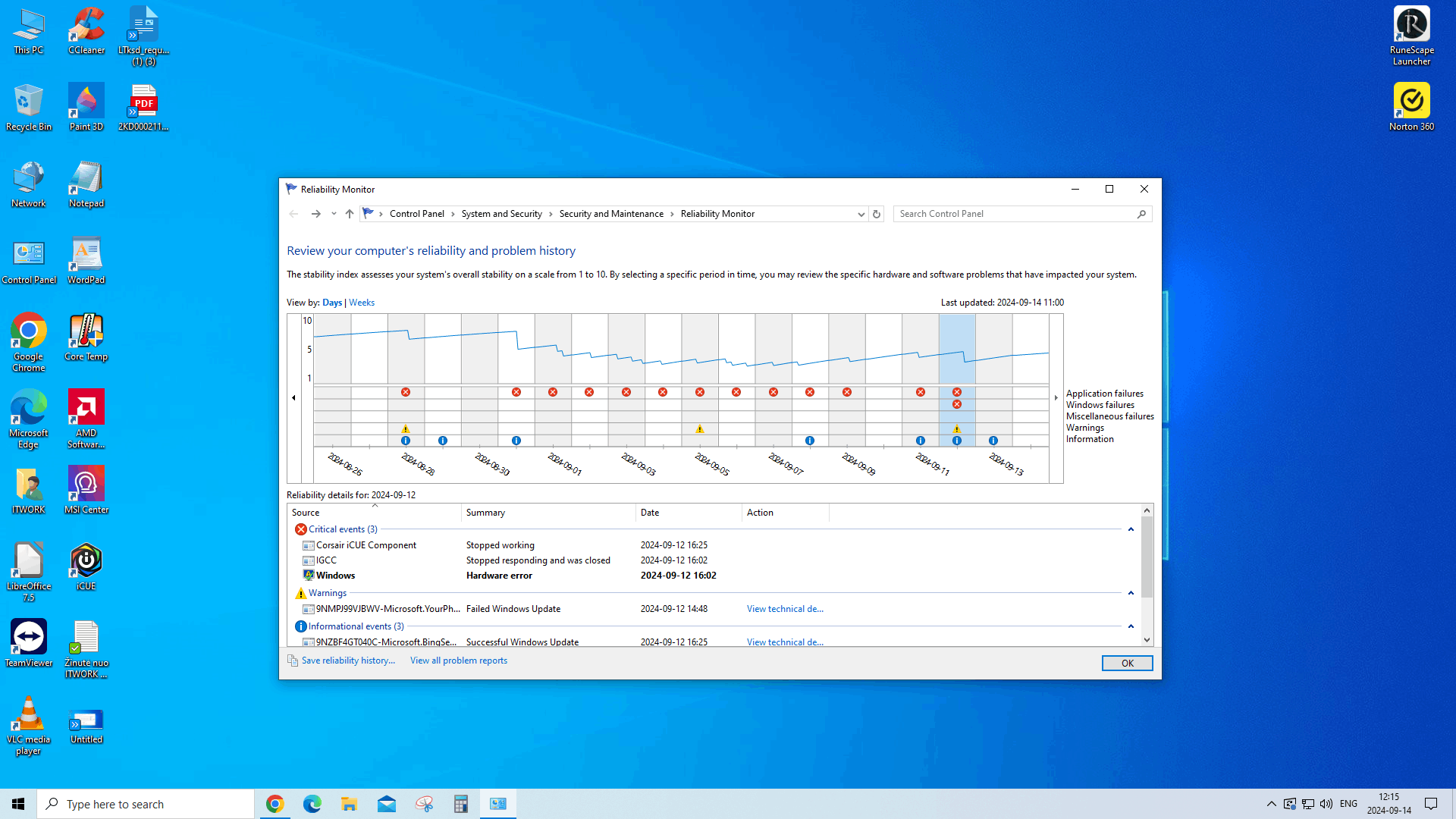
 Source
IGCC
Summary
Stopped responding and was closed
Date
2024-09-12 16:02
Status
Report sent
Description
A problem caused this program to stop interacting with Windows.
Faulting Application Path: C:\Program Files\WindowsApps\AppUp.IntelGraphicsExperience_1.100.5536.0_x64__8j3eq9eme6ctt\IGCC.exe
Problem signature
Problem Event Name: MoAppHang
Package Full Name: AppUp.IntelGraphicsExperience_1.100.5536.0_x64__8j3eq9eme6ctt
Application Name: praid:App
Application Version: 1.100.5536.0
Application Timestamp: 666b0764
Hang Signature: baf3
Hang Type: 2097152
OS Version: 10.0.19045.2.0.0.768.101
Locale ID: 1033
Additional Hang Signature 1: baf3f81cd10eb45e67bfbb1ada9eb5f7
Additional Hang Signature 2: d57a
Additional Hang Signature 3: d57ad4a1d7a0fd67264c2375b85ca183
Additional Hang Signature 4: baf3
Additional Hang Signature 5: baf3f81cd10eb45e67bfbb1ada9eb5f7
Additional Hang Signature 6: d57a
Additional Hang Signature 7: d57ad4a1d7a0fd67264c2375b85ca183
Extra information about the problem
Bucket ID: 08b5a69abd142c9419a587e93c288169 (1848032657911873897)
Source
Windows
Summary
Hardware error
Date
2024-09-12 16:02
Status
Not reported
Description
A problem with your hardware caused Windows to stop working correctly.
Problem signature
Problem Event Name: LiveKernelEvent
Code: 1a1
Parameter 1: ffffc9017d513080
Parameter 2: 0
Parameter 3: 0
Parameter 4: 0
OS version: 10_0_19045
Service Pack: 0_0
Product: 768_1
OS Version: 10.0.19045.2.0.0.768.101
Locale ID: 1033
Hello again.
I'm sorry, I don't understand what's going on with my computer, like nothing, I was at the computer yesterday, but it didn't do anything, nothing appeared, today I looked through the program and I encountered computer problems again, I wanted you to help me find out what the problem is with my computer.
I managed, I think, but I'm just curious, why did the problem appear and nothing happened to her computer?
Thanks for the help.
' cx='32' cy='32' r='32' /%3E%3Ctext x='50%25' y='55%25' dominant-baseline='middle' text-anchor='middle' fill='%23FFF' %3EA%3C/text%3E%3C/svg%3E)

