Community Center | Not monitored
Tag not monitored by Microsoft.

This browser is no longer supported.
Upgrade to Microsoft Edge to take advantage of the latest features, security updates, and technical support.
' cx='32' cy='32' r='32' /%3E%3Ctext x='50%25' y='55%25' dominant-baseline='middle' text-anchor='middle' fill='%23FFF' %3ETL%3C/text%3E%3C/svg%3E)
Hello,
The following request : GET https://graph.microsoft.com/v1.0/me/onlineMeetings/ {id}
Returns an onlineMeeting object that provides a chatInfo.threadId property, which value looks like 19:meeting_ {id} @thread.v2.
Could it be used to subscribe a webhook on chatMessage objects creation ?
I'm wondering if I could use POST https://graph.microsoft.com/v1.0/subscriptions with /teams/ {???} /channels/ {threadId} /messages as resource value but I can't figure out what value to use at {???}, I tried participants.organizer.identity.tenantId but I get the "No team found with Group Id" error so I guess that's not the right value.
Thanks
Tag not monitored by Microsoft.
' cx='32' cy='32' r='32' /%3E%3Ctext x='50%25' y='55%25' dominant-baseline='middle' text-anchor='middle' fill='%23FFF' %3ESM%3C/text%3E%3C/svg%3E)
Hi @Tiana Lemesle ,
If you use this resource (/teams/{team-id}/channels/{channel-id}/messages) for subscription creation then it will notify for a particular teams channel messages. You can get the team-id by using this Graph API Endpoint https://graph.microsoft.com/v1.0/me/joinedTeams. Refer below example screenshot from Graph Explorer on how to get team-id:
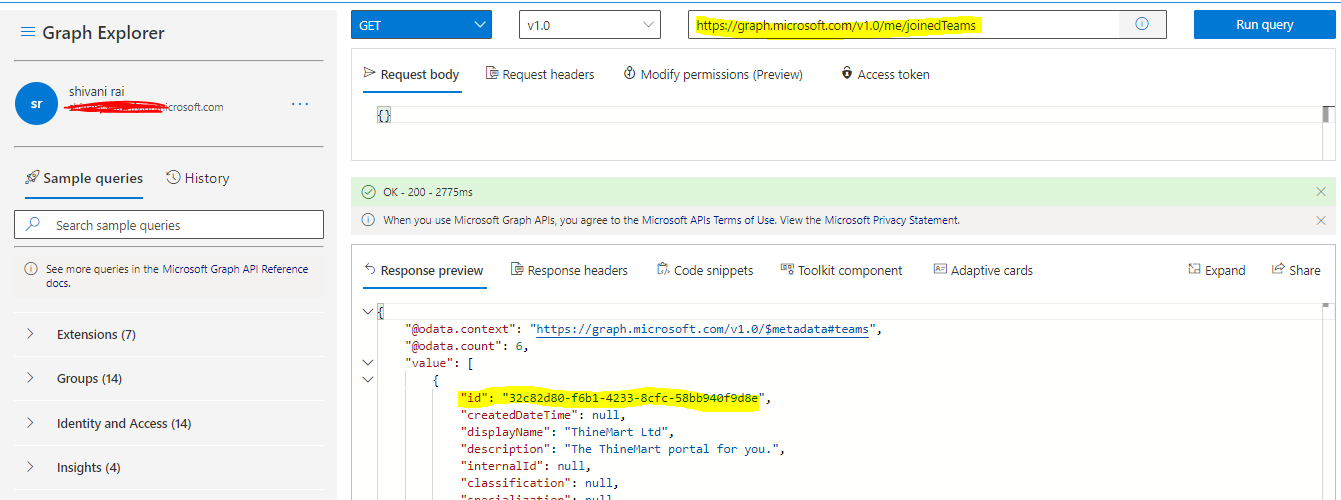
Similarly, to get the channel-Id use this Graph API Endpoint https://graph.microsoft.com/v1.0/teams/{team-Id}/channels
In addition to that if you want to subscribe to chat messages which is not associated with any particular team please use this as resource (/chats/{id}/messages). Here {id} is chatInfo.threadId
For more details refer this MS Documentation: https://learn.microsoft.com/en-us/graph/api/subscription-post-subscriptions?view=graph-rest-1.0&tabs=http#permissions
Hope this helps.
If the answer is helpful, please click Accept Answer and kindly upvote it. If you have any further questions about this answer, please click Comment.
if you want to subscribe to chat messages which is not associated with any particular team please use this as resource (
/chats/{id}/messages). Here{id}ischatInfo.threadId
This is progress, thanks !
However, I am now getting the following error :
Operation: Create; Exception: [Status Code: Forbidden; Reason: Caller does not have access to '/chats('19:meeting_XXX@thread.v2')/messages' resource]
Despite the fact that the current user is the meeting's organizer.
Thanks
please make sure to grant Chat.Read.All permission.
Would there be any way to do this using the "delegated" OAuth2 authentication method ?
' cx='32' cy='32' r='32' /%3E%3Ctext x='50%25' y='55%25' dominant-baseline='middle' text-anchor='middle' fill='%23FFF' %3ERS%3C/text%3E%3C/svg%3E)
For the above error, do you client-request-Id and timestamp when the request was made?
As far as delegated goes, it is supported but not for rich yet.
provide Chat.Read permission in scope parameter while using the "delegated" OAuth2 authentication method.
client-request-id : 77c9f96d-6b92-40e4-b9b8-e9d608c6b7e7
date : 2022-03-17T16:11:03
Although I don't think we need those anymore.
This is progress : I can now use the https://graph.microsoft.com/v1.0/me/chats/{threadId}/messages endpoint.
I can also create a subscription using the https://graph.microsoft.com/v1.0/subscriptions endpoint, and get a 201 response, as well as the Validation: Testing client application reachability for subscription test request, but nothing further, when writing messages in chat.
Moreover, when using the GET endpoint, a https://graph.microsoft.com/v1.0/chats/{threadId}/messages/{messageId}/hostedContents/{hostedContentId}/$value link that worked last friday returns 404 now, I guess it expired, but I can't find any documentation about the expiration delay or any way to renew the link ?
Thanks
I think You can follow this document for the next steps after creating subscriptions.
That's already done : I get a 201 response, receive the test call and successfully reply to it.
On Postman, all tests pass :
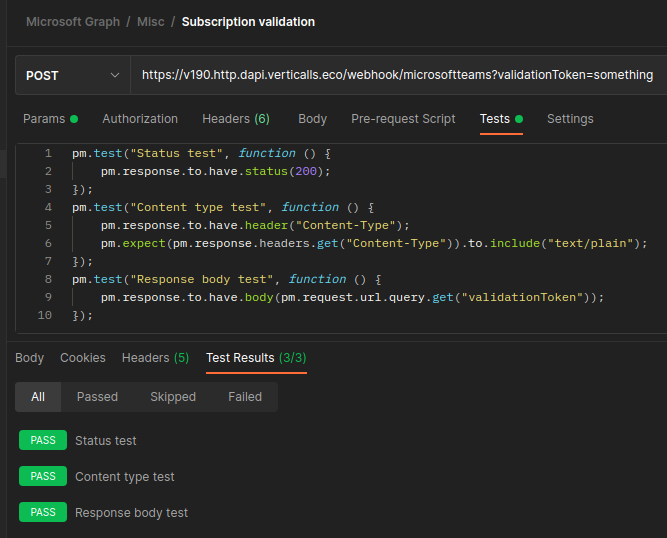
I also successfully retrieve the existing subscription when calling https://graph.microsoft.com/v1.0/subscriptions/{id}.
But, I never receive any further call when writing messages on the chat channel or creating recordings for example, while I can manually retrieve those when calling https://graph.microsoft.com/v1.0/me/chats/${threadId}/messages.
Thanks
Ideally you should get notifications in notification URL after successful creation of subscription. I will check further on this and will revert back.
you should get notifications in notification URL after successful creation of subscription
I do not get any notification but only the initial validationToken message.
I will check further on this
Did you have time to do so ?
Thanks