Share via

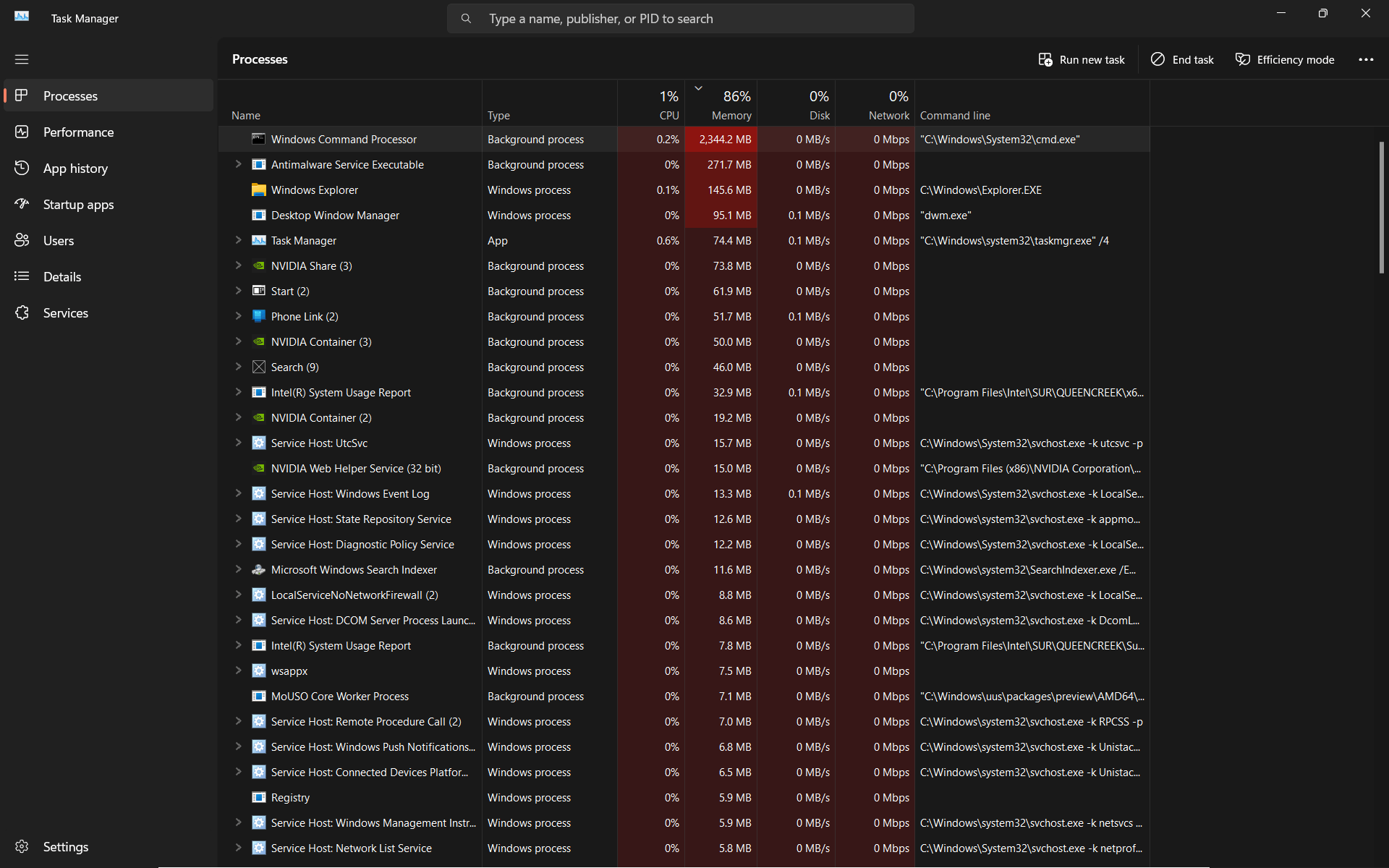
CMD.exe starts up automatically on every restart and takes up a huge chunk of memory(~2GB)

Anonymous
2024-09-20T00:09:14+00:00

Hi, I am Sam.

I recently started encountering this trouble where everytime I started up my pc, and connected it to internet, it would start an instance of cmd.exe that would take up a chunk of my Memory (~2GB). I saw this problem reported by three more fellas on this community and one dude on a reddit. A dude on that reddit post claimed that this is a cryptocurrency trojan that uses up your computer resources to mine cryptocurrency. That would explain the need for an active internet connection to kickstart the process. Also, once the process is closed, it doesn't commence automatically on any condition unless the pc is restarted. Now, I tried what the dudes in those threads attempted and some other things.

1.Yeah it's the authentic Command Processor application from System32 directory.

2.The Process Explorer showed , once that is was started by a NVIDIA Web Helper parent process, and other time it was started by Explorer parent process/program.

3.I ran a Quick and a Full scan from Windows Defender and Malwarebytes and a Microsoft Offline Scan, which all yielded no threats.

3.5.I even ran an FRST scan and it generated nothing suspicious to be actionable.

4.I also tried a clean boot. The problem still persisted.

I have already disabled all startup items, but still checked them, and rebooted. The problem still persisted.

I checked all the possible task schedules in Task Scheduler Library that might cause this, and disabled all Nvidia related tasks and all the tasks that had a trigger of 'Start on reboot'. The problem still persisted.

5.The latest program installed after which it all started happening, although not immediately after, was Google Chrome. There are no malicious extensions or programs or files downloaded from there onwards. So, I don't believe it's related to Chrome Installation. And yeah, it was an official installation from official website.

My Windows Version is 11, and it's an ASUS laptop with Intel CPU and Nvidia GPU. I am not sure if that helps but, can't hurt either to say.

I was about to do a Factory Reset but decided to come here first and kept the reset as a last resort.

I would like some further insight and if possible a solution into this problem.

Hopefully before I turn for the inevitable.

And thanks for reading till here!

Standing by,

Sam.

Windows for home | Windows 11 | Security and privacy

Locked Question. This question was migrated from the Microsoft Support Community. You can vote on whether it's helpful, but you can't add comments or replies or follow the question.

0 comments No comments

Answer accepted by question author

  1. _AW_ 67,231 Reputation points Volunteer Moderator
    2024-09-20T23:10:46+00:00

    You're welcome. It's an infection that we see a lot of on the forum. "Windows Service Task" and "Window Update" (window not windows) are the tasks it uses.

    The number one source would be oceanofgames.com, next would be getintopc.com. The instructions are usually to disable Windows Defender and then run the supposed game or software installer.

    2 people found this answer helpful.
    0 comments No comments

Answer accepted by question author

  1. _AW_ 67,231 Reputation points Volunteer Moderator
    2024-09-20T22:35:34+00:00

    This was the malware task:

    Task: {6441377B-930F-4BFC-A26E-6A63E2E85D81} - System32\Tasks\Windows Service Task => C:\Users\gshan\AppData\Local\Updates\WindowsService.exe [67072 2024-03-23] () [File not signed]

    It looks like it came from Getintopc.com

    These were both from the infection:

    C:\Users\gshan\AppData\Local\Updates

    C:\Windows\system32\WinRing0x64.sys

    2 people found this answer helpful.
    0 comments No comments

Answer accepted by question author

  1. John DeV 162.6K Reputation points Independent Advisor
    2024-09-20T00:41:15+00:00

    Hi, good day! I'm John Dev a Windows user like you and I'll be happy to assist you today. I know this has been difficult for you, Rest assured, I'm going to do my best to help you.

    Please try uninstalling Google Chrome then see if the issue persists.

    If this does not work, you may need to consider performing a System Restore at an earlier date where everything is still working.

    Press Windows key+R to open Run then type: rstrui.exe

    Press Enter. This will open System Restore

    Click the Next button.

    Select the restore point at an earlier date where everything is still working.

    Click Next then Finish

    Kindly let me know if this helps or if you have any further concerns by clicking the "Reply" button at the end of my response. I will appreciate it.

    Kind regards,

    John DeV

    Independent Advisor

    2 people found this answer helpful.
    0 comments No comments

6 additional answers

Sort by: Most helpful
  1. Anonymous
    2024-09-20T14:05:41+00:00

    Hello, Mr. _AW_. Unfortunately I didn't backed up those FRST logs and they are no longer accessible. I wished to know more about the problem and possibly identifying the malware if possible. Although after the System restore, as suggested by Mr. John, my system seems to be working perfectly fine and prevented a Factory Reset i originally dreaded. I can't reply to him anymore so i wish to Thank him here. And thank you for showing an interest towards solving my problem.

    Signing Out,

    Sam

    P.S. : There is one more thing to mention although it's quite possible it's not related to the original problem. Similar to the cmd.exe , there was a process named hxtsr, that started automatically everytime cmd.exe started and ended itself as soon as cmd.exe ended. Although the programs stated in the task manager command line for this process seemed legitimate, their coincidental startup and exit with the cmd.exe seemed a bit suspicious. I will link a screenshot of the same too. Also, I Imagewasn't able to access the windowsapp folder, due to security purposes.

    (Does it inserts the picture where my cursor is present? Yep it does.)

    0 comments No comments
  2. _AW_ 67,231 Reputation points Volunteer Moderator
    2024-09-20T00:52:51+00:00

    Please share your FRST logs.

    0 comments No comments
