Share via

Windows 10 PC restarts by itself after shutdown

Anonymous
2024-08-14T15:00:46+00:00

My Windows 10 PC restarts by itself once every 3-4 shutdowns (not every time) and NONE of the solutions provided on answers.microsoft.com or anywhere else on the Internet has fixed it. I tried every one of them. Amazingly, this issue seems to have been reported and discussed online for many years but still no effective solution from Microsoft at all. What a shame!!!

Windows for home | Windows 10 | Sleep and Power on, off

Locked Question. This question was migrated from the Microsoft Support Community. You can vote on whether it's helpful, but you can't add comments or replies or follow the question.

0 comments No comments

5 answers

Sort by: Most helpful
  1. Anonymous
    2024-09-02T02:14:54+00:00

    Dear A-till-A

    I am glad to receive your reply.

    Regarding your issue, according to your description you have tried many solutions.

    So to give you the steps to repair and install WINDOWS, first of all, it is recommended that you backup your important data on your C drive to an external device

    Download Windows 10 (microsoft.com)

    Select Download tool now - perform Media creation tool - select Yes - select Accept - select Create installation media for another computer - select DVD ISO file - Save as local.

    Execute the local WINDOWS.ISO file-right click-mount-select execute setup.exe-select don't use it for now-select keep personal files and settings-select Next-wait for the WINDOWS Repair installation to complete-reboot the WINDOWS computer.

    Best Wish

    Shawn.Z-MSFT | Microsoft Community Support Specialist

    Was this answer helpful?

    0 comments No comments
  2. Anonymous
    2024-09-01T09:48:39+00:00

    Hi again Shawn,

    Thanks for your help.

    Just wanted to let you know that I tested your last advice (unplugging the network cable before shutting the PC down) but it did not fix the issue.

    The PC continues to restart (occasionally not always) a few seconds after shutting it down regardless of whether the network cable is connected or not.

    Regards,

    A-till-A

    Was this answer helpful?

    0 comments No comments
  3. Anonymous
    2024-08-23T02:18:41+00:00

    Dear A-till-A

    I am glad to receive your reply.

    The error seems to be due to a problem with the network driver.

    You can try to test it by unplugging the network cable before shutting down the computer.

    Best Wish

    Shawn.Z-MSFT | Microsoft Community Support Specialist

    Was this answer helpful?

    0 comments No comments
  4. Anonymous
    2024-08-22T12:51:55+00:00

    Hi, thanks very much for your help.

    I just tried most of those steps one by one. Here are my results, sort of.

    1 Check the power options:

    Go to Control Panel > Hardware and Sound > Power Options > Select Power Button Function.

    Click on “Change settings that are currently unavailable”.

    Make sure that “Enable Fast Startup (recommended)” is disabled. Fast Startup can sometimes cause shutdown problems.

    Already disabled ☹

    2 Turn off automatic restart:

    Right-click on “This computer” and select “Properties”.

    Click on “Advanced System Settings”.

    Under “Startup and Failure Recovery”, click “Settings”.

    Uncheck “Automatic restart” under “System failure”.

    Was checked. Did uncheck. Didn't work ☹ Rechecked

    3 Check for update or driver issues:

    Make sure Windows is updated to the latest version.

    Check if there are any drivers that need to be updated or are incompatible, especially the drivers for the motherboard and network adapters.

    Have the latest Windows version. All drivers are up to date ☹

    4 BIOS/UEFI settings:

    Reboot the computer and enter BIOS/UEFI setup.

    Check if any wake-up functions (e.g. Wake on LAN, Wake-up timer, etc.) are enabled, disable them.

    Could not find those in BIOS. See screenshot below of wake-up functions ☹ Made no changes

    5 Check peripherals:

    Remove unnecessary peripherals as some devices may send signals to restart the computer during shutdown.

    You can disconnect all peripherals before shutting down and see if the problem persists.

    Cannot do. The peripherals are external HDDs that must stay connected ☹

    6 Check the Event Viewer:

    Open Event Viewer and check the system logs to determine if anything has been logged that caused the reboot on its own.

    Don’t know what to look for in or how to interpret those logs. See screenshot below of a recent reboot event ☹

    7 Power issues:

    Check that the power supply is stable. Power issues can cause the computer to reboot due to current fluctuations after a normal shutdown. o Ensure that the power cord and outlet are stable.

    Ensure that both the power cord and outlet are not loose and are working properly.

    All checked. PC is powered thru a UPS ☹

    8 Check hardware status:

    Ensure that hardware components (e.g., power supply, motherboard) are not faulty.

    If in doubt about the quality of the power supply, try replacing the power supply to test if that is the problem.

    Don’t think the PC hardware or the PSU has any issues ☹

    Important note: I should like to add that the reboot does not happen after every shutdown. It happens, say, 6 times out of every 10 shutdowns.
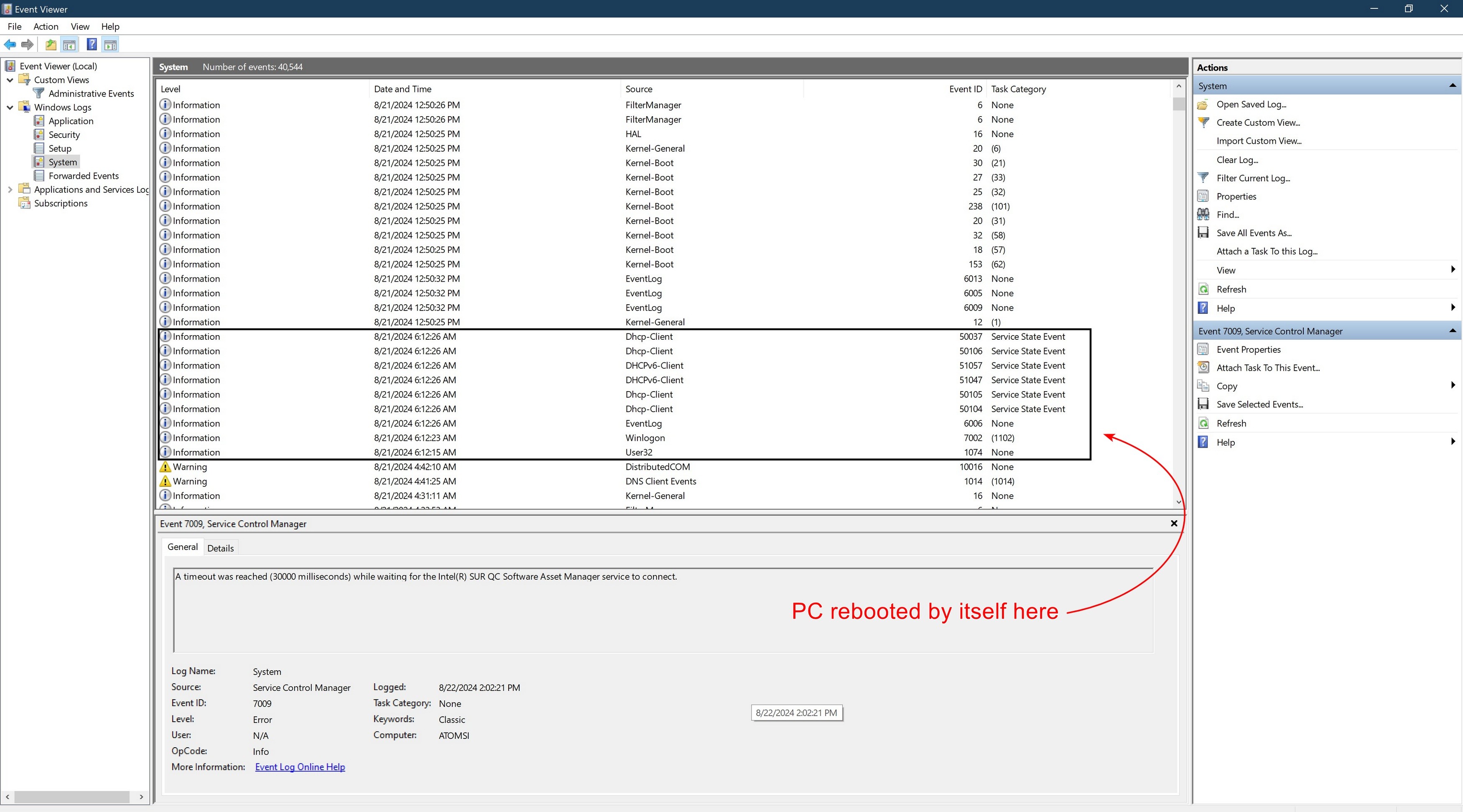
    ![Image](https://learn-attachment.microsoft.com/api/attachments/ccb1f948-06a2-4a27-a5a8-6ae02d7f5770?platform=QnA

    Was this answer helpful?

    0 comments No comments
  5. Anonymous
    2024-08-21T06:46:09+00:00

    Dear A-till-A

    Thank you for posting in the Microsoft community.

    The issue of Windows 10 PC restarting on its own after shutting down can be caused by a number of factors. Troubleshooting such issues requires a combination of hardware, system settings and drivers to solve them step by step. Here are some solutions to try:

    1. Check the power options:

    Go to Control Panel > Hardware and Sound > Power Options > Select Power Button Function.

    Click on “Change settings that are currently unavailable”.

    Make sure that “Enable Fast Startup (recommended)” is disabled. Fast Startup can sometimes cause shutdown problems.

    1. Turn off automatic restart:

    Right-click on “This computer” and select “Properties”.

    Click on “Advanced System Settings”.

    Under “Startup and Failure Recovery”, click “Settings”.

    Uncheck “Automatic restart” under “System failure”.

    1. Check for update or driver issues:

    Make sure Windows is updated to the latest version.

    Check if there are any drivers that need to be updated or are incompatible, especially the drivers for the motherboard and network adapters.

    1. BIOS/UEFI settings:

    Reboot the computer and enter BIOS/UEFI setup.

    Check if any wake-up functions (e.g. Wake on LAN, Wake-up timer, etc.) are enabled, disable them.

    Disclaimer:  Microsoft provides no assurances and/or warranties, implied or otherwise, and  is not responsible for the information you receive from the third-party  linked sites or any support related to technology.   

    If you are going to modify BIOS Settings, please  back up all your personal files first to ensure you do not lose data.

    1. Check peripherals:

    Remove unnecessary peripherals as some devices may send signals to restart the computer during shutdown.

    You can disconnect all peripherals before shutting down and see if the problem persists.

    1. Check the Event Viewer:

    Open Event Viewer and check the system logs to determine if anything has been logged that caused the reboot on its own.

    1. Power issues:

    Check that the power supply is stable. Power issues can cause the computer to reboot due to current fluctuations after a normal shutdown. o Ensure that the power cord and outlet are stable.

    Ensure that both the power cord and outlet are not loose and are working properly.

    1. Check hardware status:

    Ensure that hardware components (e.g., power supply, motherboard) are not faulty.

    If in doubt about the quality of the power supply, try replacing the power supply to test if that is the problem.

    Best Wish

    Shawn.Z-MSFT | Microsoft Community Support Specialist

    Was this answer helpful?

    0 comments No comments
