Share via

I can't find the option for e-sim either in windows settings

Anonymous
2024-08-20T07:57:12+00:00

Hi. Im having trouble finding the cellular settings in windows 10, and im even unsure if this Surface Pro 8 supports it.
I have tried following the steps here: https://answers.microsoft.com/en-us/windows/forum/all/cellular-network-option-is-not-showing-in-settings/56081a06-d800-4366-8248-aa63c0521e88

But with no luck.
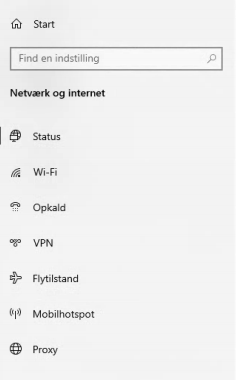
Any help would be greatly appreciated.

From the Surface App

______________________________________________________
Enhedsoplysninger:

Enhedsnavn: DESKTOP-***

Serienummer: 0F008ZT***

Surface-model: Surface Pro 8 for Business Model 1983 i5

SAM: 11.300.139.0

UEFI: 25.101.143.0

Appversion: 74.7180.129.0

Version/dato for BIOS: Microsoft Corporation 25.101.143 04/12/2024

Wi-Fi-driver: 23.30.0.6

Edition: Windows 10 Home

OS-build: 19045.4529

Processor: 11th Gen Intel(R) Core(TM) i5-1145G7 @ 2.60GHz

Installeret RAM: 8 GB

Lagerstørrelse: 188 GB free of 237 GB

GPU: Intel(R) Iris(R) Xe Graphics

Skærmopløsning: 1366 x 768

From Windows
______________________________________________________
Enhedsnavn DESKTOP-****

Processor 11th Gen Intel(R) Core(TM) i5-1145G7 @ 2.60GHz 2.61 GHz

Installeret RAM 8,00 GB (7,84 GB kan bruges)

Enheds-id 44468BDC-E197-****-****-A6F6B96FA0C7

Produkt-id ****5-80000-00000-*****

Systemtype 64-bit operativsystem, x64-baseret processor

Pen og touch Understøttelse af pen og touch med 10 touchpunkter

Udgave Windows 10 Home

Version 22H2

Installeret d. ‎17-‎06-‎2024

Operativsystemets build 19045.4529

Visning Windows Feature Experience Pack 1000.19058.1000.0

***Moved from Windows / Windows 10 / Web og netværk***

***Personal information deleted by the moderator. Please see the Microsoft Community Frequently Asked Questions for more information on how you can protect your privacy.***

Windows for home | Windows 10 | Internet and connectivity

Locked Question. This question was migrated from the Microsoft Support Community. You can vote on whether it's helpful, but you can't add comments or replies or follow the question.

0 comments No comments

4 answers

Sort by: Most helpful
  1. Anonymous
    2024-09-02T11:14:03+00:00

    Hi again.

    Is this your first time using this Surface Pro 8 device? - Yes

    Has it worked before?

    Do not know.

    Are there similar components in the hidden device list? (Select View, then select Show hidden devices)

    No similar components.

    Or, have you tried the Surface Diagnostic Tool Suite before?

    I have now - no problems identified by the tool.

    Was this answer helpful?

    0 comments No comments
  2. Anonymous
    2024-08-25T09:01:53+00:00

    Hi Jeppe K.,

    Thank you for getting back to us.

    There seems to be a lack of hardware support or driver support for e-SIM support in the device.

    Is this your first time using this Surface Pro 8 device?

    Has it worked before?

    Are there similar components in the hidden device list? (Select View, then select Show hidden devices)

    Or, have you tried the Surface Diagnostic Tool Suite before?

    Best Regards,

    Kyo.Y - MSFT | Microsoft Community Technical Support

    Was this answer helpful?

    0 comments No comments
  3. Anonymous
    2024-08-21T10:38:30+00:00

    I cant seem to find the Qualcomm Snapdragon X20 LTE Modem.

    Below is the complete list in device manager.

    Image

    Image

    Image

    Image

    Image

    ***Personal information deleted by the moderator. Please see the Microsoft Community Frequently Asked Questions for more information on how you can protect your privacy.***

    Was this answer helpful?

    0 comments No comments
  4. Anonymous
    2024-08-21T09:25:16+00:00

    Hi Jeppe K.,

    Welcome to Microsoft Community.

    Based on the original description, we understand that the eSIM related options are not available in your device.

    This could multiple factors related, including but not limited to with drivers, firmware, hardware support or not, and the state of the hardware.

    On one of our Surface Pro X devices used for testing, we were able to observe the driver associated with the LTE module, located under the “Network adapters” section.

    According to the Surface Pro 8 specifications, this device model may be equipped with Qualcomm Snapdragon X20 LTE Modem.

    Surface Pro 8 Most Powerful 2-in-1 Business Laptop - Microsoft Surface for Business

    If possible, you can check if the components in your device contain parts related to the Qualcomm Snapdragon X20 LTE Modem.

    Open Device Manager - Microsoft Support

    If I misunderstand your situation, feel free to correct me and share the information.

    Best Regards,

    Kyo.Y - MSFT | Microsoft Community Technical Support

    Was this answer helpful?

    0 comments No comments
