Microsoft 365 and Office | SharePoint | For business | Windows
A group of Microsoft Products and technologies used for sharing and managing content, knowledge, and applications.

This browser is no longer supported.
Upgrade to Microsoft Edge to take advantage of the latest features, security updates, and technical support.
' cx='32' cy='32' r='32' /%3E%3Ctext x='50%25' y='55%25' dominant-baseline='middle' text-anchor='middle' fill='%23FFF' %3EJJ%3C/text%3E%3C/svg%3E)
We have the following sites hierarchy that we want to build inside our company:-
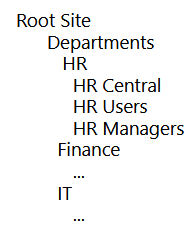
so in our case we will have the Root as a hub and associate with it another Hub site named Departments. Then associate the departments (HR, Finance, IT) with the Departments , as so on.
But seems if we define a site as hub site, then we can not associate it with another hub site (for example in the Departments case, it can not be a Hub site for the HR,Finance & IT sites + at the same time to have the Departments linked to the Root hub site).. so how we can build the above hierarchy in this case?
Thanks
A group of Microsoft Products and technologies used for sharing and managing content, knowledge, and applications.

Hi @john john
You could achieve it by:
For more information, you could refer to:
https://learn.microsoft.com/en-us/sharepoint/hub-to-hub-association
If the answer is helpful, please click "Accept Answer" and kindly upvote it. If you have extra questions about this answer, please click "Comment".
Note: Please follow the steps in our documentation to enable e-mail notifications if you want to receive the related email notification for this thread.
Would you please provide some update of this issue? Please feel free to reply.