Share via

C920 Logitech Pro Webcam - Win 11 Audio Bug – A Workaround

Anonymous
2023-10-04T22:27:12+00:00

Since July, my Windows 11 laptop says “no audio device is installed” when I plug in my C920 Logitech Pro Webcam. After much searching, I found a fix that works for me. The problem is a conflict between a specific Windows patch for Realtek's AudioProcessingObject and Logitech Webcam, which causes the Windows Audio service to terminate unexpectedly.

Here are work-around steps I'm using to re-enable audio.

  1. With the Webcam plugged in, disable the Webcam's Audio Component:
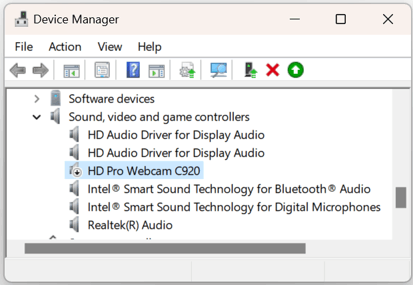
    • In Device Manager, under "Sound, video and game controllers", find the "HD Pro Webcam C920" entry.
    • Right-click on "HD Pro Webcam C920" and select "Disable". Confirm any prompts if required. Here's an image showing the webcam after it has been disabled in Device Manager:
  2. Restart the Windows Audio Service. If audio doesn't restore within 30 seconds after disabling the webcam's audio component, try manually restarting the Windows Audio Service. Here's a quick way:
    • Press Win + R to open the Run dialog
    • Type services.msc and press Enter.
    • In the list of services, scroll down and find "Windows Audio".
    • Right-click on "Windows Audio" and choose "Restart".

That's it. If you disable the "HD Pro Webcam C920" audio component in Device Manager, that specific device should remain disabled across reboots until you manually re-enable it. So, in that sense, it won't need to disabled again every time you restart.

Good luck.

<Changed to a discussion>

Windows for home | Windows 11 | Devices and drivers

Locked Question. This question was migrated from the Microsoft Support Community. You can vote on whether it's helpful, but you can't add comments or replies or follow the question.

0 comments No comments

19 answers

Sort by: Most helpful
  1. Anonymous
    2024-10-31T00:38:55+00:00

    hI i HAVE VERY RECENTLY PURCHASED A C290 PRO HD WEBCAM.

    mY ISSUE IS THAT THIS CAM WORKS OK USING SKYPE BUT USING MESSENGER i AM UNABLE TO GET THIS CAM TO SHOW MY

    CAM WINDOW MY PC IS WINDOWS 11 I AM NOT GREAT AT PROGRAMING A PC

    I CAN ASLO BE REACHED ON MY E-MAIL ******@yahoo.co.uk

    MAYBE SEND INSTRUCTIONS THERE

    ---------- PLEASE HELP ----------

    BERNARD MULLANEY

    0 comments No comments
  2. Anonymous
    2024-10-02T06:22:04+00:00

    ¡Muchas gracias por compartir esta solución para el problema de audio de la C920 en Windows 11! Tu guía paso a paso me ha sido de gran ayuda. ¡Gracias a ti, ya puedo usar mi cámara sin problemas! ❤️😊❤️

    0 comments No comments
  3. Anonymous
    2024-09-06T20:48:29+00:00

    Hi all!

    I spent about 4 hours trying out every single solution I could find (including the instructions above) and nothing worked. What eventually did work for me was resetting my laptop, completely. With the Logitech C920 still plugged in. When Windows was reinstalled, the audio issue was still there - x above icon, but I proceeded to follow the instructions provided by OP and then restarted the laptop. And, boom! It worked!

    This caused me such frustration that I wanted to share it in case someone is still desperately looking for a solution, and hopefully this will work for you as well!

    And thank you, Tony, for sharing such a simple work around that I never would have been able to find without you!

    0 comments No comments
  4. Anonymous
    2024-09-05T16:23:12+00:00

    Tony you are an absolute life saver!!!! Thank you so much I was having this issue for ages with the logitech c925e - hours fiddling about with various settings, updates and restarts - fixed in 5 mins! THANK YOU!

    0 comments No comments
