' cx='32' cy='32' r='32' /%3E%3Ctext x='50%25' y='55%25' dominant-baseline='middle' text-anchor='middle' fill='%23FFF' %3EJT%3C/text%3E%3C/svg%3E)

' cx='32' cy='32' r='32' /%3E%3Ctext x='50%25' y='55%25' dominant-baseline='middle' text-anchor='middle' fill='%23FFF' %3ESA%3C/text%3E%3C/svg%3E)
I know it's an old thread, but maybe this is still helpful to someone.
I've dealt with badly performing MSS like the OP's before.
Turns out that, ironically, the worst thing you can do to a freshly created Storage Space is to create a partition in the GUI.
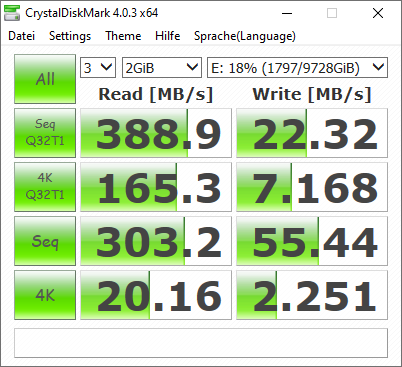
I don't know what exactly goes wrong when you do that (aside from the small additional partition that windows creates on the SS), but erasing all partition (e.g. using Diskpart "clean" command) and creating a proper partition manually brings drives and virtual disks back up to full speed.
Last time I made the mistake of trusting Windows with the difficult task of partitioning a drive, read performance was cut down by half, writes were even worse. 3500MB/s seq read instead of 6000, 700MB seq write instead of 2000. Random reads were down to 5MB/s. On an NVMe PCIe3 8x cache drive ... . Good job Microsoft, good job Storage Spaces team. Terrific work.
Apparently that bug's been there since 8.1. But isn't it nice that we finally have Emojies in Win11? Suuper.
If it doesn't carry "Azure" or "Office365" in its name, its nothing more than an afterthought these days.
[/rant] Anyway, so I quickly cleaned the virtual disk in Diskpart and created a partition manually. Disk was back to full performance immediately.
' cx='32' cy='32' r='32' /%3E%3Ctext x='50%25' y='55%25' dominant-baseline='middle' text-anchor='middle' fill='%23FFF' %3ED%3C/text%3E%3C/svg%3E)
' cx='32' cy='32' r='32' /%3E%3Ctext x='50%25' y='55%25' dominant-baseline='middle' text-anchor='middle' fill='%23FFF' %3ELT%3C/text%3E%3C/svg%3E)