Share via

How do I remove a persistent fake-virus alert popup?

Reported
Anonymous
2024-09-24T02:50:31+00:00

How do I remove a persistent fake-virus alert popup?

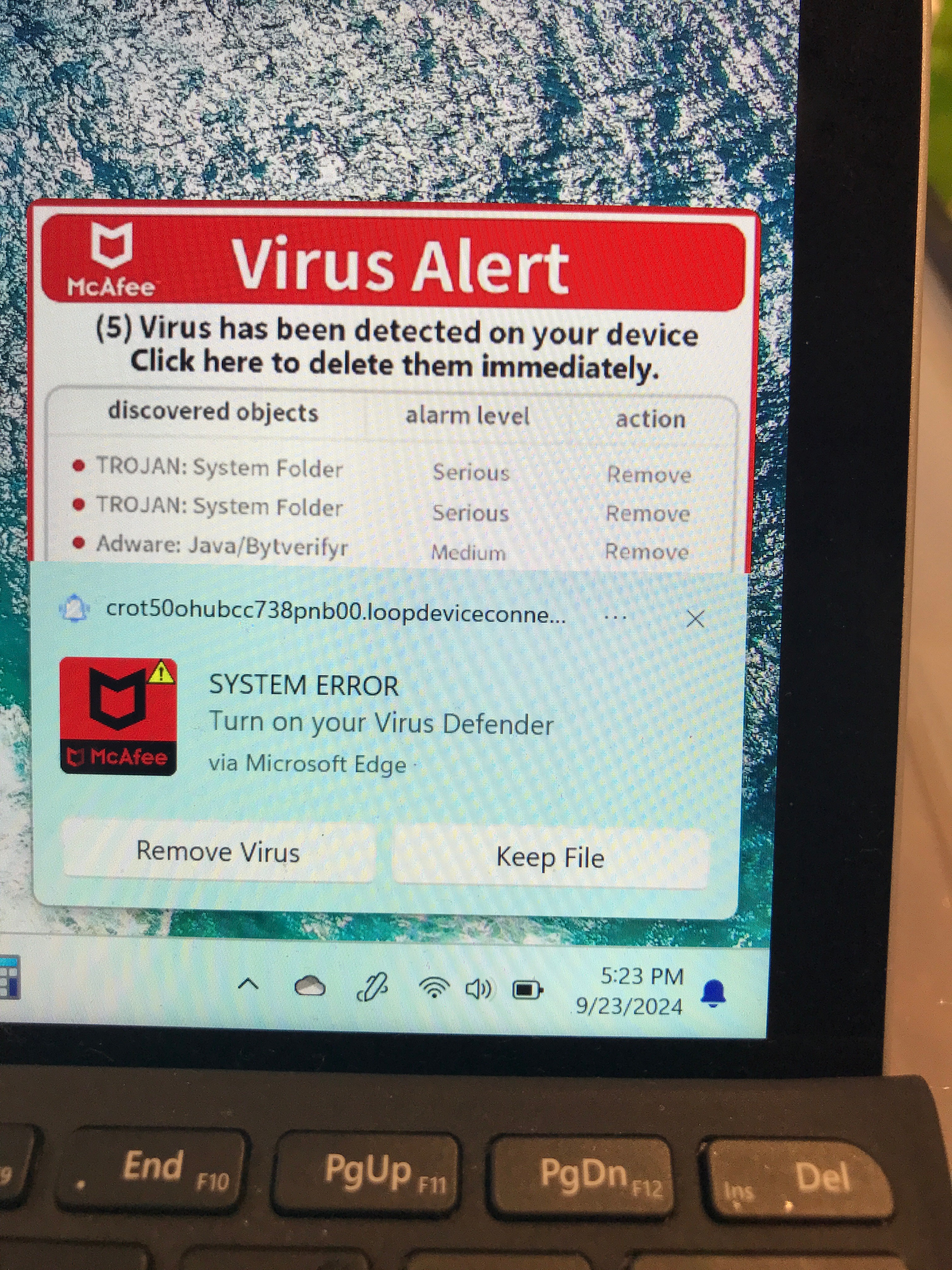
I've got a Surface Go 4 running Windows 11 in my family where today the user clicked "allow" on a popup message she got asking about cookies or something while browsing in Edge. Since then, the PC gets a popup in the lower right corner. She got maybe 15 different versions of the popup. It stays on-screen for 10 to 30 seconds, then goes away without clicking on anything. The next will pop up in 5 seconds to 5 or more minutes. Headings include "(McAfee logo) Virus Alert", "(Windows logo) Sytem Damaged!", "(microsoft logo) "Microsoft Windows Defender TROJAN found in /Win32!", "(shield image) Virus & threats protection - Threats found (16)."

All have some spelling or syntax errors but otherwise look convincing.

All have the same link snippet: "crot50ohubcc738pnb00.loopdeviceconne..."

We haven't clicked anywhere on or near the popup when it's on screen.

Steps I've tried:

Windows defender checked status: has been running ok, last updated last night (9/2224) around 10:20pm.

Powered off, shut off network, powered on, Windows defender quick scan: came up clean. No pop-ups while network was off.

Windows defender offline scan: behaved normally (warned of reboot, reboot, scan) came up clean. Pop-ups resumed when network was turned on.

Taskmgr doesn't show anything I recognize as bad in startup apps list or in running processes, but I'm not current enough to know what processes might be bad.

Example alert pic shown below:
Windows for home | Windows 11 | Security and privacy

Locked Question. This question was migrated from the Microsoft Support Community. You can vote on whether it's helpful, but you can't add comments or replies or follow the question.

0 comments No comments

Answer accepted by question author

  1. _AW_ 67,216 Reputation points Volunteer Moderator
    2024-09-24T02:57:57+00:00

    Hi, these are push notifications.

    To remove specific Edge push notifications:

    Enter edge://settings/content/notifications into the URL bar.

    For any entries you don't recognize in the Allow section, click the ellipsis (3 dots) to the right of each entry and either Block or Remove it.

    You should see an entry for "crot50ohubcc738pnb00.loopdeviceconne...".

    Image

    You can also toggle Ask before sending to off if you wish to block all notifications.

    0 comments No comments

46 additional answers

Sort by: Most helpful
  1. Anonymous
    2025-04-08T14:52:06+00:00

    thanks for the info. I have tried this and removed all the iutems in there but still get the pop ups every 3 minutes. I even ran my norton scan and it doesnt stop this annoying pop up. Any other suggestions?

    thanks,

    Frank

    0 comments No comments
  2. Anonymous
    2025-03-05T20:23:40+00:00

    I had the same problem a few months ago. All I did was hit the three dots in the corner of the alert and hit block!

    0 comments No comments
  3. Anonymous
    2024-11-15T04:07:14+00:00

    This is easily the most helpful post ever. I spent years without any pop ups or viruses and one little miss click sends me on a path of unknowing. But this here stopped everything that I was trying to get away from. Thank you!!

    0 comments No comments
  4. _AW_ 67,216 Reputation points Volunteer Moderator
    2024-09-24T04:15:33+00:00

    I'm glad you got it sorted :)

    0 comments No comments
