Share via

Windows 7 Network Hardware

Anonymous
2024-09-09T18:37:03+00:00

Message: I'm working on rebuilding my laptop model NP305V5A. My son was using it and installed the Linux operating system overtop of all the Samsung software. I've removed the Linux software and are trying to get Windows 7 installed into the system. I was not aware the factory recovery/reset partition was removed. I've reinstall my original Windows 7 to get it operational enough to get onto the internet to proceed with my reinstall. The W-7 completed the installation and now it would not access the internet. I received the error message "Window Did Not Detect Any Networking Hardware" telling me there were no software drivers available to be installed. What I'm looking for is the drivers specific to this model. I've been looking for this for several days and cannot find the software I need. Hoping you can get me back on track to salvage this laptop. Thanks

Windows for home | Previous Windows versions | Devices and drivers

Locked Question. This question was migrated from the Microsoft Support Community. You can vote on whether it's helpful, but you can't add comments or replies or follow the question.

0 comments No comments

6 answers

Sort by: Most helpful
  1. Anonymous
    2024-09-12T16:02:35+00:00

    Thank you Bill

    I went back again to Samsung and asked for their help in a different way since they would not send the the "Recovery/Reset Partition" to get the laptop back to the factory settings. I've been unable to find it elsewhere. They did direct me to a file called "Bios Update" that would also install the Standard Network Adapters and Bios update. I downloaded the file onto a USB memory stick and ran it on the laptop. This file requires internet access for the updates witch is not yet connected as I'm missing the drivers for it's Network Adapter. The error message I received from that effort was "Windows did not detect any network HARDWARE", I went back to Samsung and asked how I can install the Bios update without internet access. I learned I could connect the laptop to my desktop PC (Running Windows 11) via a USB cable and use the internet access on my PC obtain the updated files. I've been messing with this approach for a couple of days now and have not been able to get this connection working. I just can't figure out what settings I need to change to make this connection from the laptop to the internet through my PC? I will work on this more today. I wanted to reply to you to let you know I received your input and where I was at with this project.

    Thanks

    1 person found this answer helpful.
    0 comments No comments
  2. Anonymous
    2024-10-07T15:56:54+00:00

    I finally found the correct version of service pack 1. My confusion was with getting the 64 bit version, maybe I was reading the labels wrong. Once I found it, it installed correctly and I was able to use the convenience rollup, not without issues though. I was able to work through them and everything is working properly now, I hope. Next I will try to get my Windows 10 back on the laptop, we'll see.

    Thanks for all the help

    Bill

    0 comments No comments
  3. Anonymous
    2024-09-12T19:35:14+00:00

    Thank you Bill

    I went back again to Samsung and asked for their help in a different way since they would not send the the "Recovery/Reset Partition" to get the laptop back to the factory settings. I've been unable to find it elsewhere. They did direct me to a file called "Bios Update" that would also install the Standard Network Adapters and Bios update. I downloaded the file onto a USB memory stick and ran it on the laptop. This file requires internet access for the updates witch is not yet connected as I'm missing the drivers for it's Network Adapter. The error message I received from that effort was "Windows did not detect any network HARDWARE", I went back to Samsung and asked how I can install the Bios update without internet access. I learned I could connect the laptop to my desktop PC (Running Windows 11) via a USB cable and use the internet access on my PC obtain the updated files. I've been messing with this approach for a couple of days now and have not been able to get this connection working. I just can't figure out what settings I need to change to make this connection from the laptop to the internet through my PC? I will work on this more today. I wanted to reply to you to let you know I received your input and where I was at with this project.

    Thanks

    You just go to Samsung website Drivers Section > Then put in your exact model Number and look for the Network Adaptor Drivers.

    You don't go into BIOS.

    I explained the path you have to take, by downloading those Drivers to another PC and saving them to that PC, nothing to do with hooking the broken one up to a working one.

    As I originally advised you, you then copy those Drivers to a USB > and transfer and install them in the broken one.

    Once you have the internet working in the broken one, you can go back to Samsung and download the rest of those Drivers for your exact model number.

    0 comments No comments
  4. LemP 74,930 Reputation points Volunteer Moderator
    2024-09-12T17:20:51+00:00

    I went back again to Samsung and asked for their help in a different way since they would not send the the "Recovery/Reset Partition" to get the laptop back to the factory settings. I've been unable to find it elsewhere. They did direct me to a file called "Bios Update" that would also install the Standard Network Adapters and Bios update. I downloaded the file onto a USB memory stick and ran it on the laptop. This file requires internet access for the updates witch is not yet connected as I'm missing the drivers for it's Network Adapter. The error message I received from that effort was "Windows did not detect any network HARDWARE", I went back to Samsung and asked how I can install the Bios update without internet access. I learned I could connect the laptop to my desktop PC (Running Windows 11) via a USB cable and use the internet access on my PC obtain the updated files. I've been messing with this approach for a couple of days now and have not been able to get this connection working. I just can't figure out what settings I need to change to make this connection from the laptop to the internet through my PC? I will work on this more today. I wanted to reply to you to let you know I received your input and where I was at with this project.

    Thanks

    This approach seems far more complex and prone to problems than you actually need.

    There really shouldn't be any need to update the BIOS -- and attempting a BIOS update without knowing what one is doing is a recipe for turning your laptop into a doorstop.

    You can find the required driver here: https://www.samsung.com/ca/support/model/NP305V5A-S01CA/  or here: https://www.samsung.com/uk/support/model/NP305V5A-S08SE/

    I realize that these are support sites for Canada and UK, respectively, and that they are for different configurations of the NP305V5A (neither of which is likely to be the specific configuration that you have), but the fact that both sites offer the same downloads for the driver for the wireless network adapter strongly suggests that this piece of hardware is common to many, if not all, of the configurations for the NP305V5A.

    Open Device Manager, expand the "Network adapter" section, and determine if you have an Intel, Atheros, or Broadcom based wireless network adapter. If the wireless chip manufacturer isn't obvious from the name of the device, double-click to open the "Properties" for the wireless network adapter. Select the "Details" tab, and use the drop-down list under "Property" to select "Hardware Ids." You should see something like the following:
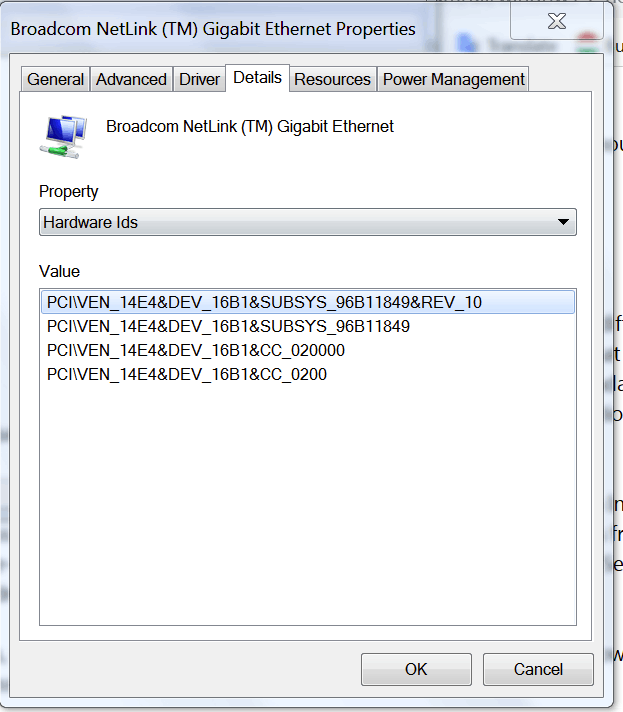
    Do a Google search for the Ven/Dev string. For the above example, you would search for ven_14e4&dev_16B1

    You can also use online database lookups such as https://www.pcilookup.com/ or https://devicehunt.com/

    Once you know the name of the chip in your wireless network adapter, go to either of the Samsung links above, and scroll down until you find the entries for your adapter. The different files for the same type of chip are for 32-bit or 64-bit Windows. You should be able to determine which is which from the downloaded file name.

    Download the file on you working laptop, copy it to a USB flash drive, bring the flash drive to your Windows 7 laptop, and run the file.

    0 comments No comments
  5. Anonymous
    2024-09-09T19:39:10+00:00

    Message: I'm working on rebuilding my laptop model NP305V5A. My son was using it and installed the Linux operating system overtop of all the Samsung software. I've removed the Linux software and are trying to get Windows 7 installed into the system. I was not aware the factory recovery/reset partition was removed. I've reinstall my original Windows 7 to get it operational enough to get onto the internet to proceed with my reinstall. The W-7 completed the installation and now it would not access the internet. I received the error message "Window Did Not Detect Any Networking Hardware" telling me there were no software drivers available to be installed. What I'm looking for is the drivers specific to this model. I've been looking for this for several days and cannot find the software I need. Hoping you can get me back on track to salvage this laptop. Thanks

    That is a Samsung Model?

    In that case go to Samsung's official website > look up the exact Model Number and download and SAVE those Windows 7 Drivers required for Internet Access on the machine that you are using top post your Question here.

    After you have downloaded and save them, transfer them to the Samsung machine.

    Then go back to the Samsung website and get the rest of those Windows 7 drivers.

    @@@@@@@@@@@@@@@@@@@@

    0 comments No comments
