Hi -Lin-,
Welcome to Microsoft Community.
Based on the original description, the device seems to be experiencing issues related to the unusual invisible cursor behavior.
This could be related to different factors including, but not limited to, driver failures, component conflicts, corrupted account profile, corrupted system components.
We tried to test this in Windows 11 23H2 (OS Build 22631.3880) on different apps but failed to reproduce the issue.
In addition to common system-level settings, the processing logic between a particular version of the driver and a particular version of Windows' APIs can be a potential factor in the problem.
If possible, would you mind sharing more information about this issue with us?
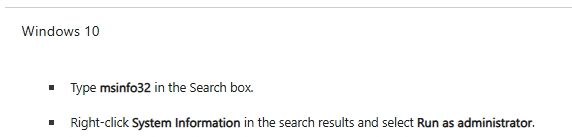
- Are the two computers equipped with similar hardware? The Msinfo32 tool can be used to obtain some hardware information. The information shown in the "System Model" item may be related to the device model specified by the vendor. Description of Microsoft System Information (Msinfo32.exe) Tool - Microsoft Support
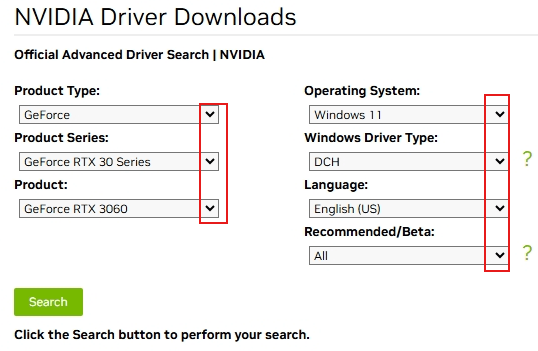
- Is the situation the same if you perform a clean install of the driver and test a previous version of the driver (so-called obsolete version)? The content in the following link mentioned the tool for cleaning up the graphics driver. How to Use the Display Driver Uninstaller (DDU) to Uninstall an... (intel.com) If you're using NVIDIA graphics device, this link can be used to obtain a specific version of the NVIDIA graphics driver. Official Advanced Driver Search | NVIDIA
|
Disclaimer: Microsoft provides no assurances and/or warranties, implied or otherwise, and is not responsible for the information you receive from the third-party linked sites or any support related to technology. |
- Is it the same if you test Windows with a specific build date? Discussion messages from community members in this thread mentioned channel to obtain some of the previous versions of Windows. (The channel is not provided directly by Microsoft and you can refer to the previous few paragraphs for the communication process between Volunteer Moderator and the original poster.) Where can I download the windows 10 and/or 11 iso for ARM - Microsoft Community

|
Disclaimer: Microsoft provides no assurances and/or warranties, implied or otherwise, and is not responsible for the information you receive from the third-party linked sites or any support related to technology. |
If I misunderstand your situation, feel free to correct me and share the information.
Best Regards,
Kyo.Y - MSFT | Microsoft Community Technical Support
' cx='32' cy='32' r='32' /%3E%3Ctext x='50%25' y='55%25' dominant-baseline='middle' text-anchor='middle' fill='%23FFF' %3EA%3C/text%3E%3C/svg%3E)
