Share via

Upgrade to Windows 11 failed - error 0xC1900101 - 0x20017 - virtualization & likely driver issue ? Reboot loop.

Anonymous
2024-11-22T15:23:53+00:00

Warning, this is a bit long and rather technical. I made several attempts at Windows 11 upgrade & installation.

I have been running Windows 10 Pro for many years on a custom built desktop PC.

I downloaded the latest Win11 version from Microsoft and flashed it to a USB drive.

  1. first upgrade attempt.

a) I ran the installer. It told me the computer did not support Windows 11. I knew it should.

b) I rebooted and reset all the BIOS settings to defaults.

c) I was then able to run the installer, and the upgrade was seemingly successful.

d) Unfortunately, when I tried to start Virtualbox, which was previously installed, it told me that virtualization was disabled. This is because I had reset the BIOS settings earlier, and virtualization is disabled by default.

e) I rebooted and enabled AMD SVM in the BIOS. Unfortunately, after that, Windows 11 went into a never-ending reboot loop.

f) I disabled SVM once again, and was able to boot back into Windows 11.

g) I saved a backup of the initial upgrade attempt using Acronis True Image.


  1. fresh install attempt

a) I cleared the boot drive using DISKPART.

b) I used my original BIOS settings, which have virtualization (AMD SVM) enabled

c) I did an install without internet (NIC disabled in BIOS) and with local account (OOBE\BYPASSNRO) to make sure no updates/drivers would run.

d) the clean install booted OK

Of course, it's missing at least 17 drivers. And I may be underestimating that number.

e) I made a disk backup of this fresh install using Acronis


  1. second upgrade attempt

a) I restored the original Win10 installation using Acronis

b) I used my original BIOS settings, which included virtualization enabled, but added Trusted computing also

c) I booted back to Win10, ran the Win10 upgrade from USB again .

d) after the first reboot, it crashed, and rebooted once more.

e) it then reverted to Windows 10

f) Once it booted back to Windows 10, I got the following pop-up :
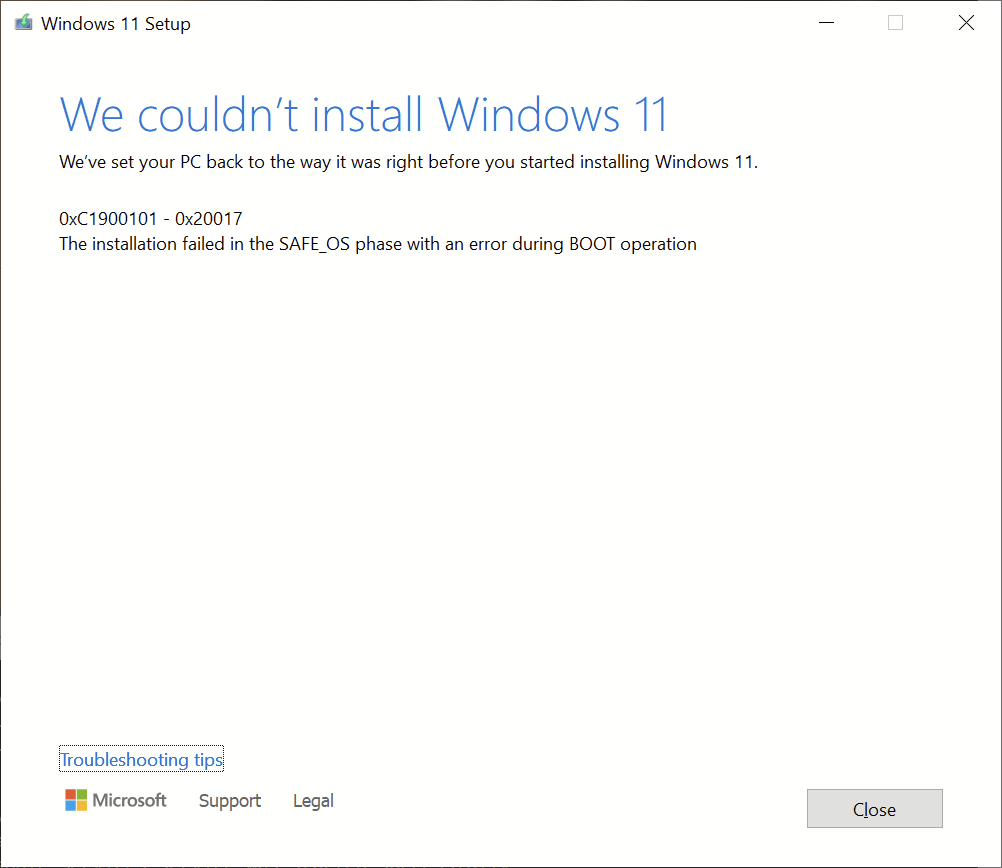
Is there any way to get more information about what failed than just this error code ?

As mentioned earlier this is a custom PC. Some of the hardware specs include :

Asus Prime X570 Pro motherboard

AMD Ryzen 5950X CPU

64 GB DDR4-3600

nVidia Geforce 3060 Ti GPU

Intel X550-T2 10 Gbps NIC

Texas Instruments XIO2213A Firewire PCI-E controller

Hauppauge HVR-1265 PCI-E video capture card

Crucial P5 Plus 2TB NVMe (boot drive)

LSI SAS2008 disk controller

8 x Samsung 860 1TB SATA SSDs

4x SATA Blu-ray drives

Dual drive SATA hotswap dock

internal USB 3.0 UHS-II multi-card reader

external :

2 x LG 32UD59-B 32" 4K monitors (running with DP)

1 x Asus PB238 monitor (running with HDMI)

Echo Audiofire 8a Firewire audio interface

Roland UM-880 MIDI interface

Roland Fantom-XR MIDI module

There is likely some sort of driver currently installed under Win10 that Win11 doesn't like after the upgrade. Is there any way to tell which one ?

Trial and error is not really an option, given that there is so much hardware. There are some software drivers as well.

I really don't want to use the fresh install since I have a lot of customization done under Win10. I only did the fresh install to try to troubleshoot the issue.

Windows for home | Windows 11 | Install and upgrade

Locked Question. This question was migrated from the Microsoft Support Community. You can vote on whether it's helpful, but you can't add comments or replies or follow the question.

0 comments No comments

4 answers

Sort by: Most helpful
  1. Anonymous
    2024-12-07T02:56:44+00:00

    After uninstalling about 20 programs & drivers under Win10, the upgrade to Win11 finally worked without a hitch. I will never know which was causing the problem. But I reinstalled them all under Win11 without issue, other than having to disabled driver signature check and disabling the memory integrity.

    All remaining unsigned drivers are A/V devices.

    • ECHO Audiofire 8a and Audiofire 12 Firewire audio/MIDI interfaces. Official support ended at Windows 8, but it still works
    • Roland UM-880 USB MIDI interface. Support ended at Windows 8.1, but hacking the INF file made it work in 10, and still does in 11
    • Roland Fantom XR USB MIDI module. Support ended at Windows 8, but hacking the INF file made it work in 10, and still does in 11

    None of these manufacturers are going to release updated drivers. The ECHO only have Thunderbolt equivalent, and my AMD system does not support Thunderbolt. Even if it did, the replacements would cost thousands.

    I'm not aware of any modern replacement for the UM-880.

    The Fantom XR does have a replacement, the Integra-7, with a Win10/11 driver.

    Was this answer helpful?

    3 people found this answer helpful.
    0 comments No comments
  2. Anonymous
    2024-11-23T03:02:21+00:00

    Ramesh,

    Thanks ! This is a very helpful reply !

    1. BIOS

    It was updated to the latest version yesterday. Since a fresh install of WIN11 seems to work fine, I don't think the BIOS is at fault.

    It's got to be a software issue, driver or otherwise.

    2)

    I have been doing trial and error basically all day long.

    In one test, I uninstalled every possible third party application in control panel, probably 80 of them, everything I could from device manage, and disabling the NICs to avoid anything getting installed.

    After that, the Win11 upgrade did work. But of course that is not the result I wanted to achieve. It just proves there is something problematic that it is possible to uninstall. But not which program/package/driver is the problem.

    1. I'm doing the nth upgrade attempt right now . There are too many programs to remove just one at a time.

    If this latest one fails again, I will download the Farbar recovery scan as instructed.

    Was this answer helpful?

    1 person found this answer helpful.
    0 comments No comments
  3. Reported
    Ramesh 176.2K Reputation points Volunteer Moderator
    2024-11-23T02:24:23+00:00

    The error 0xC1900101 - 0x20017 usually occurs due to outdated BIOS or device/chipset drivers. The logs don't mention which one causes the issue. If updating the BIOS and drivers doesn't fix the issue, the drivers must be eliminated using a trial-and-error method. There is no other option. But you can create a image-based backup if you need to revert to the original configuration.

    Share the Setup logs

    • Open the "C:$WINDOWS.~BT\Sources" folder.
    • Select the two folders, "Panther" and "Rollback" (if present).
    • Delete the GenuineTicket.xml file in the Panther folder.
    • Copy the two folders to the desktop and Zip them.
    • Upload the zip file to OneDrive and share the link here.

    Share the Farbar scan logs

    1. Download Farbar Recovery Scan Tool 64-bit (FRST64.exe)

    https://www.bleepingcomputer.com/download/farbar-recovery-scan-tool/

    Note: If Microsoft Edge or Chrome mislabels the Farbar Scanner executable as PUA/malware, choose to keep it by tapping … in the bottom bar, choosing Keep, and then choosing Keep anyway in the dialog that appears. See this screenshot: https://learn.microsoft.com/en-us/deployedge/media/microsoft-edge-security-download-interruptions/dowload-was-blocked.png

    1. If the OS language is non-English, rename FRST64.exe to FRST64English.exe.
    2. Run the program. Don't check or uncheck any options. Click "Scan".
    3. Zip the two logs, FRST.txt and Addition.txt, upload them to your OneDrive and share the link here.

    (How-To: Share OneDrive files and folders - Microsoft Support)

    OneDrive sharing options - https://imgur.com/a/vZyxpY9

    0 comments No comments
  4. Anonymous
    2024-11-23T00:34:03+00:00

    Bump. Nobody ? I'm really stuck with this one.

    Was this answer helpful?

    0 comments No comments

