Share via

Microsoft Defender wasn't able to deal with Trojan viruses. Am I safe now?

Anonymous
2024-12-02T15:21:09+00:00

Hello,

Microsoft Defender on Windows 11 detected some Trojan viruses on my computer but was unable to quarantine or delete them.

with messages like Remediation Incomplete. Quarantine failed. or Status Abandoned.

The viruses concerned were:

TrojanClicker:Win32/Doplik.Z

TrojanClicker:Win32/Doplik.P

Trojan:BAT/Starter.G!lnk

TrojanClicker:Win32/Doplik.U

TrojanDownloader:Win32/Nemucod!ml

Trojan:BAT/Starter.G!lnk

Trojan:BAT/Starter.G!lnk

At the same time, there was an issue that although quick scan and offline scan could be completed a full scan hung in the middle.

  1. I resolved the hanging in the middle issue by increasing disc space.
  2. I installed avast antivirus which got rid of the viruses. I then uninstalled it as I prefer to just use windows defender.
  3. I ran a full windows defender scan which was clear. An offline scan was clear too and I also ran MIcrosoft Safety Scanner which was also clear.

My concern is because Microsoft Defender was unable to remove these viruses previously maybe it is unable to deal with them again. Is it possible for these viruses to counteract Windows Defender in some way such that I am at risk from reinfection from these viruses or possibly windows defender and Microsoft
Safety Scanner can be prevented by the viruses from detecting them.

Can I rely on windows defender survey that I am now clear of these viruses or are there any further measures I need to take.

Thank you,

Jogey

***Moved from Microsoft 365 and Office / Defender / For home / Other***

Windows for home | Windows 11 | Security and privacy

Locked Question. This question was migrated from the Microsoft Support Community. You can vote on whether it's helpful, but you can't add comments or replies or follow the question.

0 comments No comments

3 answers

Sort by: Most helpful
  1. Anonymous
    2024-12-04T01:47:28+00:00

    Hi Jonathan Black,

    As a regular support staff, I am able to provide you with 100% conclusion.

    Generally, security products are always updated and newer products are relatively more protective compared to older ones.

    Latest security intelligence updates for Microsoft Defender Antivirus and other Microsoft antimalware - Microsoft Security Intelligence

    The OneDrive service integrates security-related features.

    Theoretically, if there is a problem with the file itself, it may have been dealt with prior to uploading or along with an update to the version of the OneDrive back-end service.

    How OneDrive safeguards your data in the cloud - Microsoft Support

    Of course, you can always download the files in OneDrive and verify them further with a different brand of security software to ensure the safety of your device before considering a Windows reinstallation.

    Best Regards,

    Kyo.Y - MSFT | Microsoft Community Technical Support

    0 comments No comments
  2. Anonymous
    2024-12-03T22:32:59+00:00

    Hi Kyo.Y

    Thanks for your reply.

    Before I go ahead with the procedure above I just wanted to check something.

    You say

    "Preparing for additional protection when a Windows reinstallation is not considered is indeed necessary, and multiple different brands of protection software have different focuses on their security capabilities."

    I would be happy to reinstall windows if this would mean that the Trojans would definitely be gone in the new windows installation.

    If I reinstalled windows (and giving that full and offline windows defenders scans are now clear) could I then restore my data from my one drive backup without concerns that the Trojans are still hanging around on my machine?

    Thank you.

    0 comments No comments
  3. Anonymous
    2024-12-03T09:07:29+00:00

    Hi Jonathan Black,

    Welcome to Microsoft Community.

    *I've edited the original post to make the scenario easier to understand.*

    Based on the information you have shared, it is understood that your device is experiencing issues related to Microsoft Defender.

    It can truly be concern when specific viruses/trojans cannot be quarantined. This potentially reduces the security of the device.

    Versions or malfunctions of application components may prevent them from functioning as intended.

    These viruses should not have the ability to completely destroy the Defender component, and it is more likely that the Defender component was experiencing other problems prior to the issue.

    Preparing for additional protection when a Windows reinstallation is not considered is indeed necessary, and multiple different brands of protection software have different focuses on their security capabilities.

    We noticed another similar thread of yours mentioned additional In-place Upgrade related issues.

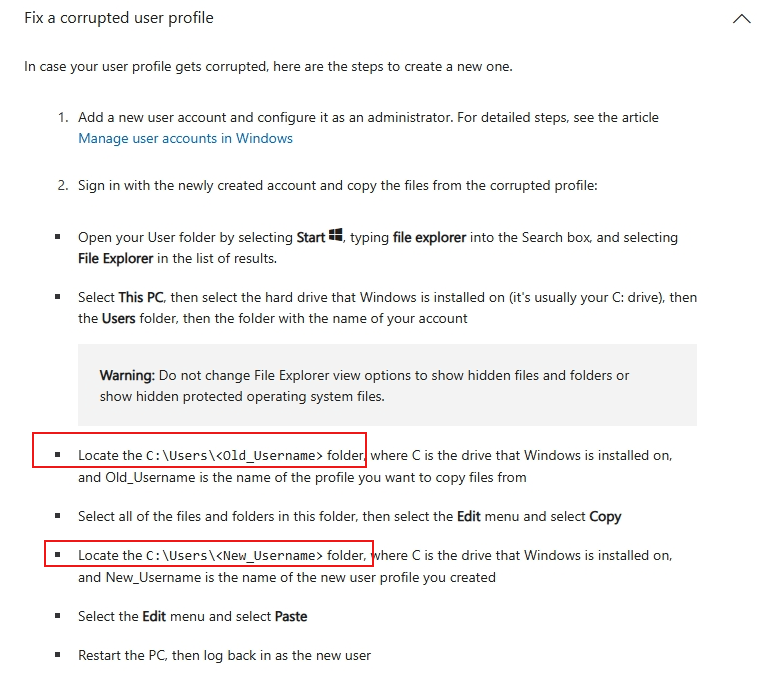
    When In-place Upgrade does not offer the option to retain personal files, it usually indicates potential user profile corruption.

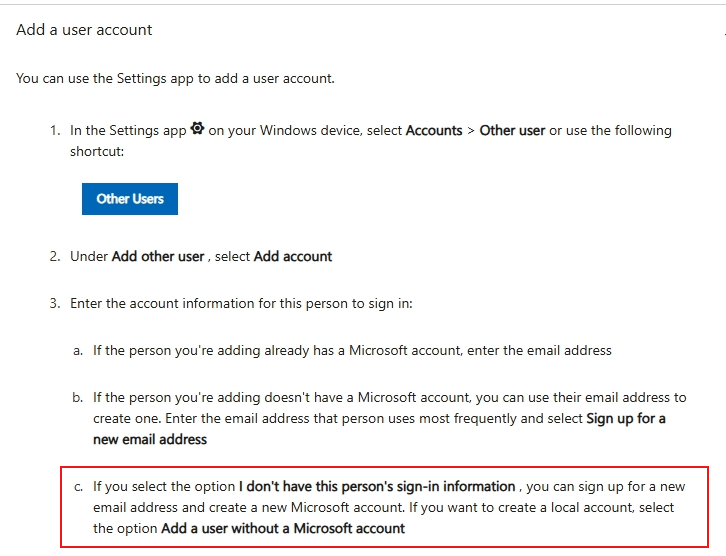
    If possible, you can first try to transfer important data to a new user profile and recheck the options provided by the In-place Upgrade process. After performing a valid In-place Upgrade process, it will help you further decide whether you need to install additional protection tools. (Disclaimer: Please back up all your important data before performing it.)

    Manage user accounts in Windows - Microsoft Support
    Image

    Troubleshoot problems signing in to Windows - Microsoft Support
    Image

    If I misunderstand your situation, feel free to correct me and share the information.

    Best Regards,

    Kyo.Y - MSFT | Microsoft Community Technical Support

    0 comments No comments
