This is definitely a bug, and I don't think that option is what's causing this problem. I have already seen other posts in different forums regarding this, and there's no permanent solution yet. However, have you tried re-enabling some options like toggling on/off PUA Protection?
Windows 11, Windows Security - Actions recommended
Hello,
Recently I started to get the Windows Security actions recommended, but when I open it, I don't see what is being recommended. Can someone please help?
I've tried different things I read in the forums but nothing worked, it's still there ad it's been a few weeks.
This is the icon next to my clock:
The next image is the security center:
I don't have any pending security updates either. So I am not sure what it being recommended. Please assist.
Windows for home | Windows 11 | Security and privacy
Locked Question. This question was migrated from the Microsoft Support Community. You can vote on whether it's helpful, but you can't add comments or replies or follow the question.
Answer accepted by question author
3 additional answers
Sort by: Most helpful
-
Anonymous
2024-12-02T03:59:09+00:00 In Reputation-based protection I turned everything off, then back on, one at a time.
I then went to Exploit Protection
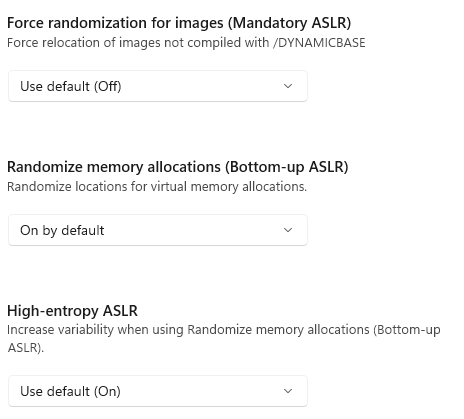
These are my settings, Any that say "Use default (on)" I forced it to say "On by default" with the exception below. I had to reoot.
Can you tell me what these options are? The entire section as I don't understand it.
Also, on a side note: Is Windows 11 installer accessible? I am legally blind and need to use Microsoft Magnifier so hoping I can use it while installing Windows 11 again as I've been wanting to do a clean install as some settings I don't want but when the IT at work installed it for me, the put in options I didn't like (example: OneDrive).
-
Paulo GM 63,460 Reputation points Independent Advisor
2024-12-02T02:03:32+00:00 Hi Nick, I am Paulo and I'd like to help.
Have you checked inside the App & browser control if there are options that are off with a message similar to this (see the image below)?
Also, some suggested that this is due to PUA Protection being off. Go to App & browser control > Reputation-based protection > Potentially unwanted app blocking (Enable this)
