Exchange | Exchange Server | Development
The process of building custom applications and tools that interact with Microsoft Exchange Server
This browser is no longer supported.
Upgrade to Microsoft Edge to take advantage of the latest features, security updates, and technical support.
' cx='32' cy='32' r='32' /%3E%3Ctext x='50%25' y='55%25' dominant-baseline='middle' text-anchor='middle' fill='%23FFF' %3EM1%3C/text%3E%3C/svg%3E)
I am working on a script that calculates the size of the last 30 days of email for an Exchange 2016 mailbox. I need to get the exact amount. The only way I know to do this is with mailbox-search. I have seen the get-mailboxfolderstatistics script that estimates the size of the last 30 days. That is not sufficient for my needs. The problem that I am having is that search-mailbox will not let me put resultItemSize into a variable. What am I doing wrong? Can this be done another way? Here is what I have.
$server=read-host "Enter server name"
$targetMailbox=read-host "Enter an email address on this network where the search mailbox folders will be created"
$startDate=(get-date).date.ToShortDateString()
$stopDate=(get-date).date.AddDays(-30).ToShortDateString()
$Report=@()
$mailboxes = Get-mailbox -server $server
foreach ($mailbox in $mailboxes) {
write-host "$($mailbox.primarysmtpaddress)"
$last30daysinMB=((Search-Mailbox -Identity $mailbox -SearchQuery "received:$($startDate)..$($stopDate) OR sent:$($startDate)..$($stopDate)"  -TargetMailbox $targetMailbox -TargetFolder "Mailbox Size Script" -estimateResultsOnly).resultItemSize)


$TotalSizeInMB = ($(Get-MailboxStatistics -Identity $Mailbox | Select-Object -ExpandProperty TotalItemSize | Select-Object -ExpandProperty Value) -split '\(| ')[-2].Replace(',','')/1MB -as [int]

#Building report
$ReportObj = New-Object PSobject
Add-Member -InputObject $ReportObj -type NoteProperty -name User -value $mailbox.PrimarySMTPAddress
Add-Member -InputObject $ReportObj -type NoteProperty -name TotalMB -value $TotalSizeInMB
Add-Member -InputObject $ReportObj -type NoteProperty -name Last30DaysMB -value $last30daysinMB
$Report += $ReportObj

}
$Report | Export-Csv -NoTypeInformation -path "C:\Users\$env:username\Desktop\30DaysOfEmailCalculated-$(Get-Date -Format 'MM-dd-yyyy').csv" -force
The process of building custom applications and tools that interact with Microsoft Exchange Server
The administration and maintenance of Microsoft Exchange Server to ensure secure, reliable, and efficient email and collaboration services across an organization.
' cx='32' cy='32' r='32' /%3E%3Ctext x='50%25' y='55%25' dominant-baseline='middle' text-anchor='middle' fill='%23FFF' %3EJS%3C/text%3E%3C/svg%3E)
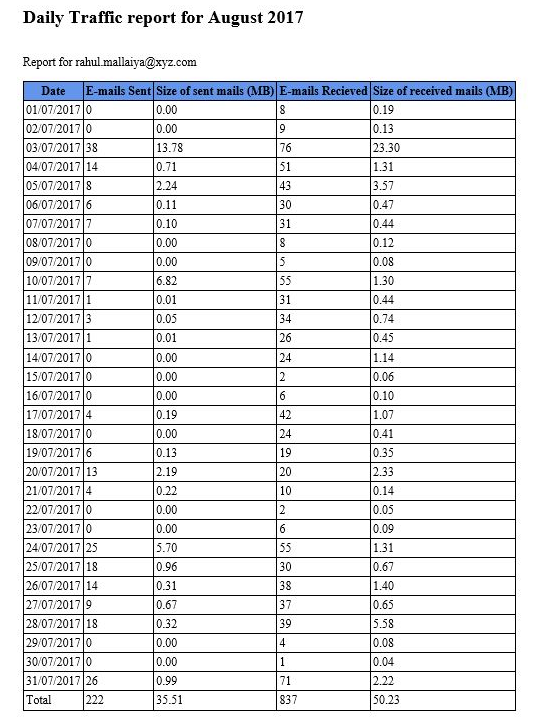
I think you could also take a referece at the script shared here:
This script generates report for mail stats for single user as well as for multiple user.
To get the report for multiple email address, save the csv file containing the multiple address
Daily_Mailbox_Stats-SMTP-HTML.ps1.ps1 -days 62 -file D:\data.csv
Is there any progress about this issue so far?
That's a nice script. However, it is estimating what is currently in the inbox. I was able to get the following command to run, but it does not seem to work with the searchquery parameter. It returns zero items if I use the searchqueury parameter and returns everything if I don't use it. I don't think it is a syntax issue. Any suggestions?
$last30daysinMB=(Search-Mailbox -Identity $mailbox -SearchQuery "received -gt '03/04/2022' OR sent -gt '03/04/2022'" -estimateResultOnly)
Answer accepted by question author
I tried this in my environment, you could take a look:
search-mailbox -Identity user -SearchQuery 'received>03/01/2022 OR sent>03/01/2022' -EstimateResultOnly

If an Answer is helpful, please click "Accept Answer" and upvote it.
Note: Please follow the steps in our documentation to enable e-mail notifications if you want to receive the related email notification for this thread.
$server=read-host "Enter server name"
$stopDate=(get-date).date.AddDays(-30).ToShortDateString()
$Report=@()
$mailboxes = Get-mailbox -server $server
foreach ($mailbox in $mailboxes) {
write-host "$($mailbox.primarysmtpaddress)"
#Pulling Data

$last30days=((Search-Mailbox -Identity $mailbox -SearchQuery "received>$($stopDate) OR sent>$($stopDate)" -estimateResultOnly)

$TotalSize = ($(Get-MailboxStatistics -Identity $Mailbox | Select-Object -ExpandProperty TotalItemSize | Select-Object -ExpandProperty Value) -split '\(| ')[-2].Replace(',','')/1MB -as [int]

#Building report
$ReportObj = New-Object PSobject
Add-Member -InputObject $ReportObj -type NoteProperty -name User -value $mailbox.PrimarySMTPAddress
Add-Member -InputObject $ReportObj -type NoteProperty -name TotalMB -value $TotalSize
Add-Member -InputObject $ReportObj -type NoteProperty -name Last30DaysMB -value $last30days.ResultItemsSize
Add-Member -InputObject $ReportObj -type NoteProperty -name Last30DaysItems -value $last30days.ResultItemsSize

$Report += $ReportObj

}
$Report | Export-Csv -NoTypeInformation -path "C:\Users\$env:username\Desktop\30DaysOfEmailCalculated-$(Get-Date -Format 'MM-dd-yyyy').csv" -force
$server=read-host "Enter server name"
$stopDate=(get-date).date.AddDays(-30).ToShortDateString()
$Report=@()
$mailboxes = Get-mailbox -server $server
foreach ($mailbox in $mailboxes) {
write-host "$($mailbox.primarysmtpaddress)"
#Pulling Data

$last30days=((Search-Mailbox -Identity $mailbox -SearchQuery "received>$($stopDate) OR sent>$($stopDate)" -estimateResultOnly)

$TotalSize = ($(Get-MailboxStatistics -Identity $Mailbox | Select-Object -ExpandProperty TotalItemSize | Select-Object -ExpandProperty Value) -split '\(| ')[-2].Replace(',','')/1MB -as [int]

#Building report
$ReportObj = New-Object PSobject
Add-Member -InputObject $ReportObj -type NoteProperty -name User -value $mailbox.PrimarySMTPAddress
Add-Member -InputObject $ReportObj -type NoteProperty -name TotalMB -value $TotalSize
Add-Member -InputObject $ReportObj -type NoteProperty -name Last30DaysMB -value $last30days.ResultItemsSize
Add-Member -InputObject $ReportObj -type NoteProperty -name Last30DaysItems -value $last30days.ResultItemsSize

$Report += $ReportObj

}
$Report | Export-Csv -NoTypeInformation -path "C:\Users\$env:username\Desktop\30DaysOfEmailCalculated-$(Get-Date -Format 'MM-dd-yyyy').csv" -force
' cx='32' cy='32' r='32' /%3E%3Ctext x='50%25' y='55%25' dominant-baseline='middle' text-anchor='middle' fill='%23FFF' %3ERM%3C/text%3E%3C/svg%3E)
This is really an Exchange question.
That said, the Search-Mailbox cmdlet, using the parameter set you're using should return an estimate of the number AND size of the messages. The fact that it's returning more than one result implies that the result would be something like a PSCustomObject, not a single value. But if you look at the output type for that cmdlet, it's "Mailbox". That seems to imply that the results you're looking for are going to be found in the mailbox identified by $targetmailbox in a folder in that mailbox named "Mailbox Size Script".
Reading further, the description for the cmdlet says about the "-EstimateOnly" switch: "You can't use this switch with the TargetMailbox parameter.
Maybe one pf the Exchange folks might be able to clarify, but I don't think you're going to be able to use the set of parameters you've chosen.
Try dropping the targetmailbox and targeffolder parameters and see if that works any better.
Thanks for the response. I will test this and provide feedback.
I was able to get the command to run. However it does not seem to work with the searchquery parameter. It returns zero items if I use the searchqueury parameter and returns everything if I don't use it. I don't think it is a syntax issue. Any suggestions?
$last30daysinMB=(Search-Mailbox -Identity $mailbox -SearchQuery "received -gt '03/04/2022' OR sent -gt '03/04/2022'" -estimateResultOnly)
When I look at the page describing properties and operators for KQL the examples look different to what you use in the SearchQuery:
