Microsoft Security | Microsoft Entra | Microsoft Entra ID
A cloud-based identity and access management service for securing user authentication and resource access

This browser is no longer supported.
Upgrade to Microsoft Edge to take advantage of the latest features, security updates, and technical support.
' cx='32' cy='32' r='32' /%3E%3Ctext x='50%25' y='55%25' dominant-baseline='middle' text-anchor='middle' fill='%23FFF' %3EKL%3C/text%3E%3C/svg%3E)
Hi i am trying to create conditional access policy using Continuous Access Evaluation as a session, but unable to create... having free subscription trial account in active state and Azure AD Premium 2 license, not sure why it is not getting selected...please find the attached screenshot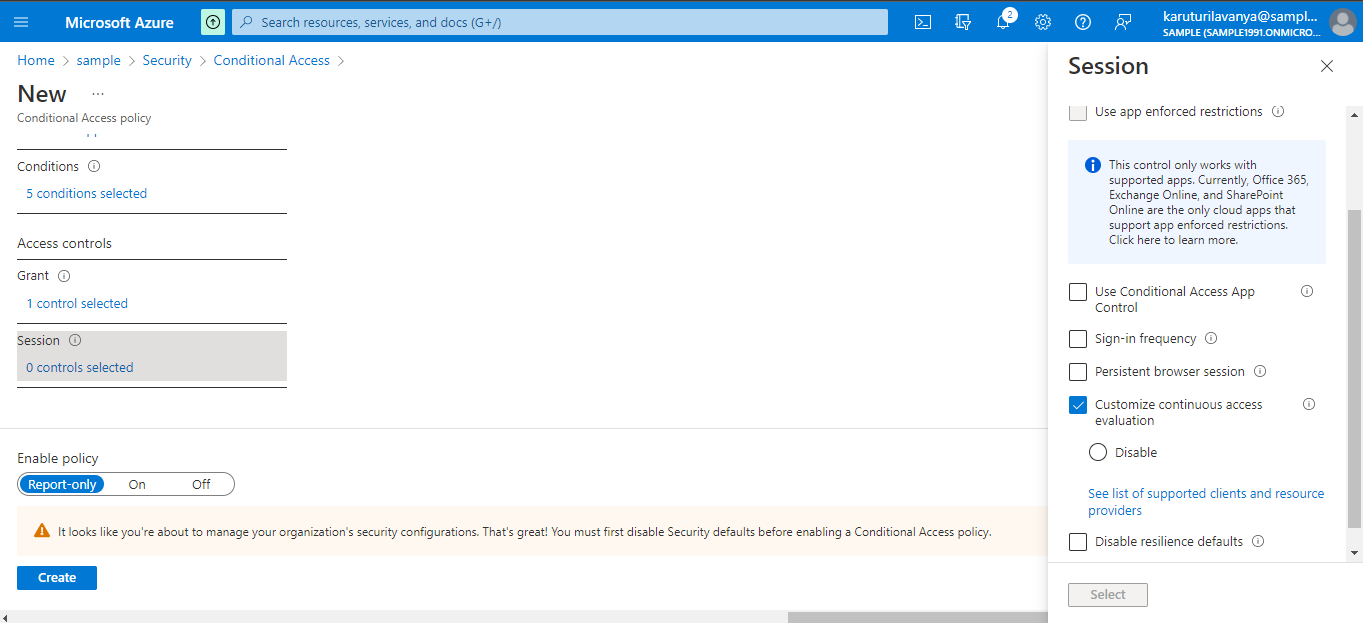 need your assistance on this thanks in advance
A cloud-based identity and access management service for securing user authentication and resource access

As the messages on the page say, you need to disable Security defaults first. Keep in mind that CAE is enabled by default now, the only thing you can do via CA policies is disable it. If that's your goal, you need to select "all cloud apps" and no other conditions. Also, you cannot use Report-only mode.
Hi @Vasil Michev thanks for the above description, since CAE is auto enabled which means all the old tenants are able to get this feature ??
For old tenants, refer to the table here: https://learn.microsoft.com/en-us/azure/active-directory/conditional-access/concept-continuous-access-evaluation#migration