Exchange | Exchange Server | Management
The administration and maintenance of Microsoft Exchange Server to ensure secure, reliable, and efficient email and collaboration services across an organization.
This browser is no longer supported.
Upgrade to Microsoft Edge to take advantage of the latest features, security updates, and technical support.

Hello All,
Please help me with following queries related to quarantine emails in Office 365.
Cheers!
The administration and maintenance of Microsoft Exchange Server to ensure secure, reliable, and efficient email and collaboration services across an organization.
' cx='32' cy='32' r='32' /%3E%3Ctext x='50%25' y='55%25' dominant-baseline='middle' text-anchor='middle' fill='%23FFF' %3EKY%3C/text%3E%3C/svg%3E)
Hi @GurudasSatardekar
How soon an email is sent to quarantine via office 365.
Once the email reaches Office 365 servers and is recognized to be dangerous or spam or it has some send reputation problems, it would be instantly quarantined by Exchange Online Protection (EOP).
The whole process is introduced in this part: How EOP works
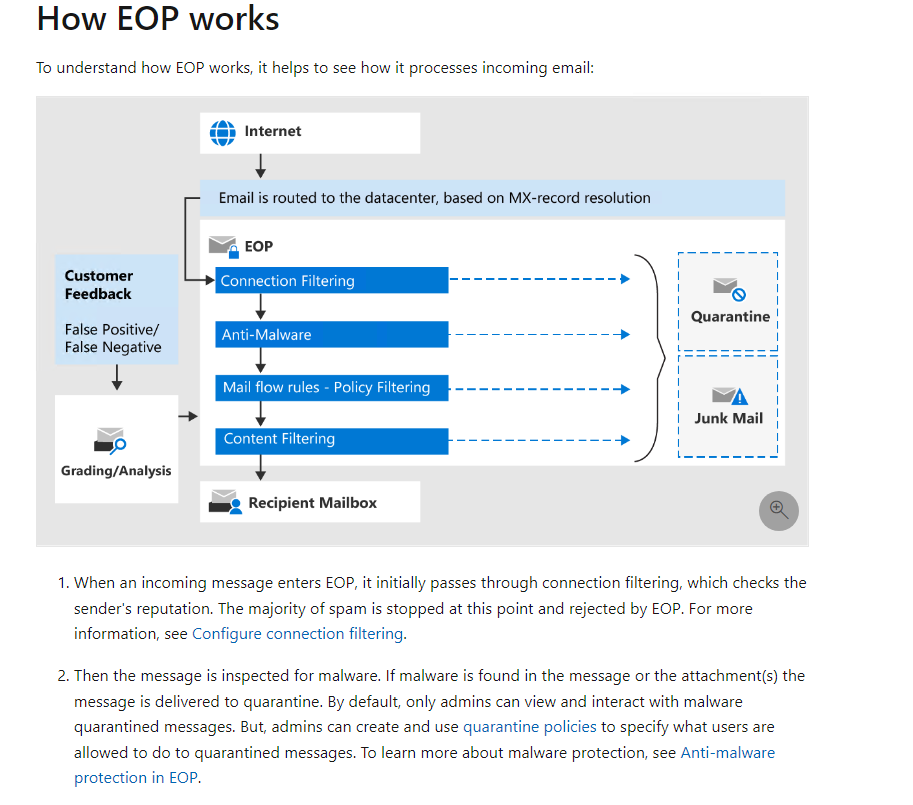
Can we as an office 365 administrators reduce the interval of emails getting quarantine automatically.
This process is by design and cannot be modified by Office 365 admins.
However, there are few methods to bypass the spam filter.
Can we create an exception to quarantine policies and allow an e-mail address to send email to our Contoso.com domain.
Please refer to this link: Create safe sender lists in EOP
The recommended method is to create a mail flow rule: (Recommended) Use mail flow rules
You may follow the example in the link above to configure the conditions and actions.
Please also note that: Messages that are identified as malware or high confidence phishing are always quarantined, regardless of the safe sender list option that you use.
If the answer is helpful, please click "Accept Answer" and kindly upvote it. If you have extra questions about this answer, please click "Comment".
Note: Please follow the steps in our documentation to enable e-mail notifications if you want to receive the related email notification for this thread.
Hi @GurudasSatardekar
Do suggestions above help?
If you have any questions or needed further help on this issue, please feel free to post back.
If the issue has been resolved, please accept the helpful replies as answers, this will make answer searching in the forum easier and be beneficial to other community members as well.