Share via

SafeGuardBrowser.Msix downloaded to my computer without my knowledge - how can I tell if it installed on my pc (windows 10)

Anonymous
2025-02-01T16:34:59+00:00

last night, i accidentally typed a URL name incorrectly and it brought me to a strange website. apparently when this happened the file "SafeGuardBrowser.Msix" downloaded onto my computer in the downloads area. It appears to be a file I don't want on my computer, however, I cannot tell if it is installed. I tried to see if it was in my WindowsApps folder, but i am not allowed to access that folder.

do you know anything about this .msix application and how do i check to see if it is installed and remove it as needed?

i have windows 10.

thank you!

Windows for home | Windows 10 | Security and privacy

Locked Question. This question was migrated from the Microsoft Support Community. You can vote on whether it's helpful, but you can't add comments or replies or follow the question.

0 comments No comments

Answer accepted by question author

  1. Anonymous
    2025-02-03T07:15:08+00:00

    Yes, the XML was needed to determine the display name. It's because some apps use cryptic names or GUIDs for the "display name" field. That's why we had to verify it with the XML file as a foolproof method.

    Please delete the SafeGuardBrowser.msix (or the renamed file). No further action is necessary.

    3 people found this answer helpful.
    0 comments No comments

9 additional answers

Sort by: Most helpful
  1. Anonymous
    2025-02-03T06:30:54+00:00

    thank you for your continued responses and assistance ramesh. much appreciated. :-)

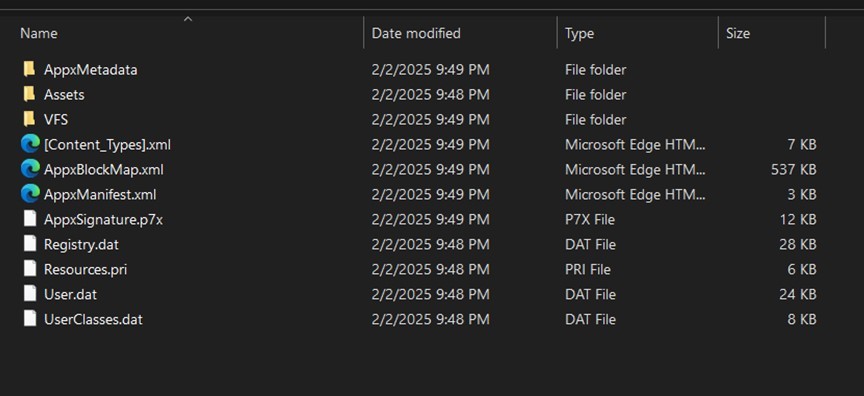
    attached are two images for you - below is the list of the files and folders in the SafeGuardBrowser.msix package.
    Below is the image of the AppxManifest.xml contents.
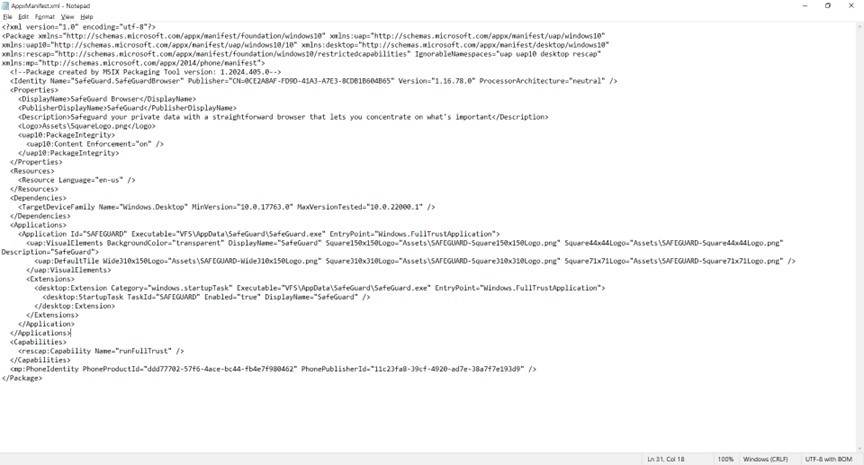
    as the image from the xml. file is not super crisp, below is the pasted version of the contents

    <Package xmlns="http://schemas.microsoft.com/appx/manifest/foundation/windows10" xmlns:uap="http://schemas.microsoft.com/appx/manifest/uap/windows10" xmlns:uap10="http://schemas.microsoft.com/appx/manifest/uap/windows10/10" xmlns:desktop="http://schemas.microsoft.com/appx/manifest/desktop/windows10" xmlns:rescap="http://schemas.microsoft.com/appx/manifest/foundation/windows10/restrictedcapabilities" IgnorableNamespaces="uap uap10 desktop rescap" xmlns:mp="http://schemas.microsoft.com/appx/2014/phone/manifest">

      <!--Package created by MSIX Packaging Tool version: 1.2024.405.0-->

      <Identity Name="SafeGuard.SafeGuardBrowser" Publisher="CN=0CE2A8AF-FD9D-41A3-A7E3-8CDB1B604B65" Version="1.16.78.0" ProcessorArchitecture="neutral" />

      <Properties>

        <DisplayName>SafeGuard Browser</DisplayName>

        <PublisherDisplayName>SafeGuard</PublisherDisplayName>

        <Description>Safeguard your private data with a straightforward browser that lets you concentrate on what's important</Description>

        <Logo>Assets\SquareLogo.png</Logo>

        <uap10:PackageIntegrity>

          <uap10:Content Enforcement="on" />

        </uap10:PackageIntegrity>

      </Properties>

      <Resources>

        <Resource Language="en-us" />

      </Resources>

      <Dependencies>

        <TargetDeviceFamily Name="Windows.Desktop" MinVersion="10.0.17763.0" MaxVersionTested="10.0.22000.1" />

      </Dependencies>

      <Applications>

        <Application Id="SAFEGUARD" Executable="VFS\AppData\SafeGuard\SafeGuard.exe" EntryPoint="Windows.FullTrustApplication">

          <uap:VisualElements BackgroundColor="transparent" DisplayName="SafeGuard" Square150x150Logo="Assets\SAFEGUARD-Square150x150Logo.png" Square44x44Logo="Assets\SAFEGUARD-Square44x44Logo.png" Description="SafeGuard">

            <uap:DefaultTile Wide310x150Logo="Assets\SAFEGUARD-Wide310x150Logo.png" Square310x310Logo="Assets\SAFEGUARD-Square310x310Logo.png" Square71x71Logo="Assets\SAFEGUARD-Square71x71Logo.png" />

          </uap:VisualElements>

          <Extensions>

            <desktop:Extension Category="windows.startupTask" Executable="VFS\AppData\SafeGuard\SafeGuard.exe" EntryPoint="Windows.FullTrustApplication">

              <desktop:StartupTask TaskId="SAFEGUARD" Enabled="true" DisplayName="SafeGuard" />

            </desktop:Extension>

          </Extensions>

        </Application>

      </Applications>

      <Capabilities>

        <rescap:Capability Name="runFullTrust" />

      </Capabilities>

      <mp:PhoneIdentity PhoneProductId="ddd77702-57f6-4ace-bc44-fb4e7f980462" PhonePublisherId="11c23fa8-39cf-4920-ad7e-38a7f7e193d9" />

    </Package>

    i have not yet deleted the .msix (now .zip) file pending your input. i did not load the files on onedrive as I am not sure you need them with the information I provided. let me know if you need me to do so or if you need any other information.

    i think it is not installed on my computer since i did not see it on the list of installed apps. would you agree?

    thanks again!

    1 person found this answer helpful.
    0 comments No comments
  2. Anonymous
    2025-02-02T19:29:11+00:00

    Hi,

    It's safe to change the file extension from .msix to .zip, open it using File Explorer or 7-Zip, and copy the XML to the desktop. Doing so won't install the app on your system.

    And XML files are plain-text files that don't have any executable code. You can open it using Notepad.

    You may also share the XML file or the MSIX file on OneDrive and post the link here.

    1 person found this answer helpful.
    0 comments No comments
  3. Anonymous
    2025-02-02T19:22:09+00:00

    thank you for your quick response ramesh.

    i opened the admin powershell and did not see SafeGuardBrowser on the list..

    i did not yet try renaming the .msix to .zip and copying "AppxManifest.xml" to the desktop. wanted to be sure i understood your instructions and that i did not have to worry about any impacts to my data.

    guessing i don't need to save the notepad version, or that if i do, it is not impactful to my drives. also, do i need to be concerned about any impacts to my data and drives if i rename the file to .zip and open the .xml file? i think it is safe to do, just want to be sure before i proceed any further.

    1 person found this answer helpful.
    0 comments No comments
  4. Anonymous
    2025-02-01T17:11:23+00:00

    Hi, This is Ramesh.

    To see the list of installed apps for all users, please open admin PowerShell and run this command:

    get-appxpackage -allusers |select packagefullname, installlocation | ogv
    

    See if SafeGuardBrowser exists in the list.

    Also, rename SafeGuardBrowser.msix to SafeGuardBrowser.zip and open the archive. Copy "AppxManifest.xml" to the desktop. Open the file in Notepad. Maximize the Notepad window and post a screenshot.

    1 person found this answer helpful.
    0 comments No comments
