Share via

why **** has Microsoft moved all my files to Cloud. I want files left on my computer and access them without the **** cloud.

Anonymous
2024-12-23T05:29:11+00:00

why **** has Microsoft moved all my files to Cloud. I want files left on my computer and access them without the **** cloud. If i want files stored on cloud I will put them there myself.

Why can't I access files on laptop without having to open cloud. Not real smart when there is no service

Windows for home | Windows 10 | Files, folders, and storage

Locked Question. This question was migrated from the Microsoft Support Community. You can vote on whether it's helpful, but you can't add comments or replies or follow the question.

0 comments No comments

5 answers

Sort by: Most helpful
  1. Anonymous
    2025-02-02T20:53:51+00:00

    This should be illegal invasion of data privacy. They never asked for permission to move my files to the cloud. I don't log in to one drive. Looks like they are trying to generate revenues by charging for storage at some point.

    If you try to download iphone photos on to computer disk, Windows gives you no option other than to put it on One drive/Cloud.

    7 people found this answer helpful.
    0 comments No comments
  2. Anonymous
    2024-12-23T15:29:01+00:00

    I second the advice from LesFerch.

    Nobody needs to have their OneDrive and their hard drive reflecting the same files. You should be in charge of where you store your files, whether in your OneDrive or your hard drive. You don't need an app for that.

    Microsoft's ultimate goal is for us to store all our files in our OneDrive. There are definite advantages to doing this, and some disadvantages, and this is the direction where computing is going. Unfortunately, the way Microsoft is trying to accomplish this, in my opinion, is ridiculous and causes mayhem for many users.

    7 people found this answer helpful.
    0 comments No comments
  3. Gunasekar N 65,460 Reputation points Independent Advisor
    2024-12-23T08:16:23+00:00

    Hello,

    Thank you for reaching out to the Microsoft Community and I'll be glad to assist you today.

    I totally understand your frustration here.

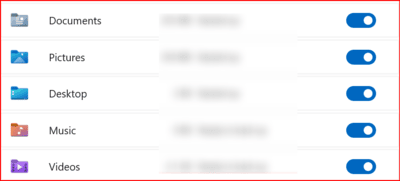
    By default, any files and folders you save in the OneDrive backup locations—such as Documents, Pictures, Desktop, Music, and Videos—will automatically sync to OneDrive. These folders appear as colored icons in the left pane of File Explorer and are located in **C:/Users/YourUsername/OneDrive**.

    To prevent files from syncing automatically to OneDrive:

    • Save your files in a location outside the default OneDrive backup folders.
    • Keep in mind that if files are synced and the folders has blue cloud icon, they might only be accessible online due to OneDrive’s “Files On-Demand” feature.

    If your files are already synced:

    1. Download them to your device by selecting the folder, right-clicking, and choosing **Always keep on this device**. (Files that you mark as "Always keep on this device" have the green circle with the white check mark.)
    2. Once downloaded, move or copy the files from the OneDrive folder to a different location.
    3. You can then disable backup or uninstall OneDrive entirely.

    To disable backup:

    1. Right-click the OneDrive icon in the taskbar.
    2. Select **Settings** > **Manage Backup**.
    3. Turn off the toggle for each folder.

    This way, files you save in these locations will always be available offline, without requiring an internet connection.

    I hope this information helps. If you have any questions, please let me know and I will be happy to help you further.

    Best regards,

    Gunasekar N

    6 people found this answer helpful.
    0 comments No comments
  4. Les Ferch 10,326 Reputation points Volunteer Moderator
    2024-12-23T14:55:27+00:00

    It sounds like the "files on demand" feature is enabled. Turning that off should keep your files on both local and cloud storage.

    Or you can go further and unlink OneDrive from your PC and then uninstall it.

    To prevent Windows from foisting OneDrive on you in the future, I recommend using a local account to login to Windows instead of a Microsoft account. You can do that by creating a local account and moving your data to the new account. It should also work to convert to a local account by running Account Profile Fixer. Once you're set up with a local account, you can still use OneDrive, but it won't just jump in and start syncing stuff automatically.

    5 people found this answer helpful.
    0 comments No comments
  5. Deleted

    This answer has been deleted due to a violation of our Code of Conduct. The answer was manually reported or identified through automated detection before action was taken. Please refer to our Code of Conduct for more information.


    Comments have been turned off. Learn more