Using the version from the Microsoft Store can be a bit confusing to me. It’s technically a PWA installed through Edge, but it doesn’t show up in edge://apps, which is unexpected. That’s why I suggested installing the website as an app through Chrome instead, so you can compare the behavior and see if there’s any difference.
X.com app disappeared from 'Get notifications from these senders' and no longer receiving any desktop notifications from X
Good evening. I had been using X on my desktop and I could access the settings through X directly or Windows 10 Home 'Get notifications from these senders menu.' I had downloaded the X App from the Microsoft store but had seen it was connected via Edge and could be opened in Edge. About a day ago none of my X notifications were coming across my desktop. I went to the 'Get notifications' and it was missing from the list but still accessible through the Start Menu. I initially went to the Edge Browser and went to X.com. Push notifications were off and when I tried to reset them it said it was incompatible with my browser. I cleaned the cache, cookies, etc. for all time. I went to Edge Settings, allowed notifications and pop-ups to x.com and when I went back could allow push notifications. So x.com via Edge is set and Edge is set for notifications. I uninstalled and reinstalled the X App and everything is good to go. But the get notifications menu is still missing X. Because I cleared Edge out I wonder if it will come back once I get a notification. But I'm not sure.
Windows for home | Windows 10 | Settings
Locked Question. This question was migrated from the Microsoft Support Community. You can vote on whether it's helpful, but you can't add comments or replies or follow the question.
25 answers
Sort by: Most helpful
-
Anonymous
2025-04-22T04:17:18+00:00 I did just that but I'm not sure if it makes a difference. I downloaded the X app from the Microsoft store as an app, but it has a link to open in Edge.
I downloaded chrome and downloaded x as an app but it shows a link to open in chrome. In the start menu now it shows under File-Chrome Apps The X app.
-
Paulo GM 67,235 Reputation points Independent Advisor
2025-04-22T03:42:42+00:00 Just checked the app again from the Store and it looks like the name hasn’t changed, but the app is actually a PWA (Progressive Web App), essentially a website installed as an app. That explains why it routes through Edge. However, I’m not sure why it doesn’t show up in edge://apps, where it normally should since it’s a PWA. That said, I suggest you test the following:
- Uninstall the app that you installed from the Microsoft Store
- Use Google Chrome and go to x.com
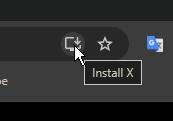
- In Chrome's address bar, you should be able to see an Install icon (See the image below)
- Click it to install the website as an app and open it
- Click the three dots on top of the X app window and select App info > Settings
- Enable notifications
- Check if the notifications work properly
-
Anonymous
2025-04-22T03:18:38+00:00 I am using a desktop PC with Windows 10 home and no power settings besides the display closing after 10 minutes. As I said I don't use sleep. But as soon as I got back on tonight all the notifications popped up with sound. I'm not sure why when I downloaded the app it routes through Edge, though.
-
Paulo GM 67,235 Reputation points Independent Advisor
2025-04-22T00:22:26+00:00 I see. In that case, the issue might not be related to the app or the browser anymore. Are you using a laptop or a desktop PC? Also, is Battery Saver turned on?
